 Blog's Page
 Blog's Page
Learn What Zynex Ransomware Is, Its .zynx Encrypted Files, Symptoms, Detection Methods, Affected Systems, Country Impact, Ransom Note, Recovery Options, And Prevention Techniques.
Keywords: Zynex Ransomware Removal, Zynex Ransomware Encrypted Files, .zynx Files, Zynex Ransomware Symptoms, Zynex Ransomware Detection, Zynex Ransomware Prevention, Zynex Malware, Ransomware Recovery, Ransomware Attack, Windows Ransomware
Research Note: Zynex Is A Newly Documented Ransomware Specimen Reported In October 2026. Current Reporting Identifies The
.zynxEncrypted-file Extension Andreadme.txtRansom Note. Public Reporting Does not Establish A Reliable List Of Countries Specifically Affected By Zynex, So Country Attribution Should Not Be Presented As Confirmed.
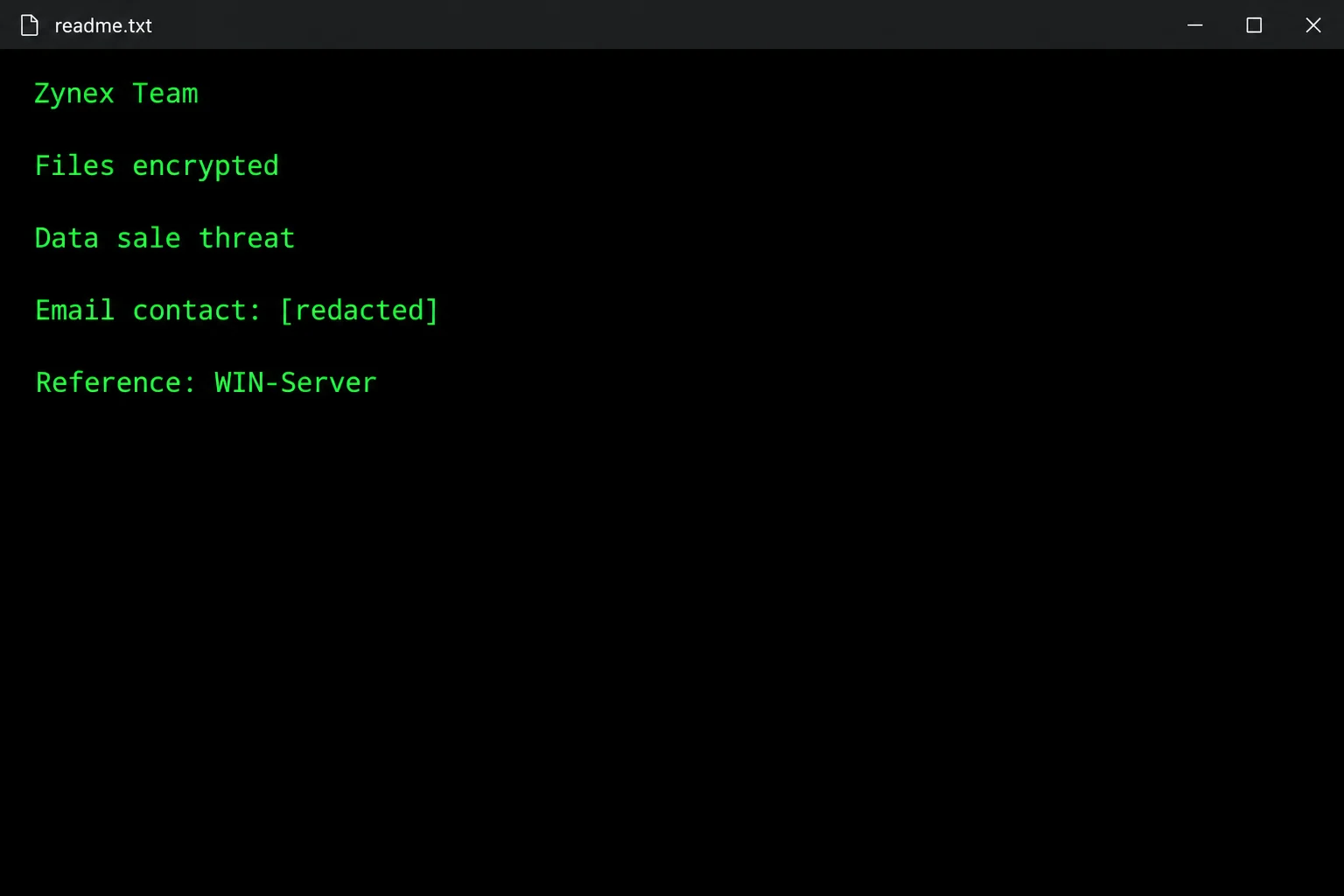
Zynex Ransomware Is A Newly Identified File-encrypting Malware Threat That Prevents Victims From Normally Accessing Their Files. Security Researchers Reported The Ransomware After Analyzing Newly Submitted Malware Samples. The Documented Variant Encrypts Files And Appends The .zynx Extension To Affected Filenames. It Also Creates A Ransom Note Named readme.txt.
For Example, A Normal File Such As:
photo.jpg
may Become:
photo.jpg.zynx
Similarly, A Document Such As:
financial-report.xlsx
may Become:
financial-report.xlsx.zynx
The Presence Of .zynx Is An Important Indicator For Identifying This Particular Zynex Ransomware Variant.
Zynex Also Reportedly Uses A double-extortion Approach. Its Ransom Note Claims That Files And Databases Were Copied Before Encryption And Threatens To Sell The Stolen Information. However, An Attacker's Ransom Note Is A Claim, Not Independent Forensic Proof That Data Was Actually Exfiltrated. Organizations Should Verify Possible Data Theft Through Network, Authentication, Endpoint, And Server Logs.
| Category | Details |
|---|---|
| Threat Name | Zynex Ransomware |
| Malware Type | Ransomware / File-encrypting Malware |
| Encrypted Extension | .zynx |
| Ransom Note | readme.txt |
| Encryption Impact | Files Become Inaccessible |
| Extortion Model | Reported Double Extortion |
| Potential Target | Windows-based Systems And Accessible Network Resources |
| Free Public Decryptor | No Verified Public Decryptor Reported In The Sources Reviewed |
| Discovery | Reported In October 2026 |
| Country Attribution | No Reliable Country-specific Victim List Publicly Established |
| Primary Impact | Data Unavailability And Potential Data-exposure Risk |
The .zynx Extension And readme.txt Ransom Note Are The Strongest Publicly Documented Identification Characteristics.
A Ransomware Attack Generally Consists Of Several Stages: Initial Access, Execution, Privilege Escalation, Discovery, File Encryption, Possible Data Theft, And Extortion.
For Zynex, Publicly Available Reporting Confirms The file-encryption Stage And The Creation Of The Ransom Note. Some Reports Also Describe Claims Of Data Exfiltration And Network-wide Compromise. Those Broader Claims Should Be Validated During An Actual Forensic Investigation Rather Than Assumed Automatically.
Once Files Are Encrypted, Simply Renaming .zynx Files Back To Their Original Extensions Will not Decrypt Them. The Underlying File Contents Have Been Cryptographically Transformed.
The Most Recognizable Indicator Is The .zynx File Extension.
Examples Include:
document.docx → Document.docx.zynx

Photo.jpg → Photo.jpg.zynx

Database.sql → Database.sql.zynx

Report.pdf → Report.pdf.zynx

Backup.zip → Backup.zip.zynx
Security Researchers Observed Zynex Encrypting Files And Appending .zynx During Testing.
After Encryption, Affected Files May Remain Visible In Windows Explorer, But Normal Applications Cannot Interpret Their Contents Correctly.
For Example, Microsoft Word May Report That A .zynx File Cannot Be Opened Or Is Corrupted.
Changing The Extension Does Not Recover The File. The Encrypted Data Needs To Be Recovered Through A Legitimate Decryptor, An Available Backup, Or Another Viable Recovery Mechanism.
Zynex Reportedly Creates A Text File Named:
readme.txt
The Note Claims That The Victim's Network Has Been Compromised And That Important Information Has Been Encrypted. It Also Reportedly Threatens To Sell Allegedly Stolen Files And Databases.
The Note Reportedly Provides Attacker-controlled Email Addresses And Instructs Victims To Identify Themselves Using A Particular Subject Line.
The Ransom Note Should Be Preserved As forensic Evidence. Do Not Treat Instructions Contained Within The Note As Trustworthy Technical Advice.
Common Symptoms Associated With The Documented Zynex Infection Include:
.zynx File ExtensionsPreviously Normal Files Suddenly Have .zynx Appended To Their Names.
Documents, Images, Databases, And Other Files That Worked Previously May Become Inaccessible.
readme.txt AppearsA Ransom Note Named readme.txt May Appear In Directories Containing Affected Files.
Ransomware Can Modify Large Numbers Of Files In A Relatively Short Period.
Applications Dependent On Encrypted Databases Or Documents May Fail.
If Ransomware Gains Access To Shared Storage, Files On Accessible Network Resources May Also Be Affected.
The Ransom Note May Threaten Publication Or Sale Of Allegedly Stolen Information.
Recovery Resources May Become Unavailable If Attackers Obtain Sufficient Privileges To Interfere With Backup Infrastructure.
Detection Should Combine file-system Indicators, Endpoint Telemetry, Network Monitoring, And Forensic Analysis.
The Simplest Initial Indicator Is Searching For Files Ending In:
.zynx
Security Teams Can Also Search For:
readme.txt
However, readme.txt Alone Is Not Enough To Prove A Zynex Infection Because Many Unrelated Ransomware Families Use Similarly Named Ransom Notes.
Security Teams Should Investigate:
.zynx Files
Zynex-related Ransom Notes
Mass File Modification
Suspicious Executable Processes
Unexpected PowerShell Activity
Unusual Command-line Execution
Abnormal Administrative Activity
Suspicious Remote-access Sessions
Unusual Network Traffic
Attempts To Disable Security Products
Backup Manipulation
Unexpected Data Transfers
Newly Created Scheduled Tasks Or Services
Endpoint Detection And Response (EDR) Platforms Can Be Particularly Useful Because They Can Correlate Process Execution With File Modifications And Network Activity.
The Currently Documented Technical Information Strongly Points Toward Windows Environments. Security Vendors Reported Windows-oriented Detection Names For The Analyzed Specimen, Including Detections Identifying It As A Windows Ransomware/trojan.
Therefore, Windows PCs And Windows-based Organizational Environments Should Be Considered Relevant Systems For Zynex Analysis.
However, This Does not Mean That Every Windows Version Is Confirmed To Be Vulnerable Or That Linux, MacOS, NAS, Or Other Platforms Are Definitely Immune. A Malware's Ability To Affect A Particular Environment Depends On Its Actual Executable, Privileges, Network Access, And Available Resources.
Windows Desktop Computers
Windows Workstations
Windows Servers
Windows File Servers
Network Shares Accessible From Compromised Windows Systems
Business Environments Using Windows Domains
There Is Currently Insufficient Reliable Public Evidence To Claim A Comprehensive List Of Affected Operating-system Versions.
This Is An Important Point For An SEO Article Because there Is Currently No Reliable Public Country-by-country Victim List For Zynex Ransomware In The Sources Reviewed.
Therefore, It Would Be Misleading To State That Zynex Has Definitively Infected Specific Countries Such As India, The United States, The United Kingdom, Germany, Or Australia Unless Verified Incident Data Becomes Available.
Confirmed Countries: No Reliable Country-specific Victim List Established.
Potential Geographic Reach: Global, Because Ransomware Distributed Through The Internet Can Potentially Target Organizations In Multiple Countries.
The Absence Of A Published Country List Does not Mean That The Malware Is Geographically Harmless. It Means That Available Public Reporting Is Insufficient To Make A Defensible Country-level Attribution.
Public Reporting Associates Ransomware Distribution Generally With Methods Such As Phishing Emails, Malicious Attachments, Compromised Services, And Vulnerable Systems. One Current Report Specifically Lists Infected Email Attachments, Torrent Websites, And Malicious Advertising Among Possible Distribution Mechanisms.
For A Specific Zynex Incident, However, Investigators Should Determine The Actual Initial-access Mechanism From Evidence Rather Than Automatically Attributing The Infection To One Of These Methods.
Potential Routes To Investigate Include:
Phishing Emails
Malicious Attachments
Compromised Credentials
Exposed Remote-access Services
Vulnerable Applications
Malicious Downloads
Network-based Lateral Movement
Third-party Compromise
Zynex Is Particularly Concerning Because Its Ransom Note Reportedly Claims That Attackers Copied Files And Databases Before Encryption. This Represents The double-extortion Model: Victims Face Both Loss Of Data Availability And A Potential Confidentiality Problem.
However, Organizations Should Distinguish Between:
Claim: The Ransom Note Says Data Was Stolen.
Evidence: Logs, Network Traffic, Authentication Records, Cloud Activity, Endpoint Telemetry, Or Forensic Artifacts Demonstrate That Data Was Actually Transferred.
This Distinction Is Important When Communicating With Customers, Regulators, Employees, And Law Enforcement.
A Layered Cybersecurity Strategy Is The Best Defense.
Maintain Regular Backups Of Critical Information And Keep At Least Some Backup Copies Isolated From Ordinary Network Access.
A Backup Is Only Useful If It Can Actually Be Restored. Organizations Should Regularly Test Recovery Procedures.
MFA Should Be Implemented For Administrative Accounts, VPNs, Cloud Services, Remote-access Systems, And Other Sensitive Resources.
Keep Operating Systems, Browsers, Applications, VPN Products, Firewalls, And Servers Updated.
Deploy Modern Endpoint Protection And EDR Capabilities Capable Of Detecting Suspicious Encryption Activity And Abnormal Processes.
Users Should Have Only The Permissions Necessary To Perform Their Jobs.
Separate Workstations, Servers, Databases, Backups, And Critical Infrastructure Where Practical.
Protect RDP, VPN, Remote-management Systems, And Other Externally Accessible Services With MFA, Access Restrictions, Strong Authentication, And Monitoring.
Employees Should Be Trained To Recognize Phishing Messages, Suspicious Attachments, Fake Login Pages, And Unexpected Software Downloads.
A Sudden Increase In File Modifications Can Be An Important Early-warning Indicator Of Ransomware.
If .zynx Files And The readme.txt Ransom Note Appear, Organizations Should Treat The Event As A Potential Active Security Incident.
Isolate Affected Computers From The Network.
Disconnect Affected Systems From Shared Drives Where Appropriate.
Protect Unaffected Backups.
Preserve The Ransom Note.
Preserve Representative Encrypted Files.
Identify Affected Accounts And Systems.
Investigate The Initial Access Method.
Look For Evidence Of Lateral Movement.
Investigate Possible Data Exfiltration.
Remove The Malicious Persistence After Evidence Is Preserved.
Patch The Original Vulnerability Or Close The Initial-access Route.
Reset Potentially Compromised Credentials.
Restore From Verified Clean Backups.
Monitor Restored Systems Carefully.
Do Not Assume That Removing The Ransomware Executable Will Restore Already Encrypted Files.
Current Reporting Reviewed For This Article Does not Identify A Verified Public Decryptor Specifically For Zynex.
Victims Should Avoid Downloading Random "Zynex Decryptors" From Unknown Websites Because Fake Decryptors Can Contain Additional Malware.
Recovery Possibilities Should Be Investigated In This Order:
Verified Clean Backups.
Legitimate Security-research Decryptors, If One Becomes Available.
Appropriate Forensic Recovery Options.
Other Organizational Recovery Mechanisms.
Preserve Encrypted Files Rather Than Deleting Them. Future Research May Potentially Produce Additional Recovery Options.
Zynex Ransomware Is A Newly Documented Ransomware Threat Associated With The .zynx Encrypted-file Extension And readme.txt Ransom Note. Current Reporting Indicates That It Encrypts Files And Reportedly Uses Double-extortion Claims Involving Alleged Data Theft.
The Most Useful Indicators For Identifying The Documented Variant Are .zynx Files And The Associated Ransom Note. Windows Environments Appear Particularly Relevant Based On Available Detection Information, But A Comprehensive List Of Affected Operating-system Versions Has Not Been Established.
There Is Also no Reliable Public Country-by-country Victim List At Present, So SEO Content Should Avoid Claiming That Particular Countries Have Been Confirmed As Zynex Victims Without Supporting Incident Data.
Organizations Should Focus On network Isolation, Evidence Preservation, EDR Monitoring, MFA, Vulnerability Management, Network Segmentation, And Tested Offline Backups. Most Importantly, A Ransom Note's Claim Of Data Theft Should Be Investigated Independently Rather Than Accepted As Forensic Fact.
Step 1: Boot Into Safe Mode
Restart Your PC And Press F8 (or Shift + F8 For Some Systems) Before Windows Loads.
Choose Safe Mode With Networking.
Safe Mode Prevents Most Malware From Loading.
Press Win + R, Type appwiz.cpl, And Press Enter.
Sort By Install Date And Uninstall Unknown Or Recently Added Programs.
Use A Trusted Anti-malware Tool:
Malwarebytes – https://www.malwarebytes.com
Screenshot Of Malwarebytes - Visit Links
Microsoft Defender – Built Into Windows 10/11
HitmanPro, ESET Online Scanner, Or Kaspersky Virus Removal Tool
ZoneAlarm Pro Antivirus + Firewall NextGen
VIPRE Antivirus - US And Others Countries, | India
Run A Full Scan And Delete/quarantine Detected Threats.
Win + R, Type temp → Delete All Files.Press Win + R, Type %temp% → Delete All Files.
Use Disk Cleanup: cleanmgr In The Run Dialog.
Go To: C:\Windows\System32\drivers\etc
Open hosts File With Notepad.
Replace With Default Content:
Press Ctrl + Shift + Esc → Open Task Manager
Go To Startup Tab
Disable Any Suspicious Entries.
Open Command Prompt As Administrator.
Run These Commands:
netsh Winsock Reset

netsh Int Ip Reset

ipconfig /flushdns
Unwanted Homepage Or Search Engine
Pop-ups Or Redirects
Unknown Extensions Installed
For Chrome:
Go To: chrome://extensions/
Remove Anything Unfamiliar
For Firefox:
Go To: about:addons → Extensions
Remove Suspicious Add-ons
For Edge:
Go To: edge://extensions/
Uninstall Unknown Add-ons
Chrome:
Go To chrome://settings/reset → "Restore Settings To Their Original Defaults"
Firefox:
Go To about:support → "Refresh Firefox"
Edge:
Go To edge://settings/resetProfileSettings → "Reset Settings"
All Browsers:
Use Ctrl + Shift + Del → Select All Time
Clear Cookies, Cached Files, And Site Data
Make Sure They Are Not Hijacked.
Chrome: chrome://settings/search
Firefox: about:preferences#search
Edge: edge://settings/search
Chrome: chrome://settings/cleanup
Use Malwarebytes Browser Guard For Real-time Browser Protection.
Always Download Software From Trusted Sources.
Keep Windows, Browsers, And Antivirus Updated.
Avoid Clicking Suspicious Links Or Ads.
Use ad Blockers And reputable Antivirus Software.
Backup Your Files Regularly.
To Remove Malware From Your Windows PC, Start By Booting Into Safe Mode, Uninstalling Suspicious Programs, And Scanning With Trusted Anti-malware Tools Like Malwarebytes. Clear Temporary Files, Reset Your Network Settings, And Check Startup Apps For Anything Unusual.
For web Browsers, Remove Unwanted Extensions, Reset Browser Settings, Clear Cache And Cookies, And Ensure Your Homepage And Search Engine Haven’t Been Hijacked. Use Cleanup Tools Like Chrome Cleanup Or Browser Guard For Added Protection.
?? Prevention Tips: Keep Software Updated, Avoid Suspicious Downloads, And Use Antivirus Protection Plus Browser Ad Blockers. Regular Backups Are Essential.
Why It Matters: Not All VPNs Offer Malware Protection.
What To Look For: Providers With built-in Malware/ad/tracker Blockers (e.g., NordVPN’s Threat Protection, ProtonVPN’s NetShield).
Purpose: Prevents Data Leaks If Your VPN Connection Drops.
Benefit: Ensures Your Real IP And Browsing Activity Aren’t Exposed To Malware-distributing Websites.
Why It Matters: DNS Leaks Can Expose Your Online Activity To Attackers.
Solution: Enable DNS Leak Protection In Your VPN Settings Or Use A Secure DNS Like Cloudflare (1.1.1.1).
Risk: Free VPNs Often Contain Malware, Sell User Data, Or Lack Security Features.
Better Option: Use Reputable Paid VPNs That Offer security Audits And Transparent Privacy Policies.
Some VPNs Block Known Phishing And Malicious Sites.
Example: Surfshark’s CleanWeb, CyberGhost’s Content Blocker.
Reason: Security Patches Fix Known Vulnerabilities.
Tip: Enable Auto-updates Or Check For Updates Weekly.
Scope: Malware Can Enter Through Phones, Tablets, Or IoT Devices.
Solution: Install VPN Apps On Every Internet-connected Device.
Fact: VPNs Do Not Remove Or Detect Malware On Your System.
Complement It With:
Antivirus Software
Firewall
Browser Extensions For Script Blocking
VPN Encrypts Traffic But Can’t Stop Malware From Executing If You Download Infected Files.
Split Tunneling Allows Certain Apps/sites To Bypass VPN.
Tip: Never Exclude Browsers, Email Clients, Or Download Managers From VPN Tunneling.
A VPN (Virtual Private Network) Enhances Your Online Privacy By Encrypting Your Internet Traffic And Masking Your IP Address. It Protects Your Data On Public Wi-Fi, Hides Browsing Activity From Hackers And ISPs, And Helps Bypass Geo-restrictions. VPNs Also Add A Layer Of Defense Against Malware By Blocking Malicious Websites And Trackers When Using Advanced Features. However, A VPN Does Not Remove Existing Malware Or Act As Antivirus Software. For Full Protection, Combine VPN Use With Antivirus Tools, Regular Software Updates, And Cautious Browsing Habits. Always Choose A Reputable VPN Provider With Strong Security And Privacy Policies.
Zynex Ransomware, Ransomware, Malware, Cybersecurity, .zynx, Ransomware Detection, Ransomware Prevention, Malware Removal, Windows Security, Data Encr











