 Blog's Page
 Blog's Page
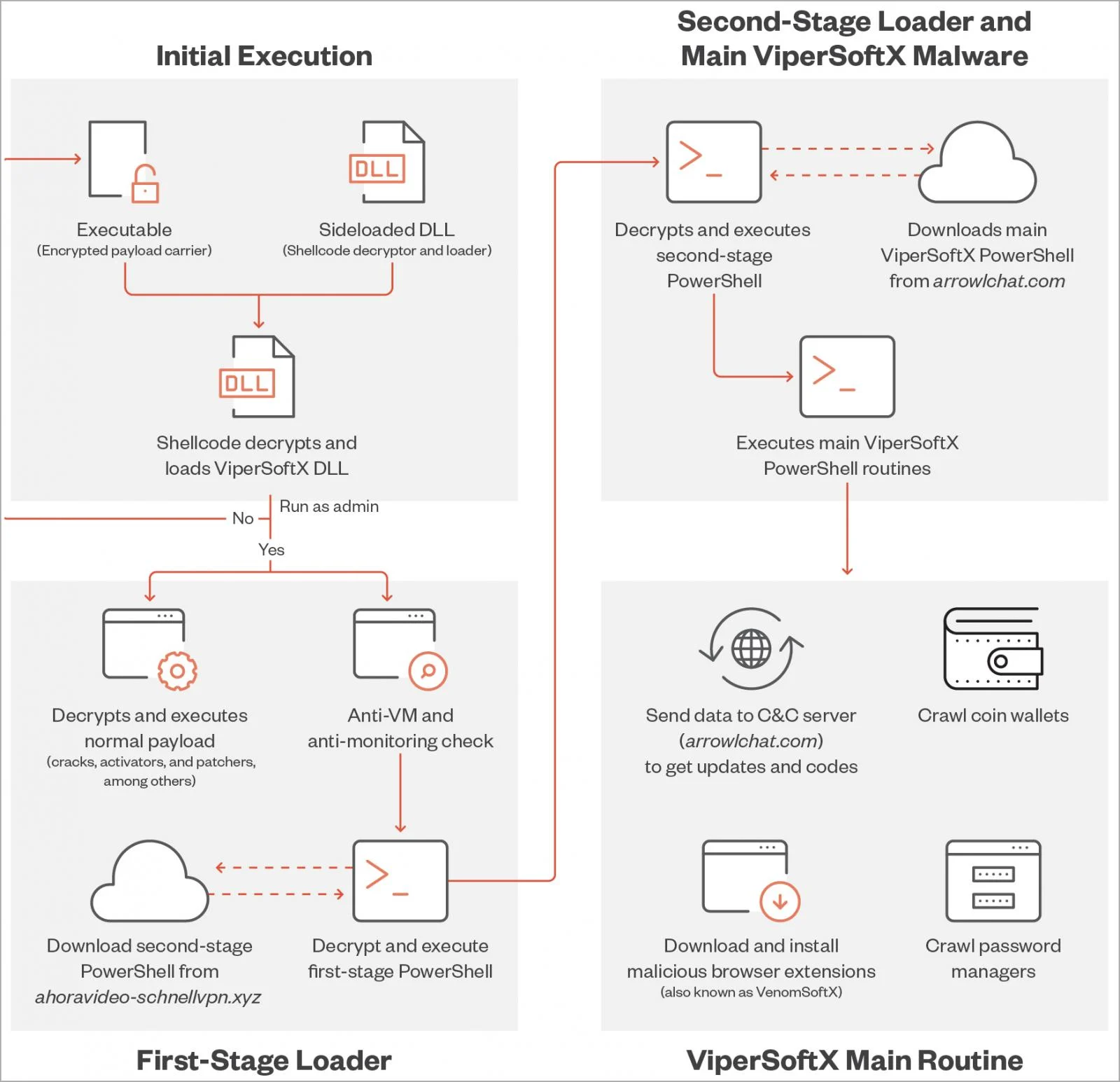
Cyber Threats Continue To Evolve, And One Of The More Persistent And Dangerous Malware Strains Discovered In Recent Years Is ViperSoftX Malware. Originally Detected As A JavaScript-based Crypto-mining Malware, ViperSoftX Has Since Evolved Into A multi-stage Malware Loader Capable Of Delivering A Wide Range Of Malicious Payloads.
This Malware Primarily Targets Windows Systems, Silently Infiltrating Devices, Stealing Sensitive Data, And Degrading System Performance. Due To Its Stealthy Behavior And Ability To Evade Traditional Antivirus Detection, ViperSoftX Has Become A Serious Concern For Both Individual Users And Organizations.
In This In-depth Guide, We Will Explore what ViperSoftX Malware Is, how It Works, how It Spreads, symptoms Of Infection, And Most Importantly, how To Remove And Prevent It.
ViperSoftX Is A malicious Software Strain That Originally Functioned As A cryptocurrency Miner, Exploiting Infected Systems To Mine Digital Currencies Without User Consent. Over Time, Threat Actors Enhanced Its Capabilities, Transforming It Into A malware Delivery Platform.
Today, ViperSoftX Is Commonly Used To:
Steal Browser Credentials
Hijack Cryptocurrency Wallets
Download Additional Malware
Enable Remote Access To Infected Systems
Execute Malicious Scripts Silently
What Makes ViperSoftX Particularly Dangerous Is Its Ability To persist On Systems And reinfect Devices Even After Partial Removal.
ViperSoftX Was First Identified Around 2020–2021 As A JavaScript-based Malware Hosted On Compromised Websites. Early Versions Focused On cryptomining, Consuming CPU Resources To Generate Revenue For Attackers.
As Cybersecurity Defenses Improved, ViperSoftX Evolved Into A loader-type Malware, Enabling Attackers To Push Additional Payloads Such As:
Info-stealers
Remote Access Trojans (RATs)
Clipboard Hijackers
Browser Injectors
This Evolution Significantly Increased Its Impact And Threat Level.
ViperSoftX Uses A multi-stage Infection Process, Making Detection And Removal Difficult.
The Malware Typically Enters A System Through:
Malicious Browser Extensions
Cracked Software Downloads
Fake Software Updates
Infected Installer Packages
Compromised Websites Hosting Malicious Scripts
Once Executed, It Installs Itself Quietly In The Background.
ViperSoftX Ensures It Remains Active By:
Creating scheduled Tasks
Modifying Windows Registry Entries
Installing malicious Browser Extensions
Using PowerShell Scripts For Reactivation
These Persistence Methods Allow The Malware To Survive Reboots And Evade Simple Cleanup Attempts.
After Establishing Itself, ViperSoftX Connects To command-and-control (C2) Servers To Receive Further Instructions, Such As:
Downloading Credential Stealers
Injecting Scripts Into Browsers
Exfiltrating Sensitive Data
Installing Ransomware Or Spyware
Understanding How ViperSoftX Spreads Is Key To Prevention.
One Of The Most Common Distribution Methods Is fake Browser Extensions Claiming To Offer:
Free VPN Services
Crypto Price Trackers
Productivity Tools
Ad Blockers
Once Installed, These Extensions Inject Malicious JavaScript Into Web Sessions.
Cracked Or Pirated Software Is A Major Infection Source. Attackers Bundle ViperSoftX With:
Fake Activators
Key Generators
Modified Installers
Emails Containing Malicious Links Or Attachments Can Trigger ViperSoftX Installation When Users Click Without Verification.
ViperSoftX Often Operates Silently, But Several Warning Signs May Appear:
Sudden slow System Performance
High CPU Or Memory Usage
Unknown Browser Extensions Installed
Browser Redirects To Suspicious Websites
Antivirus Disabled Without User Action
Unexpected Cryptocurrency Wallet Activity
Frequent System Crashes Or Freezes
If Multiple Symptoms Appear Simultaneously, A Malware Infection Is Likely.
ViperSoftX Can Steal:
Browser Passwords
Saved Credit Card Information
Cryptocurrency Wallet Keys
Autofill Data
Crypto Clipboard Hijacking Replaces Wallet Addresses During Transactions, Redirecting Funds To Attackers.
Sensitive Personal And Corporate Data Can Be Exfiltrated And Sold On Underground Forums.
Because It Acts As A Loader, ViperSoftX Often Installs additional Malware, Escalating The Attack.
Modern Security Tools With behavior-based Detection Are More Effective Than Signature-only Solutions.
Recommended Steps:
Run A full System Scan
Enable real-time Protection
Use Multiple Scanners For Verification
Advanced Users Can Check:
Suspicious Scheduled Tasks
Unknown Registry Startup Entries
Unrecognized PowerShell Activity
Browser Extension Permissions
This Prevents Further Data Exfiltration And Payload Downloads.
Safe Mode Limits Malware Execution And Allows Easier Removal.
Use Trusted Tools To:
Detect Malicious Files
Remove Registry Entries
Clean Browser Extensions
Manually Review And Delete Any Unfamiliar Or Unnecessary Extensions.
Reset Settings To Default To Eliminate Injected Scripts.
Change All Passwords, Especially:
Email Accounts
Banking Credentials
Crypto Wallets
Cloud Services
Always Download Software From official Sources.
Install Only Extensions With:
Verified Publishers
High User Ratings
Minimal Permissions
Apply Regular Updates For:
Operating Systems
Browsers
Security Software
Modern Endpoint Detection Solutions Can Stop ViperSoftX Before Execution.
Security Awareness Reduces The Risk Of Phishing And Social Engineering Attacks.
Organizations Are Increasingly Targeted Due To Valuable Data Assets. In Corporate Environments, ViperSoftX Can Lead To:
Data Breaches
Compliance Violations
Operational Disruptions
Reputational Damage
Implementing endpoint Detection And Response (EDR) Tools And network Monitoring Is Critical For Enterprise Protection.
Yes. ViperSoftX Remains Active And Continues To Evolve. Security Researchers Frequently Report New Variants Using:
Obfuscation Techniques
Encrypted Payloads
Fileless Execution Methods
Staying Informed About Emerging Threats Is Essential For Ongoing Protection.
ViperSoftX Malware Represents A modern, Adaptable Cyber Threat That Combines Stealth, Persistence, And Versatility. While It May Start As A Silent Infection, Its Long-term Consequences Can Be Severe — From Financial Loss To Identity Theft And Data Breaches.
The Best Defense Against ViperSoftX Is A Combination Of:
Strong Cybersecurity Hygiene
Trusted Security Software
User Awareness
Regular System Monitoring
By Understanding How ViperSoftX Works And Taking Proactive Measures, Users And Organizations Can Significantly Reduce Their Risk Of Infection.
Step 1: Boot Into Safe Mode
Restart Your PC And Press F8 (or Shift + F8 For Some Systems) Before Windows Loads.
Choose Safe Mode With Networking.
Safe Mode Prevents Most Malware From Loading.
Press Win + R, Type appwiz.cpl, And Press Enter.
Sort By Install Date And Uninstall Unknown Or Recently Added Programs.
Use A Trusted Anti-malware Tool:
Malwarebytes – https://www.malwarebytes.com
Screenshot Of Malwarebytes - Visit Links
Microsoft Defender – Built Into Windows 10/11
HitmanPro, ESET Online Scanner, Or Kaspersky Virus Removal Tool
ZoneAlarm Pro Antivirus + Firewall NextGen
VIPRE Antivirus - US And Others Countries, | India
Run A Full Scan And Delete/quarantine Detected Threats.
Win + R, Type temp → Delete All Files.Press Win + R, Type %temp% → Delete All Files.
Use Disk Cleanup: cleanmgr In The Run Dialog.
Go To: C:\Windows\System32\drivers\etc
Open hosts File With Notepad.
Replace With Default Content:
Press Ctrl + Shift + Esc → Open Task Manager
Go To Startup Tab
Disable Any Suspicious Entries.
Open Command Prompt As Administrator.
Run These Commands:
netsh Winsock Reset

netsh Int Ip Reset

ipconfig /flushdns
Unwanted Homepage Or Search Engine
Pop-ups Or Redirects
Unknown Extensions Installed
For Chrome:
Go To: chrome://extensions/
Remove Anything Unfamiliar
For Firefox:
Go To: about:addons → Extensions
Remove Suspicious Add-ons
For Edge:
Go To: edge://extensions/
Uninstall Unknown Add-ons
Chrome:
Go To chrome://settings/reset → "Restore Settings To Their Original Defaults"
Firefox:
Go To about:support → "Refresh Firefox"
Edge:
Go To edge://settings/resetProfileSettings → "Reset Settings"
All Browsers:
Use Ctrl + Shift + Del → Select All Time
Clear Cookies, Cached Files, And Site Data
Make Sure They Are Not Hijacked.
Chrome: chrome://settings/search
Firefox: about:preferences#search
Edge: edge://settings/search
Chrome: chrome://settings/cleanup
Use Malwarebytes Browser Guard For Real-time Browser Protection.
Always Download Software From Trusted Sources.
Keep Windows, Browsers, And Antivirus Updated.
Avoid Clicking Suspicious Links Or Ads.
Use ad Blockers And reputable Antivirus Software.
Backup Your Files Regularly.
To Remove Malware From Your Windows PC, Start By Booting Into Safe Mode, Uninstalling Suspicious Programs, And Scanning With Trusted Anti-malware Tools Like Malwarebytes. Clear Temporary Files, Reset Your Network Settings, And Check Startup Apps For Anything Unusual.
For web Browsers, Remove Unwanted Extensions, Reset Browser Settings, Clear Cache And Cookies, And Ensure Your Homepage And Search Engine Haven’t Been Hijacked. Use Cleanup Tools Like Chrome Cleanup Or Browser Guard For Added Protection.
?? Prevention Tips: Keep Software Updated, Avoid Suspicious Downloads, And Use Antivirus Protection Plus Browser Ad Blockers. Regular Backups Are Essential.
Why It Matters: Not All VPNs Offer Malware Protection.
What To Look For: Providers With built-in Malware/ad/tracker Blockers (e.g., NordVPN’s Threat Protection, ProtonVPN’s NetShield).
Purpose: Prevents Data Leaks If Your VPN Connection Drops.
Benefit: Ensures Your Real IP And Browsing Activity Aren’t Exposed To Malware-distributing Websites.
Why It Matters: DNS Leaks Can Expose Your Online Activity To Attackers.
Solution: Enable DNS Leak Protection In Your VPN Settings Or Use A Secure DNS Like Cloudflare (1.1.1.1).
Risk: Free VPNs Often Contain Malware, Sell User Data, Or Lack Security Features.
Better Option: Use Reputable Paid VPNs That Offer security Audits And Transparent Privacy Policies.
Some VPNs Block Known Phishing And Malicious Sites.
Example: Surfshark’s CleanWeb, CyberGhost’s Content Blocker.
Reason: Security Patches Fix Known Vulnerabilities.
Tip: Enable Auto-updates Or Check For Updates Weekly.
Scope: Malware Can Enter Through Phones, Tablets, Or IoT Devices.
Solution: Install VPN Apps On Every Internet-connected Device.
Fact: VPNs Do Not Remove Or Detect Malware On Your System.
Complement It With:
Antivirus Software
Firewall
Browser Extensions For Script Blocking
VPN Encrypts Traffic But Can’t Stop Malware From Executing If You Download Infected Files.
Split Tunneling Allows Certain Apps/sites To Bypass VPN.
Tip: Never Exclude Browsers, Email Clients, Or Download Managers From VPN Tunneling.
A VPN (Virtual Private Network) Enhances Your Online Privacy By Encrypting Your Internet Traffic And Masking Your IP Address. It Protects Your Data On Public Wi-Fi, Hides Browsing Activity From Hackers And ISPs, And Helps Bypass Geo-restrictions. VPNs Also Add A Layer Of Defense Against Malware By Blocking Malicious Websites And Trackers When Using Advanced Features. However, A VPN Does Not Remove Existing Malware Or Act As Antivirus Software. For Full Protection, Combine VPN Use With Antivirus Tools, Regular Software Updates, And Cautious Browsing Habits. Always Choose A Reputable VPN Provider With Strong Security And Privacy Policies.
Vipersoftx Malware, Remove Vipersoftx Malware, Uninstall Vipersoftx Malware, Get Rid Of Vipersoftx Malware, Vipersoftx Malware Removal











