 Blog's Page
 Blog's Page
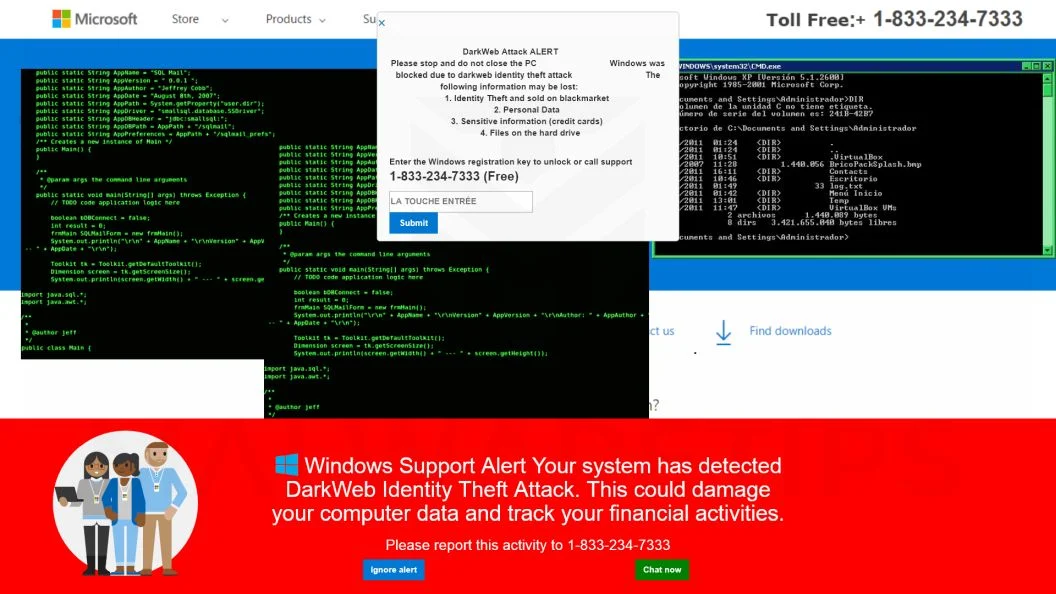
The Proliferation Of Tech Support Scams Targeting Windows Users Has Seen A Surge In Recent Times, With The Fake Microsoft Security Alert Scam Being One Of The Most Prevalent And Deceptive.
In This Comprehensive Guide, We Will Delve Into The Intricacies Of This Scam, Shedding Light On Its Tactics, Showcasing Real Examples Of Phishing Pop-ups, And Equipping You With Essential Knowledge To Identify And Thwart These Malicious Attempts. Our Guide Will Also Outline Best Practices In Case You Encounter Suspicious Activity Or Inadvertently Download Malware.
I. Understanding The Microsoft Security Alert Scam:
A. Overview Of The Scam
1. Common Tactics Employed By Scammers
2. Purpose And Motivation Behind The Scam
B. How The Scam Operates
1. Creation Of Malicious Websites
2. Fake Pop-Up Warnings And Impersonation Of Microsoft
3. Social Engineering Techniques To Instill Fear
II. Real Examples Of Phishing Pop-Ups:
A. Visual Walkthrough Of Fake Microsoft Security Alerts
B. Analyzing Content And Design Cues
III. Identifying And Avoiding Victimization:
A. Key Indicators Of A Fake Microsoft Security Alert
1. Examining URL And Web Address Authenticity
2. Verifying The Legitimacy Of Pop-Up Messages
3. Microsoft's Official Communication Channels
B. Best Practices For Avoiding Scams
1. Keeping Software Updated
2. Utilizing Reliable Security Software
3. Exercising Caution When Clicking On Links
4. Verifying Caller Authenticity In Case Of Phone Scams
IV. What To Do If You Encounter Suspicious Activity:
A. Reporting The Incident To Microsoft
B. Running Antivirus And Antimalware Scans
C. Monitoring Personal And Financial Accounts
V. Additional Resources And Support:
A. Microsoft's Official Support Channels
B. Cybersecurity Organizations And Reporting Platforms
The Microsoft Security Alert Scam Poses A Pervasive Threat To Windows Users, Employing Deceptive Tactics To Exploit Unsuspecting Individuals. In This Overview, We Will Unravel The Modus Operandi Of This Scam, Shedding Light On The Steps Scammers Take To Impersonate Microsoft And Manipulate Users Into Compromising Their Computer Security.
I. The Anatomy Of The Microsoft Security Alert Scam:
A. Malicious Redirects And Fake Pop-Up Alerts
1. Techniques Used In Redirecting Users
2. Impersonation Of Microsoft Through Phony Pop-Ups
B. Characteristics Of Deceptive Pop-Up Warnings
1. Use Of Microsoft Logos
2. Urgent Warnings About Viruses And Security Threats
C. Implementation Of Scare Tactics
1. Psychological Pressure To Call Tech Support Numbers
2. Exploiting Fear To Facilitate Social Engineering
D. The Journey To Overseas Scam Call Centers
1. Routing Calls Away From Legitimate Microsoft Support
2. Establishing False Tech Support Connections
E. Exploitation And Consequences
1. Gaining Remote Access As A Gateway
2. Installation Of Spyware, Data Theft, And Ransomware Attacks
II. Aliases Of The Scam:
A. Microsoft Technician Virus
B. Windows Defender Security Alert Phishing Scam
III. The Illusion Of Authenticity:
A. Convincing Nature Of Phony Pop-Ups
1. Leveraging The Microsoft Brand
2. Creating Credible Warnings About Malware
IV. The Deceptive Act:
A. Clarification On Microsoft's Communication Methods
1. Microsoft's Official Approach To User Communication
2. Distinguishing Genuine Alerts From Scams
Conclusion:
Arming Yourself With Knowledge And Vigilance Is The First Line Of Defense Against The Fake Microsoft Security Alert Scam. By Understanding Its Tactics, Recognizing Warning Signs, And Implementing Best Practices, You Can Safeguard Your Personal Data And Finances. Stay Informed, Stay Cautious, And Together, We Can Thwart The Attempts Of These Malicious Actors In The Digital Realm.
The Microsoft Security Alert Scam, Often Masquerading As The "Microsoft Technician Virus" Or "Windows Defender Security Alert" Phishing Scam, Preys On The Trust Of Windows Users.
By Understanding Its Deceptive Techniques And Recognizing The Red Flags, Users Can Safeguard Themselves Against Falling Victim To This Widespread Threat. Remember, Microsoft Would Never Resort To Such Tactics Or Use Alarming Pop-ups To Contact Users – Stay Informed, Stay Vigilant, And Protect Your Digital Security.
Removing Malware From A Windows Computer Involves A Combination Of Using Antivirus Or Anti-malware Tools, Performing System Scans, And Taking Manual Actions To Eliminate The Malicious Software. Here's A Step-by-step Guide:
Ctrl + Shift + Esc To Open Task Manager.Win + R To Open The Run Dialog, Type cleanmgr, And Press Enter.Remember To Maintain Good Security Practices, Such As Keeping Your Operating System And Software Up-to-date, Using A Reputable Antivirus Program, And Being Cautious When Clicking On Links Or Downloading Files From The Internet. Regularly Backing Up Your Important Data Is Also Crucial To Mitigate The Impact Of Potential Infections.
If You Have Malwarebytes Installed On Your Computer And It Has Detected Malware, Follow These Steps To Remove The Malware:

Open Malwarebytes:
Update Malwarebytes:
Run A Threat Scan:
Review Scan Results:
Quarantine Or Remove Threats:
Reboot Your Computer:
Check For Persistence:
Monitor For Issues:
Clear Browser Data:
Reset Browser Settings:
Review Installed Programs:
Change Passwords:
Update Operating System:


If The Malware Persists Or If You Encounter Difficulties During The Removal Process, You May Want To Seek Assistance From The Malwarebytes Support Community Or Consider Running Additional Scans Using Other Reputable Antivirus Or Anti-malware Tools. Remember To Keep Your Security Software Updated And Practice Safe Computing Habits To Minimize The Risk Of Future Infections.
Malwarebytes Is A Leading Cybersecurity Solution Dedicated To Protecting Users From The Ever-evolving Landscape Of Digital Threats. With A Proven Track Record In Malware Detection And Removal, Malwarebytes Offers Cutting-edge Technology To Safeguard Computers And Devices Against Viruses, Ransomware, And Other Malicious Software.
Boasting A User-friendly Interface, Malwarebytes Provides A Seamless Experience For Both Novice And Advanced Users. Its Real-time Protection Capabilities, Coupled With Powerful Scanning Algorithms, Ensure That Users Are Shielded From The Latest Cybersecurity Threats. Malwarebytes Continually Updates Its Extensive Malware Database, Enabling Users To Stay Ahead Of Emerging Risks And Vulnerabilities.
Beyond malware Detection, Malwarebytes Offers Additional Features Such As Web Protection And Anti-exploit Technology, Fortifying Defenses Against Malicious Websites And Zero-day Exploits. The Software's Lightweight Footprint Ensures Minimal Impact On System Performance, Delivering Robust Security Without Compromising Speed.
Whether Used As A Standalone Solution Or In Conjunction With Other Cybersecurity Tools, Malwarebytes Remains A Trusted Ally In The Battle Against Cyber Threats. As A Proactive And Responsive Cybersecurity Partner, Malwarebytes Empowers Users To Navigate The Digital World With Confidence, Knowing That Their Data And Devices Are Safeguarded Against The Latest And Most Sophisticated Threats.
Fake Microsoft Security Alert Scam, Microsoft Security Alert Scam











