 Blog's Page
 Blog's Page
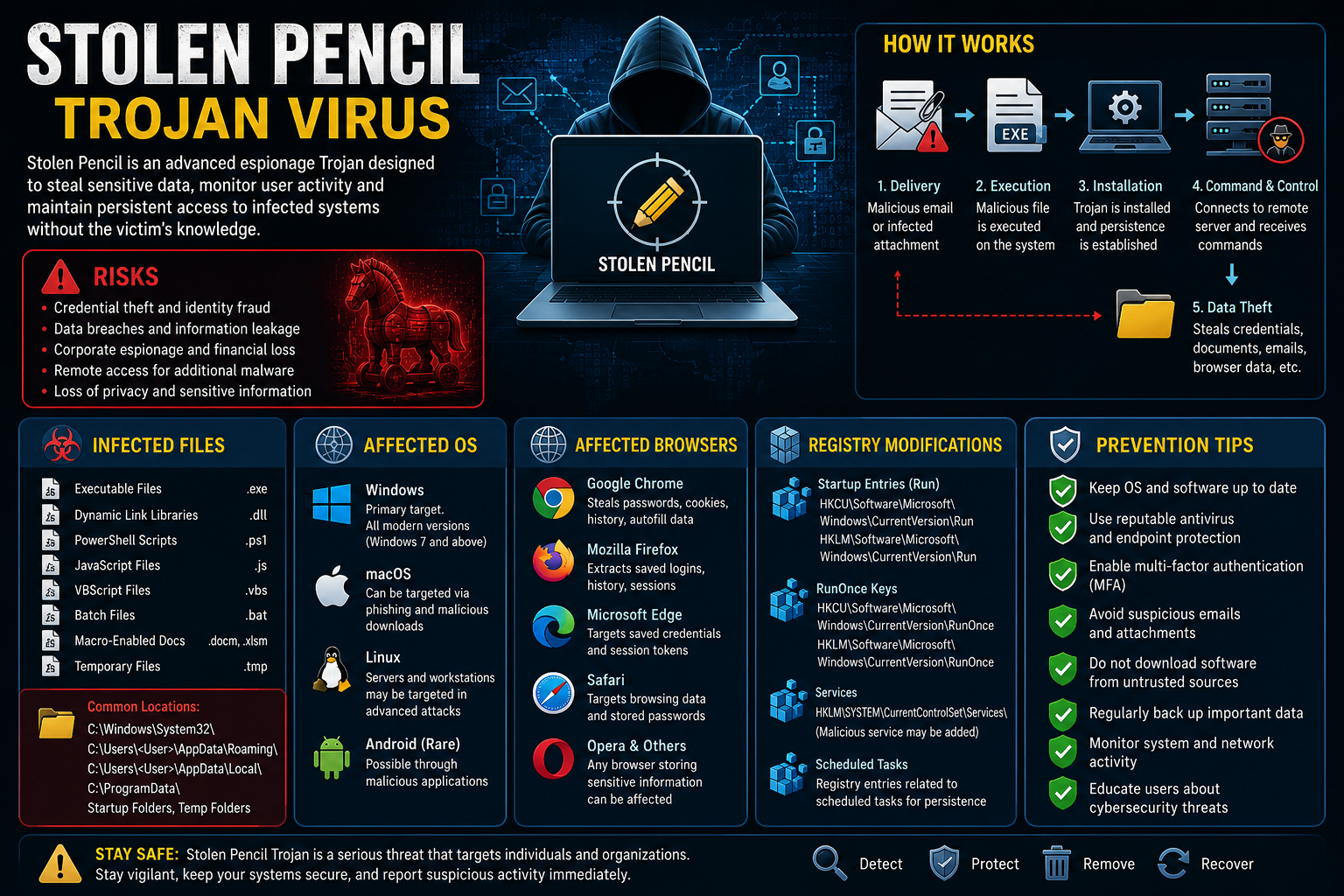
The Stolen Pencil Trojan Virus Is A Sophisticated Cyber-espionage Malware Family That Has Been Associated With Targeted Attacks Against Government Agencies, Educational Institutions, Research Organizations, And Businesses. Unlike Traditional Malware Designed Primarily For Financial Gain, Stolen Pencil Focuses On Gathering Sensitive Information, Monitoring User Activities, And Maintaining Long-term Access To Compromised Systems.
Cybersecurity Researchers Classify Stolen Pencil As An Advanced Trojan Because It Often Operates Silently In The Background While Collecting Valuable Data From Infected Devices. The Malware Can Steal Documents, Login Credentials, Emails, Browser Data, And Other Confidential Information Without Alerting The Victim.
Due To Its Stealthy Behavior And Persistence Mechanisms, Stolen Pencil Remains A Significant Threat To Organizations Handling Sensitive Information.
Stolen Pencil Typically Enters A System Through Phishing Campaigns, Malicious Attachments, Compromised Websites, Or Infected Software Downloads. Once Executed, The Trojan Establishes Persistence On The Device And Begins Communicating With A Remote Command-and-control (C2) Server Operated By Attackers.
The Attack Process Usually Includes:
Delivery Through Phishing Emails Or Malicious Downloads.
Execution Of Malicious Code On The Target System.
Installation Of Persistence Mechanisms.
Communication With Attacker-controlled Servers.
Collection Of Sensitive Information.
Downloading Additional Malware Components.
Maintaining Long-term Unauthorized Access.
Because It Is Designed For Espionage, The Malware Often Avoids Behaviors That Might Trigger Immediate Detection.
Stolen Pencil Can Utilize Multiple File Types To Infect Systems And Maintain Persistence.
Common Infected Files
Executable Files (.exe)
Dynamic Link Libraries (.dll)
PowerShell Scripts (.ps1)
JavaScript Files (.js)
Visual Basic Scripts (.vbs)
Batch Files (.bat)
Document Files With Malicious Macros (.docm, .xlsm)
Temporary System Files
Common Infection Locations
Attackers Often Store Malicious Files In:
C:\Windows\System32\
C:\Users\Username\AppData\Roaming\
C:\Users\Username\AppData\Local\
C:\ProgramData\
Startup Folders
Temporary Directories
The Malware Frequently Uses Filenames That Resemble Legitimate Windows Processes To Evade Detection.
Windows
Windows Systems Are The Primary Target Because They Dominate Enterprise Environments. Most Known Stolen Pencil Campaigns Focus On Windows-based Networks.
macOS
Some Variants And Associated Spyware Tools May Target MacOS Users Through Phishing Attacks And Malicious Downloads.
Linux
Linux Servers And Workstations Can Be Targeted When Attackers Seek Access To Organizational Infrastructure Or Sensitive Data.
Mobile Platforms
Although Less Common, Related Espionage Campaigns May Also Attempt To Compromise Android Devices Through Malicious Applications.
Since The Trojan Focuses Heavily On Data Collection, Web Browsers Are Common Targets.
Google Chrome
Attackers May Attempt To Steal:
Saved Passwords
Cookies
Browsing History
Autofill Information
Mozilla Firefox
Stored Credentials And Browsing Data Can Be Extracted From Firefox Profiles.
Microsoft Edge
Browser Sessions And Authentication Tokens May Be Collected.
Safari
Mac Users May Experience Credential Theft And Browser Monitoring.
Opera And Other Browsers
Any Browser Storing Sensitive Information Can Potentially Be Targeted.
Because Browser Credentials Often Provide Access To Email, Cloud Storage, And Business Applications, They Are Highly Valuable To Cybercriminals.
To Maintain Persistence And Survive System Reboots, Stolen Pencil May Modify Windows Registry Entries.
Startup Registry Keys
HKEY_CURRENT_USER\Software\Microsoft\Windows\CurrentVersion\Run
HKEY_LOCAL_MACHINE\Software\Microsoft\Windows\CurrentVersion\Run
These Entries Allow Malware To Launch Automatically When Windows Starts.
RunOnce Keys
HKEY_CURRENT_USER\Software\Microsoft\Windows\CurrentVersion\RunOnce
HKEY_LOCAL_MACHINE\Software\Microsoft\Windows\CurrentVersion\RunOnce
These Keys May Be Used To Execute Malicious Files After System Restarts.
Service Configuration Keys
HKEY_LOCAL_MACHINE\SYSTEM\CurrentControlSet\Services
Attackers May Create Malicious Services To Maintain Long-term Persistence.
Scheduled Task References
Registry Entries Associated With Scheduled Tasks Can Also Be Modified To Ensure Malware Execution.
Important Note: Registry Changes Vary By Malware Variant. Administrators Should Verify Suspicious Entries Before Deleting Them.
Indicators Of Compromise:
IP
Because The Malware Is Designed For Stealth, Symptoms May Be Subtle.
Common Warning Signs Include:
Unusual Network Traffic
Slow System Performance
Unknown Background Processes
Unexpected Login Attempts
Browser Credential Theft
Security Software Being Disabled
Increased CPU Or Memory Usage
Unauthorized Access To Accounts
Suspicious Scheduled Tasks
Organizations May Also Observe Connections To Unknown External Servers.
Credential Theft
The Malware Can Capture Usernames, Passwords, Browser Cookies, And Authentication Tokens.
Data Exfiltration
Sensitive Documents, Emails, And Proprietary Information May Be Stolen.
Corporate Espionage
Businesses Can Lose Valuable Intellectual Property And Confidential Information.
Additional Malware Infections
Attackers May Use The Trojan As A Gateway To Deploy Ransomware, Spyware, Or Remote Access Tools.
Financial Losses
Data Breaches, Legal Consequences, And Recovery Costs Can Result In Significant Financial Damage.
If An Infection Is Suspected:
Disconnect The Device
Immediately Isolate The Affected System From The Network.
Perform A Full Security Scan
Use Reputable Antivirus And Endpoint Detection Tools To Identify Malicious Components.
Remove Suspicious Files
Investigate Unknown Executables, Scripts, And Scheduled Tasks.
Check Registry Entries
Review Startup And Persistence-related Registry Keys.
Reset Credentials
Change All Passwords, Especially For Email And Business Accounts.
Apply Security Updates
Patch Operating Systems, Browsers, And Software Applications.
Conduct A Forensic Investigation
Organizations Should Perform Detailed Incident Response Procedures To Identify The Scope Of Compromise.
Keep Software Updated
Install Security Patches Regularly To Eliminate Exploitable Vulnerabilities.
Use Advanced Endpoint Protection
Deploy Modern Antivirus And Endpoint Detection Solutions.
Enable Multi-Factor Authentication
MFA Significantly Reduces The Risk Of Account Compromise.
Train Employees
Educate Users About Phishing Emails And Suspicious Attachments.
Restrict Administrative Privileges
Limit Access Rights To Reduce The Impact Of Malware Infections.
Monitor Network Traffic
Use Security Monitoring Tools To Detect Suspicious Communications.
Backup Important Data
Maintain Secure And Regularly Updated Backups.
Implement Email Security
Use Spam Filters And Email Scanning Solutions To Block Malicious Content.
The Stolen Pencil Trojan Virus Is A Sophisticated Cyber-espionage Threat Designed To Steal Sensitive Information While Remaining Hidden From Users And Security Tools. By Targeting Files, Browsers, Credentials, And System Configurations, It Can Provide Attackers With Long-term Access To Valuable Data And Organizational Networks.
Understanding Its Infection Methods, Affected Operating Systems, Browser Risks, Registry Modifications, And Warning Signs Can Help Organizations Strengthen Their Defenses. Through Proactive Cybersecurity Measures, Employee Awareness, And Continuous Monitoring, Users Can Significantly Reduce The Risk Of Falling Victim To Stolen Pencil And Similar Advanced Trojan Threats.
Step 1: Boot Into Safe Mode
Restart Your PC And Press F8 (or Shift + F8 For Some Systems) Before Windows Loads.
Choose Safe Mode With Networking.
Safe Mode Prevents Most Malware From Loading.
Press Win + R, Type appwiz.cpl, And Press Enter.
Sort By Install Date And Uninstall Unknown Or Recently Added Programs.
Use A Trusted Anti-malware Tool:
Malwarebytes – https://www.malwarebytes.com
Screenshot Of Malwarebytes - Visit Links
Microsoft Defender – Built Into Windows 10/11
HitmanPro, ESET Online Scanner, Or Kaspersky Virus Removal Tool
ZoneAlarm Pro Antivirus + Firewall NextGen
VIPRE Antivirus - US And Others Countries, | India
Run A Full Scan And Delete/quarantine Detected Threats.
Win + R, Type temp → Delete All Files.Press Win + R, Type %temp% → Delete All Files.
Use Disk Cleanup: cleanmgr In The Run Dialog.
Go To: C:\Windows\System32\drivers\etc
Open hosts File With Notepad.
Replace With Default Content:
Press Ctrl + Shift + Esc → Open Task Manager
Go To Startup Tab
Disable Any Suspicious Entries.
Open Command Prompt As Administrator.
Run These Commands:
netsh Winsock Reset

netsh Int Ip Reset

ipconfig /flushdns
Unwanted Homepage Or Search Engine
Pop-ups Or Redirects
Unknown Extensions Installed
For Chrome:
Go To: chrome://extensions/
Remove Anything Unfamiliar
For Firefox:
Go To: about:addons → Extensions
Remove Suspicious Add-ons
For Edge:
Go To: edge://extensions/
Uninstall Unknown Add-ons
Chrome:
Go To chrome://settings/reset → "Restore Settings To Their Original Defaults"
Firefox:
Go To about:support → "Refresh Firefox"
Edge:
Go To edge://settings/resetProfileSettings → "Reset Settings"
All Browsers:
Use Ctrl + Shift + Del → Select All Time
Clear Cookies, Cached Files, And Site Data
Make Sure They Are Not Hijacked.
Chrome: chrome://settings/search
Firefox: about:preferences#search
Edge: edge://settings/search
Chrome: chrome://settings/cleanup
Use Malwarebytes Browser Guard For Real-time Browser Protection.
Always Download Software From Trusted Sources.
Keep Windows, Browsers, And Antivirus Updated.
Avoid Clicking Suspicious Links Or Ads.
Use ad Blockers And reputable Antivirus Software.
Backup Your Files Regularly.
To Remove Malware From Your Windows PC, Start By Booting Into Safe Mode, Uninstalling Suspicious Programs, And Scanning With Trusted Anti-malware Tools Like Malwarebytes. Clear Temporary Files, Reset Your Network Settings, And Check Startup Apps For Anything Unusual.
For web Browsers, Remove Unwanted Extensions, Reset Browser Settings, Clear Cache And Cookies, And Ensure Your Homepage And Search Engine Haven’t Been Hijacked. Use Cleanup Tools Like Chrome Cleanup Or Browser Guard For Added Protection.
?? Prevention Tips: Keep Software Updated, Avoid Suspicious Downloads, And Use Antivirus Protection Plus Browser Ad Blockers. Regular Backups Are Essential.
Why It Matters: Not All VPNs Offer Malware Protection.
What To Look For: Providers With built-in Malware/ad/tracker Blockers (e.g., NordVPN’s Threat Protection, ProtonVPN’s NetShield).
Purpose: Prevents Data Leaks If Your VPN Connection Drops.
Benefit: Ensures Your Real IP And Browsing Activity Aren’t Exposed To Malware-distributing Websites.
Why It Matters: DNS Leaks Can Expose Your Online Activity To Attackers.
Solution: Enable DNS Leak Protection In Your VPN Settings Or Use A Secure DNS Like Cloudflare (1.1.1.1).
Risk: Free VPNs Often Contain Malware, Sell User Data, Or Lack Security Features.
Better Option: Use Reputable Paid VPNs That Offer security Audits And Transparent Privacy Policies.
Some VPNs Block Known Phishing And Malicious Sites.
Example: Surfshark’s CleanWeb, CyberGhost’s Content Blocker.
Reason: Security Patches Fix Known Vulnerabilities.
Tip: Enable Auto-updates Or Check For Updates Weekly.
Scope: Malware Can Enter Through Phones, Tablets, Or IoT Devices.
Solution: Install VPN Apps On Every Internet-connected Device.
Fact: VPNs Do Not Remove Or Detect Malware On Your System.
Complement It With:
Antivirus Software
Firewall
Browser Extensions For Script Blocking
VPN Encrypts Traffic But Can’t Stop Malware From Executing If You Download Infected Files.
Split Tunneling Allows Certain Apps/sites To Bypass VPN.
Tip: Never Exclude Browsers, Email Clients, Or Download Managers From VPN Tunneling.
A VPN (Virtual Private Network) Enhances Your Online Privacy By Encrypting Your Internet Traffic And Masking Your IP Address. It Protects Your Data On Public Wi-Fi, Hides Browsing Activity From Hackers And ISPs, And Helps Bypass Geo-restrictions. VPNs Also Add A Layer Of Defense Against Malware By Blocking Malicious Websites And Trackers When Using Advanced Features. However, A VPN Does Not Remove Existing Malware Or Act As Antivirus Software. For Full Protection, Combine VPN Use With Antivirus Tools, Regular Software Updates, And Cautious Browsing Habits. Always Choose A Reputable VPN Provider With Strong Security And Privacy Policies.
Stolen Pencil Trojan Virus, Remove Stolen Pencil Trojan Virus, How To Remove Stolen Pencil Trojan Virus, Uninstall Stolen Pencil Trojan Virus, Delete











