 Blog's Page
 Blog's Page
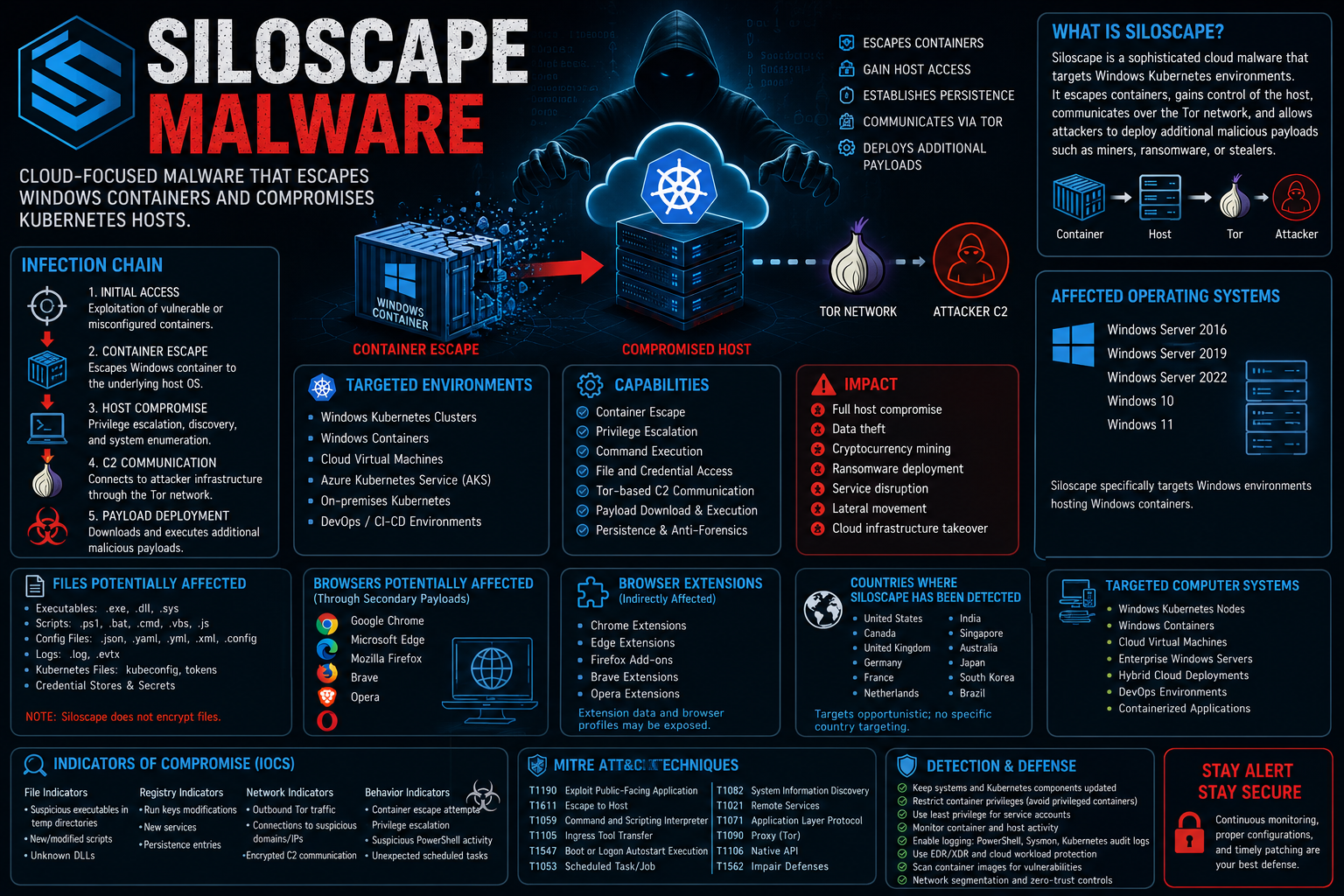
Siloscape Is A Sophisticated Cloud-focused Malware First Publicly Disclosed In 2021. Unlike Traditional Ransomware Or Banking Trojans, Siloscape Is Designed To Compromise Windows-based Kubernetes Container Environments By Escaping Containers And Gaining Access To The Underlying Host Operating System. Once On The Host, It Establishes Communication With Attacker-controlled Infrastructure Through The Tor Network And Enables Remote Execution Of Malicious Payloads, Making It A Powerful Backdoor For Cloud-native Environments.
The Malware Demonstrates Advanced Capabilities, Including Container Escape, Privilege Escalation, API Abuse, Stealth Techniques, And Anti-forensics. Siloscape Primarily Targets Misconfigured Kubernetes Clusters Running Windows Containers And Can Be Used To Deploy Additional Malware Such As Cryptocurrency Miners, Ransomware, Information Stealers, Or Remote Access Tools.
Unlike File-encrypting Malware, Siloscape Focuses On Maintaining Persistent Access And Facilitating Post-exploitation Activities. Organizations Operating Containerized Workloads Should Implement Strong Kubernetes Security Practices, Restrict Container Privileges, Continuously Monitor Workloads, And Regularly Update Their Infrastructure.
| Attribute | Details |
|---|---|
| Malware Name | Siloscape |
| Malware Type | Cloud Malware / Container Escape Malware |
| Primary Objective | Escape Windows Containers And Compromise Kubernetes Hosts |
| First Public Disclosure | 2021 |
| Primary Target | Windows Kubernetes Clusters |
| Initial Access | Exploitation Of Vulnerable Or Misconfigured Containers |
| Persistence | Yes |
| Command And Control | Tor Network |
| Payload Delivery | Additional Malware Deployment |
| Target Environment | Cloud Infrastructure |
Siloscape Follows A Multi-stage Attack Process Designed For Cloud-native Environments.
The Attacker Gains Access Through:
Vulnerable Windows Containers
Misconfigured Kubernetes Deployments
Exposed Services
Weak Administrative Credentials
Instead Of Remaining Inside The Compromised Container, Siloscape Abuses Windows Container Mechanisms To Escape Into The Host Operating System.
After Escaping, The Malware:
Gains Elevated Privileges
Executes Commands
Accesses Sensitive Host Resources
Enumerates Running Services
Siloscape Connects To Attacker Infrastructure Through The Tor Anonymity Network.
Capabilities Include:
Remote Command Execution
Payload Download
System Monitoring
Data Collection
The Attackers May Deploy:
Cryptocurrency Miners
Ransomware
Information Stealers
Credential Theft Tools
Remote Access Trojans (RATs)
Common Infection Methods Include:
Misconfigured Kubernetes Clusters
Vulnerable Windows Containers
Internet-exposed Services
Weak Administrator Credentials
Privilege Misconfigurations
Supply-chain Attacks
Exploited Software Vulnerabilities
Compromised Container Images
Remote Code Execution Vulnerabilities
Unlike Ransomware, Siloscape Does not Primarily Encrypt User Files. Instead, It Installs Malicious Binaries, Creates Persistence Mechanisms, And Downloads Additional Payloads.
Commonly Affected Files Include:
.exe
.dll
.sys
.bat
.cmd
.json
.yaml
.yml
.xml
.config
.log
.evtx
kubeconfig Files
Cluster Configuration Files
Service Account Tokens
.ps1
.vbs
.js
Cached Credentials
Windows Credential Stores
Kubernetes Secrets
API Tokens
Siloscape Is not A File-encrypting Malware, So It Does not Append A Unique File Extension To Victim Files. Instead, It May Create Or Drop Malicious Executable Files And Scripts Using Standard Windows Extensions Such As:
.exe
.dll
.ps1
.bat
.cmd
Siloscape Specifically Targets Microsoft Windows Environments That Host Windows Containers.
Supported Victim Operating Systems Include:
Windows Server 2016
Windows Server 2019
Windows Server 2022
Windows 10
Windows 11 (if Configured For Windows Containers)
The Malware Has Been Observed Targeting Windows Container Infrastructure Rather Than Linux-based Kubernetes Nodes.
Siloscape Does Not Specifically Attack Web Browsers. However, If Follow-on Malware Is Deployed, Browser Data May Become A Target.
Potentially Affected Browsers Include:
Google Chrome
Microsoft Edge
Mozilla Firefox
Brave
Opera
Possible Browser-related Data Exposed By Secondary Payloads:
Saved Passwords
Cookies
Authentication Tokens
Browser History
Stored Sessions
Autofill Information
Bookmarks
There Is No Public Evidence That Siloscape Directly Targets Browser Extensions. However, If Credential-stealing Payloads Are Deployed After Compromise, Extension-related Data Stored In Browser Profiles May Be Accessed.
Potential Browser Extension Data Includes:
Google Chrome Extensions
Microsoft Edge Extensions
Mozilla Firefox Add-ons
Brave Extensions
Opera Extensions
Siloscape Is Considered An Opportunistic Threat Targeting Exposed Cloud Environments Rather Than Specific Countries.
Public Reporting Has Identified Victims And Exposed Systems In Multiple Regions, Including:
United States
Canada
United Kingdom
Germany
France
Netherlands
India
Singapore
Australia
Japan
South Korea
Brazil
The Geographic Distribution Depends Largely On The Exposure Of Vulnerable Windows Kubernetes Deployments.
Primary Targets Include:
Windows Kubernetes Nodes
Windows Containers
Kubernetes Clusters
Cloud Virtual Machines
Azure Kubernetes Service (AKS) With Windows Nodes
On-premises Kubernetes Environments
Enterprise Windows Servers
Hybrid Cloud Deployments
Cloud-native Infrastructure
DevOps Environments
The Following IOC Categories Are Commonly Associated With Siloscape Investigations. Actual Values Such As Hashes, Domains, IP Addresses, Or Mutex Names Vary By Sample And Should Be Obtained From Trusted Threat Intelligence For A Specific Campaign.
Suspicious Executables In Temporary Directories
Unexpected Binaries Within Container File Systems
PowerShell Scripts Created Without Authorization
New Scheduled Task Or Service Binaries
Common Directories To Inspect Include:
%Temp%
%AppData%
%ProgramData%
%SystemRoot%\Temp
Potential Persistence Locations:
HKCU\Software\Microsoft\Windows\CurrentVersion\Run
HKLM\Software\Microsoft\Windows\CurrentVersion\Run
Suspicious Behavior Includes:
Unusual PowerShell Execution
Container Process Spawning Host Processes
Execution Of cmd.exe From Container Contexts
Unexpected Use Of rundll32.exe
New Windows Services
Remote Command Execution
Potential Activity Includes:
Outbound Tor Traffic
Communication With Command-and-control Infrastructure
DNS Requests To Suspicious Domains
Download Of Secondary Payloads
Encrypted HTTPS Connections To Attacker-controlled Servers
Container Escape Attempts
Privilege Escalation
Kubernetes API Enumeration
Host Process Creation From Container Context
Persistence Through Scheduled Tasks Or Registry Keys
Deployment Of Additional Malware
The Following ATT&CK Techniques Are Commonly Associated With Siloscape Behavior.
| Technique ID | Technique |
|---|---|
| T1190 | Exploit Public-Facing Application |
| T1611 | Escape To Host |
| T1610 | Deploy Container |
| T1133 | External Remote Services |
| T1059.001 | PowerShell |
| T1059.003 | Windows Command Shell |
| T1105 | Ingress Tool Transfer |
| T1027 | Obfuscated Files Or Information |
| T1547.001 | Registry Run Keys / Startup Folder |
| T1053.005 | Scheduled Task |
| T1082 | System Information Discovery |
| T1083 | File And Directory Discovery |
| T1016 | System Network Configuration Discovery |
| T1087 | Account Discovery |
| T1046 | Network Service Discovery |
| T1021 | Remote Services |
| T1071.001 | Web Protocols |
| T1090.003 | Multi-hop Proxy (Tor) |
| T1570 | Lateral Tool Transfer |
| T1106 | Native API |
| T1562 | Impair Defenses |
title: Siloscape Suspicious PowerShell

Id: Siloscape-powershell

Status: Experimental

Logsource:
  Product: Windows
  Category: Process_creation

Detection:
  Selection:
    Image|endswith:
      - '\powershell.exe'

    CommandLine|contains:
      - Invoke-WebRequest
      - DownloadString
      - EncodedCommand

Condition: Selection

Level: High
title: Windows Container Host Escape Activity

Status: Experimental

Logsource:
  Product: Windows
  Category: Process_creation

Detection:
  Selection:
    ParentImage|contains:
      - Container

    Image|endswith:
      - '\cmd.exe'
      - '\powershell.exe'

Condition: Selection

Level: High
title: Suspicious Scheduled Task Creation

Status: Stable

Logsource:
  Product: Windows
  Category: Process_creation

Detection:
  Selection:
    CommandLine|contains:
      - Schtasks
      - /create

Condition: Selection

Level: Medium
rule Siloscape_Generic
{
    Meta:
        Description = "Generic Detection For Siloscape-like Malware"

    Strings:
        $a = "tor"
        $b = "powershell"
        $c = "cmd.exe"
        $d = "CreateProcess"

    Condition:
        Any Of Them
}
Monitor The Following Windows Event IDs:
Event ID 4688 – Process Creation
Event ID 4698 – Scheduled Task Creation
Event ID 7045 – Service Installation
Event ID 4624 – Successful Logon
Event ID 4625 – Failed Logon
Event ID 5156 – Windows Filtering Platform Connection
Event ID 4104 – PowerShell Script Block Logging
Alert On:
Unexpected PowerShell Downloads
New Services Installed
Registry Run Key Modifications
Tor-related Outbound Connections
Host Process Creation From Containerized Environments
Unauthorized Scheduled Task Creation
Organizations Can Reduce The Risk Of Siloscape Infections By Implementing The Following Security Controls:
Keep Windows Server And Kubernetes Components Fully Patched.
Restrict Container Privileges And Avoid Running Privileged Windows Containers.
Apply The Principle Of Least Privilege To Kubernetes Service Accounts.
Use Trusted And Regularly Scanned Container Images.
Enable Windows Defender, Endpoint Detection And Response (EDR), And Container Runtime Monitoring.
Monitor Kubernetes API Activity And Container Escape Attempts.
Disable Unnecessary Administrative Services And Secure Remote Desktop Protocol (RDP).
Segment Cloud Workloads And Isolate Sensitive Infrastructure.
Enable PowerShell Logging And Centralized Security Event Monitoring.
Conduct Regular Vulnerability Assessments And Penetration Testing Of Cloud Environments.
Siloscape Is A Cloud-focused Malware Family Designed To Escape Windows Containers In Kubernetes Environments, Compromise The Host Operating System, And Provide Attackers With Remote Access For Deploying Additional Malicious Payloads.
No. Siloscape Is not Ransomware. It Functions Primarily As A Container Escape Tool And Backdoor Rather Than Encrypting Victim Files Or Demanding A Ransom.
It Primarily Targets Windows-based Kubernetes Environments, Including Windows Server Hosts Running Windows Containers In On-premises Or Cloud Deployments.
No. Siloscape Does Not Encrypt User Files Or Append Ransomware-style File Extensions. Its Objective Is Unauthorized Access, Persistence, And Post-exploitation.
It Can Spread Through Vulnerable Or Misconfigured Windows Containers, Exposed Kubernetes Services, Weak Credentials, Exploited Software Vulnerabilities, And Compromised Container Images.
Siloscape Itself Focuses On Establishing Access And Control. However, Attackers May Deploy Secondary Payloads Capable Of Credential Theft, Data Exfiltration, Cryptocurrency Mining, Or Ransomware.
Siloscape Does Not Directly Target Browsers, But Follow-on Malware May Access Data Stored In Browsers Such As Google Chrome, Microsoft Edge, Mozilla Firefox, Brave, And Opera.
Common Indicators Include Suspicious PowerShell Activity, Unexpected Processes Spawned From Container Contexts, Persistence Through Registry Keys Or Scheduled Tasks, Outbound Tor Communications, And Unauthorized Downloads Of Additional Malware.
Modern Antivirus And Endpoint Detection And Response (EDR) Solutions May Detect Known Siloscape Samples Or Suspicious Behaviors. However, Behavioral Monitoring, Kubernetes Security Controls, And Cloud Workload Protection Are Essential Because Attackers Frequently Modify Malware To Evade Signature-based Detection.
Organizations Should Harden Kubernetes Deployments, Restrict Container Privileges, Regularly Update Windows Server Hosts, Scan Container Images, Monitor For Container Escape Attempts, Enable Comprehensive Logging, And Implement Layered Security Controls Across Cloud And On-premises Environments.
Step 1: Boot Into Safe Mode
Restart Your PC And Press F8 (or Shift + F8 For Some Systems) Before Windows Loads.
Choose Safe Mode With Networking.
Safe Mode Prevents Most Malware From Loading.
Press Win + R, Type appwiz.cpl, And Press Enter.
Sort By Install Date And Uninstall Unknown Or Recently Added Programs.
Use A Trusted Anti-malware Tool:
Malwarebytes – https://www.malwarebytes.com
Screenshot Of Malwarebytes - Visit Links
Microsoft Defender – Built Into Windows 10/11
HitmanPro, ESET Online Scanner, Or Kaspersky Virus Removal Tool
ZoneAlarm Pro Antivirus + Firewall NextGen
VIPRE Antivirus - US And Others Countries, | India
Run A Full Scan And Delete/quarantine Detected Threats.
Win + R, Type temp → Delete All Files.Press Win + R, Type %temp% → Delete All Files.
Use Disk Cleanup: cleanmgr In The Run Dialog.
Go To: C:\Windows\System32\drivers\etc
Open hosts File With Notepad.
Replace With Default Content:
Press Ctrl + Shift + Esc → Open Task Manager
Go To Startup Tab
Disable Any Suspicious Entries.
Open Command Prompt As Administrator.
Run These Commands:
netsh Winsock Reset

netsh Int Ip Reset

ipconfig /flushdns
Unwanted Homepage Or Search Engine
Pop-ups Or Redirects
Unknown Extensions Installed
For Chrome:
Go To: chrome://extensions/
Remove Anything Unfamiliar
For Firefox:
Go To: about:addons → Extensions
Remove Suspicious Add-ons
For Edge:
Go To: edge://extensions/
Uninstall Unknown Add-ons
Chrome:
Go To chrome://settings/reset → "Restore Settings To Their Original Defaults"
Firefox:
Go To about:support → "Refresh Firefox"
Edge:
Go To edge://settings/resetProfileSettings → "Reset Settings"
All Browsers:
Use Ctrl + Shift + Del → Select All Time
Clear Cookies, Cached Files, And Site Data
Make Sure They Are Not Hijacked.
Chrome: chrome://settings/search
Firefox: about:preferences#search
Edge: edge://settings/search
Chrome: chrome://settings/cleanup
Use Malwarebytes Browser Guard For Real-time Browser Protection.
Always Download Software From Trusted Sources.
Keep Windows, Browsers, And Antivirus Updated.
Avoid Clicking Suspicious Links Or Ads.
Use ad Blockers And reputable Antivirus Software.
Backup Your Files Regularly.
To Remove Malware From Your Windows PC, Start By Booting Into Safe Mode, Uninstalling Suspicious Programs, And Scanning With Trusted Anti-malware Tools Like Malwarebytes. Clear Temporary Files, Reset Your Network Settings, And Check Startup Apps For Anything Unusual.
For web Browsers, Remove Unwanted Extensions, Reset Browser Settings, Clear Cache And Cookies, And Ensure Your Homepage And Search Engine Haven’t Been Hijacked. Use Cleanup Tools Like Chrome Cleanup Or Browser Guard For Added Protection.
?? Prevention Tips: Keep Software Updated, Avoid Suspicious Downloads, And Use Antivirus Protection Plus Browser Ad Blockers. Regular Backups Are Essential.
Why It Matters: Not All VPNs Offer Malware Protection.
What To Look For: Providers With built-in Malware/ad/tracker Blockers (e.g., NordVPN’s Threat Protection, ProtonVPN’s NetShield).
Purpose: Prevents Data Leaks If Your VPN Connection Drops.
Benefit: Ensures Your Real IP And Browsing Activity Aren’t Exposed To Malware-distributing Websites.
Why It Matters: DNS Leaks Can Expose Your Online Activity To Attackers.
Solution: Enable DNS Leak Protection In Your VPN Settings Or Use A Secure DNS Like Cloudflare (1.1.1.1).
Risk: Free VPNs Often Contain Malware, Sell User Data, Or Lack Security Features.
Better Option: Use Reputable Paid VPNs That Offer security Audits And Transparent Privacy Policies.
Some VPNs Block Known Phishing And Malicious Sites.
Example: Surfshark’s CleanWeb, CyberGhost’s Content Blocker.
Reason: Security Patches Fix Known Vulnerabilities.
Tip: Enable Auto-updates Or Check For Updates Weekly.
Scope: Malware Can Enter Through Phones, Tablets, Or IoT Devices.
Solution: Install VPN Apps On Every Internet-connected Device.
Fact: VPNs Do Not Remove Or Detect Malware On Your System.
Complement It With:
Antivirus Software
Firewall
Browser Extensions For Script Blocking
VPN Encrypts Traffic But Can’t Stop Malware From Executing If You Download Infected Files.
Split Tunneling Allows Certain Apps/sites To Bypass VPN.
Tip: Never Exclude Browsers, Email Clients, Or Download Managers From VPN Tunneling.
A VPN (Virtual Private Network) Enhances Your Online Privacy By Encrypting Your Internet Traffic And Masking Your IP Address. It Protects Your Data On Public Wi-Fi, Hides Browsing Activity From Hackers And ISPs, And Helps Bypass Geo-restrictions. VPNs Also Add A Layer Of Defense Against Malware By Blocking Malicious Websites And Trackers When Using Advanced Features. However, A VPN Does Not Remove Existing Malware Or Act As Antivirus Software. For Full Protection, Combine VPN Use With Antivirus Tools, Regular Software Updates, And Cautious Browsing Habits. Always Choose A Reputable VPN Provider With Strong Security And Privacy Policies.
Siloscape Malware, Remove Siloscape Malware, Delete Siloscape Malware, Uninstall Siloscape Malware, Get Rid Of Siloscape Malware, Siloscape Malware Re











