 Blog's Page
 Blog's Page
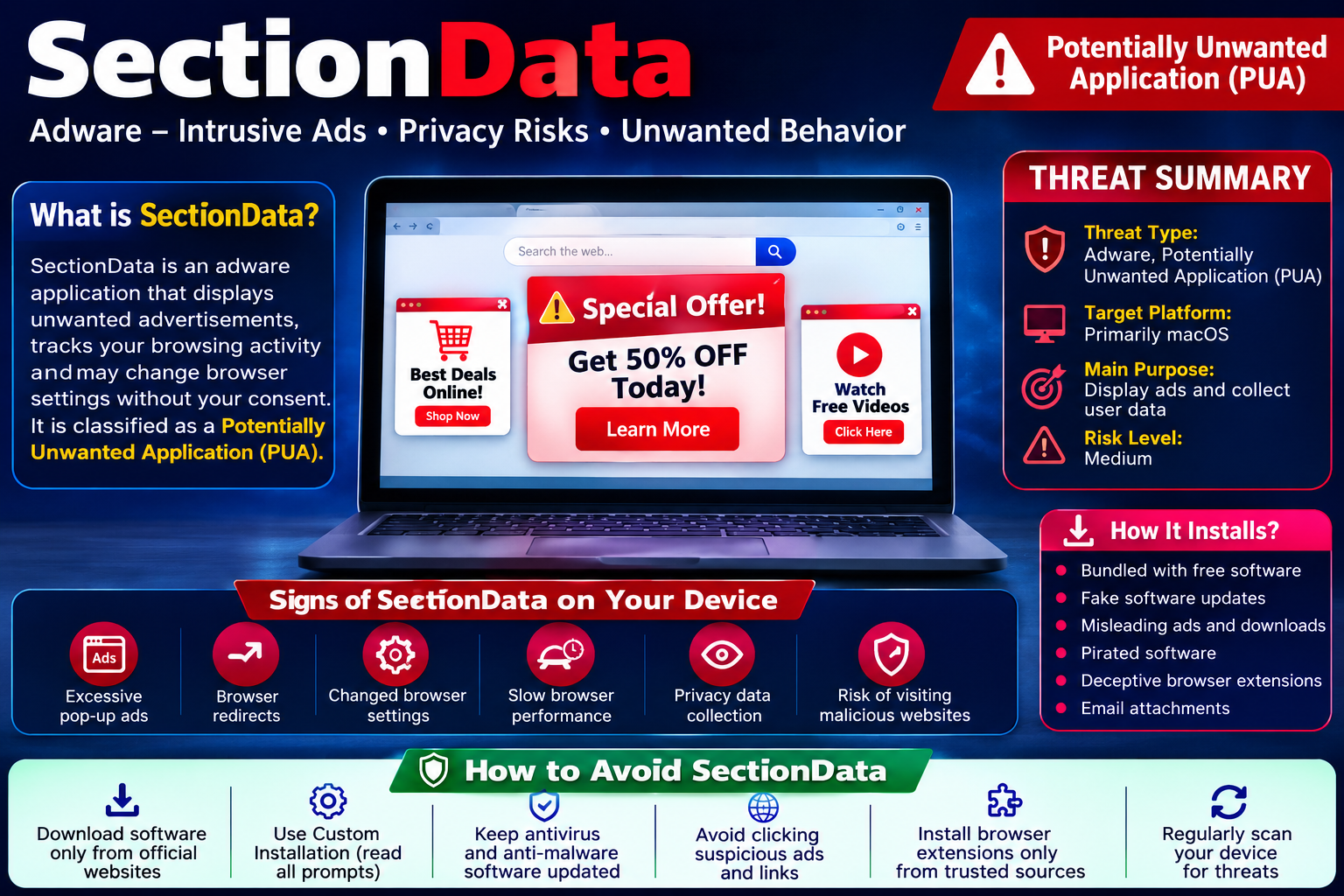
SectionData Is A Potentially Unwanted Application (PUA) That Is Primarily Classified As adware. It Is Designed To Display Intrusive Advertisements On A User's Device While Collecting Browsing-related Information For Advertising And Marketing Purposes. Although It Is Not Considered A Traditional Virus, Ransomware, Or Trojan, SectionData Can Significantly Affect A Computer's Performance, Compromise User Privacy, And Expose Users To Various Online Security Risks.
SectionData Has Been Associated Mainly With MacOS Systems And Belongs To A Family Of Advertising-supported Software That Frequently Targets Apple Devices. Once Installed, It Integrates Into The Operating System And Web Browsers, Enabling It To Inject Advertisements Into Websites, Open Promotional Pop-ups, Redirect Browser Searches, And Encourage Users To Visit Sponsored Or Potentially Dangerous Websites.
Unlike Legitimate Advertising Software, SectionData Often Arrives Without The User's Informed Consent. It Is Commonly Bundled With Free Software Installers, Fake Software Updates, Deceptive Advertisements, Or Misleading Download Pages. Because Of These Deceptive Distribution Methods, Cybersecurity Vendors Classify It As A Potentially Unwanted Application Rather Than A Legitimate Marketing Tool.
Although SectionData's Primary Objective Is Generating Advertising Revenue Through Pay-per-click (PPC) Schemes, The Software May Also Collect Various Forms Of User Data, Including:
Browsing History
Search Queries
IP Address
Browser Type
Device Information
Geographic Location
Cookies
Session Identifiers
Visited Websites
Clicked Advertisements
Some Variants May Even Attempt To Monitor User Behavior More Extensively To Improve Targeted Advertising.
While SectionData Itself May Not Directly Damage Files Or Encrypt Data, Its Presence Increases The Likelihood Of Users Encountering Phishing Websites, Fraudulent Surveys, Fake Technical Support Pages, Browser Hijackers, Cryptocurrency Scams, And Malware Downloads.
SectionData Operates Similarly To Many Modern Advertising-supported Applications. After Installation, It Silently Runs In The Background And Integrates Itself With The Web Browser. Depending On The Variant, It May Install Browser Extensions, Helper Applications, Launch Agents, Or Startup Entries To Maintain Persistence After System Reboot.
Once Active, Users May Notice Numerous Unwanted Activities.
SectionData Injects Advertisements Into Websites That Normally Do Not Display Them. These Advertisements Include:
Banner Advertisements
Pop-up Advertisements
Pop-under Windows
In-text Advertisements
Video Advertisements
Coupon Offers
Fake Discount Notifications
Sponsored Search Results
These Ads Often Appear Even On Trusted Websites.
One Of The Common Behaviors Of SectionData Involves Redirecting Browser Traffic.
Users Searching Through Legitimate Search Engines May Suddenly Be Redirected To:
Fake Search Engines
Advertising Pages
Affiliate Websites
Scam Domains
Phishing Websites
These Redirects Generate Affiliate Commissions For The Operators Behind The Adware.
Since The Application Continuously Loads Advertisements And Tracks Browsing Activities, It Consumes System Resources.
Users Commonly Experience:
Slow Browser Performance
High CPU Usage
Increased Memory Consumption
Longer Boot Times
Browser Freezing
Random Crashes
Some SectionData Variants Modify Browser Settings Without Permission.
Possible Modifications Include:
Homepage Changes
Default Search Engine Replacement
New Tab Page Modification
Installation Of Unwanted Extensions
Notification Permission Abuse
These Changes Make It Difficult For Users To Restore Normal Browser Behavior.
Advertising-supported Software Relies Heavily On User Profiling.
SectionData May Collect:
URLs Visited
Search History
Browser Cookies
Language Settings
Installed Browser Extensions
Device Identifiers
Screen Resolution
Operating System Version
Collected Information May Later Be Shared With Advertising Partners Or Third-party Marketing Companies.
Although Advertisements Themselves May Appear Harmless, They Often Redirect Users To Risky Websites.
Examples Include:
Fake Antivirus Pages
Tech Support Scams
Lottery Scams
Investment Fraud
Cryptocurrency Scams
Browser Update Scams
Fake Software Downloads
Clicking These Advertisements May Result In Additional Malware Infections.
| Category | Details |
|---|---|
| Threat Name | SectionData |
| Threat Type | Adware, Potentially Unwanted Application (PUA) |
| Target Platforms | Primarily MacOS |
| Primary Purpose | Display Advertisements And Generate Advertising Revenue |
| Risk Level | Medium |
| Symptoms | Pop-ups, Redirects, Slow Browser, Unwanted Ads |
| Distribution Methods | Software Bundling, Fake Updates, Deceptive Advertisements |
| Data Collected | Browsing History, Cookies, IP Address, Search Queries, Device Information |
| Persistence | Launch Agents, Startup Entries, Browser Extensions |
| Associated Risks | Privacy Issues, Phishing, Malware Downloads, Browser Hijacking |
| Removal Difficulty | Moderate |
Users Affected By SectionData May Notice One Or More Of The Following Symptoms:
Continuous Pop-up Advertisements
Unexpected Browser Redirects
New Browser Extensions
Modified Homepage
Changed Search Engine
Frequent Advertisements On Every Website
Browser Becoming Unusually Slow
Increased Fan Activity Due To CPU Usage
Unknown Applications Installed
Numerous Notification Requests
Fake Software Update Alerts
Random Promotional Tabs Opening Automatically
The Severity Depends On The Particular Variant Installed.
Many Users Assume Adware Is Simply Annoying. However, Modern Adware Presents Several Security Concerns.
Continuous Tracking Enables Advertisers To Build Detailed User Profiles.
These Profiles May Reveal:
Personal Interests
Shopping Habits
Search Behavior
Frequently Visited Websites
Approximate Location
Such Information Can Be Valuable For Targeted Advertising Or May Be Shared With Unknown Third Parties.
SectionData Advertisements Often Promote Questionable Websites.
Users May Unknowingly Download:
Banking Trojans
Password Stealers
Fake Antivirus Software
Cryptocurrency Miners
Browser Hijackers
Ransomware
Therefore, The Adware Acts As A Gateway To More Serious Infections.
Some Advertisements Encourage Users To:
Purchase Fake Software
Subscribe To Fraudulent Services
Call Fake Technical Support Numbers
Invest In Scam Cryptocurrency Platforms
Victims May Suffer Direct Financial Losses.
Most Users Never Intentionally Install SectionData. Instead, It Is Distributed Through Deceptive Techniques Designed To Trick Users Into Approving The Installation Unknowingly.
The Most Common Installation Method Is Software Bundling.
Free Applications Downloaded From Unofficial Websites Often Include Optional Components.
If Users Repeatedly Click Next, Accept, Or Express Installation, Bundled Applications Such As SectionData May Be Installed Automatically.
Cybercriminals Create Fake Update Notifications Claiming That Users Must Update:
Flash Player
Media Player
Browser
Video Codec
Java
Instead Of Legitimate Updates, These Downloads Install Adware.
Certain Websites Display Advertisements That Imitate Legitimate Download Buttons.
Clicking These Advertisements May Initiate Automatic Downloads.
Cracked Applications Frequently Contain Bundled Unwanted Software.
Many Unofficial Software Repositories Monetize Downloads By Including Advertising-supported Applications.
Downloads From Torrent Websites Or Peer-to-peer File-sharing Platforms May Contain Modified Installers That Silently Install Unwanted Applications.
Some Browser Extensions Advertise Useful Features But Secretly Inject Advertisements And Collect Browsing Information.
Although Less Common, Malicious Email Attachments May Contain Installers That Deploy Adware Alongside Other Unwanted Software.
Removing SectionData Typically Involves Several Steps.
Review Installed Applications And Remove Unknown Or Recently Installed Programs.
Inspect All Installed Browser Extensions.
Remove Extensions That:
You Do Not Recognize
Were Installed Without Permission
Display Excessive Advertisements
Restore Browser Defaults By Resetting:
Homepage
Search Engine
New Tab Page
Notification Permissions
Use A Trusted Anti-malware Solution To Detect Remaining Files, Launch Agents, Startup Items, And Browser Modifications Associated With SectionData.
Delete:
Cookies
Cached Files
Browsing History
Website Permissions
This Helps Remove Tracking Information.
Preventing Adware Infections Is Much Easier Than Removing Them. Following Cybersecurity Best Practices Can Significantly Reduce The Risk.
Always Obtain Software From The Developer's Official Website Or Trusted App Stores.
Avoid Third-party Download Portals.
Never Choose Express Or Recommended Installation Options.
Instead:
Select Custom
Review Every Installation Step
Deselect Optional Software
Decline Browser Extensions You Do Not Need
Many Bundled Applications Are Disclosed In Small Print.
Take Time To Read Installation Screens Before Clicking Next.
Use Built-in Update Features Or Official Vendor Websites.
Ignore Update Prompts Displayed By Random Websites.
A Reliable Antivirus Or Anti-malware Solution Can Detect And Block Potentially Unwanted Applications Before Installation.
Enable Real-time Protection Whenever Possible.
Illegal Software Often Carries Hidden Installers That Distribute Adware, Spyware, Or Trojans.
Downloading Genuine Software Greatly Reduces Security Risks.
Install Extensions Only From Official Browser Stores.
Review:
Ratings
Permissions
Developer Information
User Reviews
Remove Extensions That Request Excessive Permissions.
Many Malicious Websites Abuse Browser Notifications.
Only Allow Notifications From Websites You Trust.
Regularly Review Notification Permissions And Revoke Unnecessary Access.
Do Not Click Advertisements Promising:
Free Prizes
System Optimization
Virus Removal
Urgent Software Updates
Exclusive Discounts Requiring Downloads
These Are Common Social Engineering Tactics.
Periodic Security Scans Help Identify Unwanted Applications Before They Become Persistent.
SectionData Is An Advertising-supported Application That May Initially Appear Harmless But Can Expose Users To Numerous Privacy And Cybersecurity Risks. By Displaying Intrusive Advertisements, Collecting Browsing-related Information, Modifying Browser Settings, And Redirecting Users To Questionable Websites, It Creates An Unsafe Browsing Environment And Increases The Likelihood Of Encountering Scams Or Additional Malware.
Although SectionData Is Not Classified As A Destructive Virus, Its Deceptive Installation Methods And Intrusive Behavior Make It A Significant Security Concern. Users Should Remove The Application Promptly If Detected And Carefully Inspect Their Browsers And Installed Software For Any Associated Components.
The Best Defense Against SectionData And Similar Unwanted Applications Is Prevention. Download Software Only From Trusted Sources, Choose Custom Installation Options, Avoid Clicking Suspicious Advertisements, Keep Your Operating System And Applications Updated, And Use Reputable Security Software With Real-time Protection. Practicing Safe Browsing Habits And Remaining Cautious During Software Installations Can Greatly Reduce The Risk Of Adware Infections And Help Maintain A Secure, Private, And Reliable Computing Environment.
Step 1: Boot Into Safe Mode
Restart Your PC And Press F8 (or Shift + F8 For Some Systems) Before Windows Loads.
Choose Safe Mode With Networking.
Safe Mode Prevents Most Malware From Loading.
Press Win + R, Type appwiz.cpl, And Press Enter.
Sort By Install Date And Uninstall Unknown Or Recently Added Programs.
Use A Trusted Anti-malware Tool:
Malwarebytes – https://www.malwarebytes.com
Screenshot Of Malwarebytes - Visit Links
Microsoft Defender – Built Into Windows 10/11
HitmanPro, ESET Online Scanner, Or Kaspersky Virus Removal Tool
ZoneAlarm Pro Antivirus + Firewall NextGen
VIPRE Antivirus - US And Others Countries, | India
Run A Full Scan And Delete/quarantine Detected Threats.
Win + R, Type temp → Delete All Files.Press Win + R, Type %temp% → Delete All Files.
Use Disk Cleanup: cleanmgr In The Run Dialog.
Go To: C:\Windows\System32\drivers\etc
Open hosts File With Notepad.
Replace With Default Content:
Press Ctrl + Shift + Esc → Open Task Manager
Go To Startup Tab
Disable Any Suspicious Entries.
Open Command Prompt As Administrator.
Run These Commands:
netsh Winsock Reset

netsh Int Ip Reset

ipconfig /flushdns
Unwanted Homepage Or Search Engine
Pop-ups Or Redirects
Unknown Extensions Installed
For Chrome:
Go To: chrome://extensions/
Remove Anything Unfamiliar
For Firefox:
Go To: about:addons → Extensions
Remove Suspicious Add-ons
For Edge:
Go To: edge://extensions/
Uninstall Unknown Add-ons
Chrome:
Go To chrome://settings/reset → "Restore Settings To Their Original Defaults"
Firefox:
Go To about:support → "Refresh Firefox"
Edge:
Go To edge://settings/resetProfileSettings → "Reset Settings"
All Browsers:
Use Ctrl + Shift + Del → Select All Time
Clear Cookies, Cached Files, And Site Data
Make Sure They Are Not Hijacked.
Chrome: chrome://settings/search
Firefox: about:preferences#search
Edge: edge://settings/search
Chrome: chrome://settings/cleanup
Use Malwarebytes Browser Guard For Real-time Browser Protection.
Always Download Software From Trusted Sources.
Keep Windows, Browsers, And Antivirus Updated.
Avoid Clicking Suspicious Links Or Ads.
Use ad Blockers And reputable Antivirus Software.
Backup Your Files Regularly.
To Remove Malware From Your Windows PC, Start By Booting Into Safe Mode, Uninstalling Suspicious Programs, And Scanning With Trusted Anti-malware Tools Like Malwarebytes. Clear Temporary Files, Reset Your Network Settings, And Check Startup Apps For Anything Unusual.
For web Browsers, Remove Unwanted Extensions, Reset Browser Settings, Clear Cache And Cookies, And Ensure Your Homepage And Search Engine Haven’t Been Hijacked. Use Cleanup Tools Like Chrome Cleanup Or Browser Guard For Added Protection.
?? Prevention Tips: Keep Software Updated, Avoid Suspicious Downloads, And Use Antivirus Protection Plus Browser Ad Blockers. Regular Backups Are Essential.
Why It Matters: Not All VPNs Offer Malware Protection.
What To Look For: Providers With built-in Malware/ad/tracker Blockers (e.g., NordVPN’s Threat Protection, ProtonVPN’s NetShield).
Purpose: Prevents Data Leaks If Your VPN Connection Drops.
Benefit: Ensures Your Real IP And Browsing Activity Aren’t Exposed To Malware-distributing Websites.
Why It Matters: DNS Leaks Can Expose Your Online Activity To Attackers.
Solution: Enable DNS Leak Protection In Your VPN Settings Or Use A Secure DNS Like Cloudflare (1.1.1.1).
Risk: Free VPNs Often Contain Malware, Sell User Data, Or Lack Security Features.
Better Option: Use Reputable Paid VPNs That Offer security Audits And Transparent Privacy Policies.
Some VPNs Block Known Phishing And Malicious Sites.
Example: Surfshark’s CleanWeb, CyberGhost’s Content Blocker.
Reason: Security Patches Fix Known Vulnerabilities.
Tip: Enable Auto-updates Or Check For Updates Weekly.
Scope: Malware Can Enter Through Phones, Tablets, Or IoT Devices.
Solution: Install VPN Apps On Every Internet-connected Device.
Fact: VPNs Do Not Remove Or Detect Malware On Your System.
Complement It With:
Antivirus Software
Firewall
Browser Extensions For Script Blocking
VPN Encrypts Traffic But Can’t Stop Malware From Executing If You Download Infected Files.
Split Tunneling Allows Certain Apps/sites To Bypass VPN.
Tip: Never Exclude Browsers, Email Clients, Or Download Managers From VPN Tunneling.
A VPN (Virtual Private Network) Enhances Your Online Privacy By Encrypting Your Internet Traffic And Masking Your IP Address. It Protects Your Data On Public Wi-Fi, Hides Browsing Activity From Hackers And ISPs, And Helps Bypass Geo-restrictions. VPNs Also Add A Layer Of Defense Against Malware By Blocking Malicious Websites And Trackers When Using Advanced Features. However, A VPN Does Not Remove Existing Malware Or Act As Antivirus Software. For Full Protection, Combine VPN Use With Antivirus Tools, Regular Software Updates, And Cautious Browsing Habits. Always Choose A Reputable VPN Provider With Strong Security And Privacy Policies.
SectionData, SectionData Adware, SectionData Potentially Unwanted Program, SectionData Removal Guide, Delete SectionData, Uninstall SectionData, Get R











