 Blog's Page
 Blog's Page
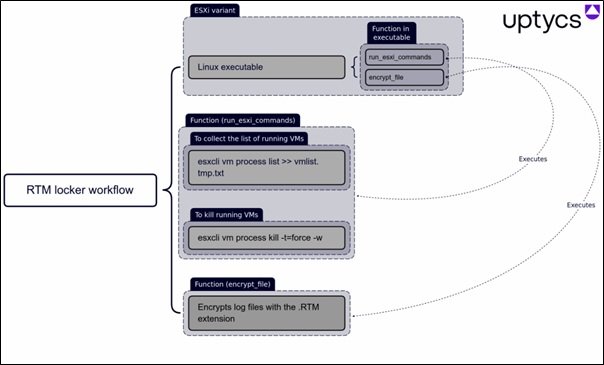
RTM Locker Ransomware Is A Malicious Software Strain Designed To Encrypt Victim Data And Demand Payment In Exchange For Decryption. Like Many Modern Ransomware Families, RTM Locker Targets Organizations Rather Than Individuals, Focusing On Environments Where Operational Disruption Can Translate Into Financial Pressure.
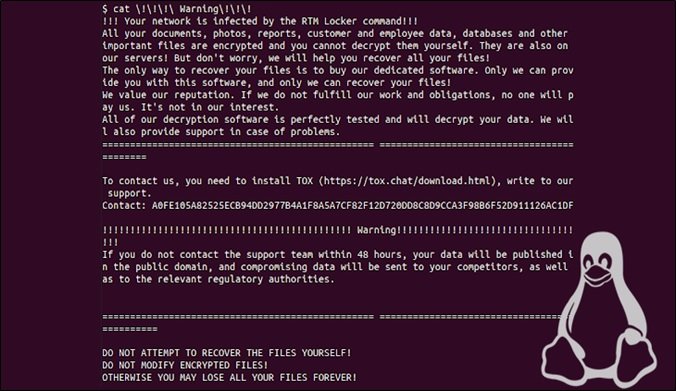
Unlike Opportunistic Malware, RTM Locker Campaigns Are Typically Associated With Targeted Intrusion Activity, Where Attackers Spend Time Inside A Network Before Executing Encryption. This Increases Damage And Complicates Recovery.
From A Defensive Standpoint, RTM Locker Follows A Common Ransomware Lifecycle:
Initial Access Through Compromised Credentials Or Exposed Services
Lateral Movement Within The Environment
Privilege Escalation
Data Discovery And Encryption
Extortion Via Ransom Note Or Communication Channel
Understanding This Lifecycle Helps Defenders Identify Early Warning Signs Before Encryption Occurs.
RTM Locker Ransomware Has Been Observed Impacting:
Manufacturing Organizations
Healthcare Providers
Professional Services Firms
Education And Research Institutions
Mid-sized Enterprises With Limited Security Staffing
These Sectors Often Have High Uptime Requirements, Making Them Attractive Ransomware Targets.
The Consequences Of An RTM Locker Infection Extend Beyond Encrypted Files:
Operational Downtime
Data Loss And Potential Data Exposure
Regulatory And Compliance Penalties
Reputational Damage
Long-term Recovery Costs
For Many Organizations, Indirect Costs Far Exceed The Ransom Demand Itself.
Security Teams Should Watch For:
Unusual Authentication Attempts
Unexpected Administrative Account Creation
Abnormal File Rename Activity
Sudden Spikes In CPU Or Disk Usage
Disabled Security Tools
Early Detection Remains The Most Effective Defense.
Key Defensive Measures Include:
Enforcing Multi-factor Authentication
Regular Patch Management
Network Segmentation
Immutable And Offline Backups
Employee Security Awareness Training
A Layered Security Approach Significantly Reduces Attack Success Rates.
If RTM Locker Ransomware Is Suspected:
Isolate Affected Systems Immediately
Preserve Forensic Evidence
Notify Internal Stakeholders
Engage Incident Response Professionals
Restore From Clean Backups
Paying A Ransom Does Not Guarantee Data Recovery And May Increase Future Risk.
Organizations Affected By Ransomware May Face:
Data Breach Notification Obligations
Industry-specific Compliance Requirements
Potential Legal Exposure
Legal Counsel Should Be Involved Early In The Response Process.
Is RTM Locker Still Active?
Ransomware Families Often Evolve Or Rebrand, Making Continuous Monitoring Essential.RTM Locker (short For “Read The Manual Locker”) Is A ransomware-as-a-service (RaaS) Operation That Has Been Observed Targeting Enterprise Environments Since At Least 2023. As Of The Most Recent Cybersecurity Reporting, RTM Locker Is not Known To Have Been Officially Shut Down, But Its Activity Remains relatively Low And Under The Radar Compared With Major Ransomware Families Like LockBit Or Black Basta.
RTM Locker First Came To Broader Attention When Cybersecurity Researchers Observed The Gang Deploying A Ransomware Strain That Could Encrypt Data On Both Windows Systems And Linux Hosts, Including VMware ESXi Servers — Widely Used Virtualization Platforms In Corporate Networks. The Ransomware Has Capabilities Derived From The Leaked Source Code Of Babuk, Another Defunct Ransomware Project, And Uses Strong Cryptographic Algorithms Such As Curve25519 And ChaCha20 For Encryption.
Unlike Some Ransomware Groups That Generate Headlines Through Widespread And Highly Disruptive Attacks, RTM Locker’s Operators Appear To Prefer A “fly Under The Radar” Strategy. They Impose strict Rules On Affiliates — The Third-party Operators Who Deploy The Malware — Including Requirements That Affiliates Remain Active, That They only Target Opportunistic Victims, And That They Avoid Certain Industries Like Law Enforcement, Healthcare, Or Critical National Infrastructure That Could Draw Unwanted Attention. This Disciplined Approach Suggests The Gang Still Intends To Operate But In A stealthy Fashion Rather Than Through High-volume Campaigns.
One Notable Development Reported Last Year Was The Creation Of A Linux/ESXi Variant Of The RTM Locker Ransomware. This Was Specifically Designed To Encrypt Virtual Machines On ESXi Hosts — A Sign That, At Least Technically, The Group Has Been Updating And Diversifying Its Malware Capabilities. While This Variation Was Detected In 2023, There Have Been No Major Announcements From Law Enforcement Or Cybersecurity Firms Indicating That The Group Has Been Dismantled Since Then.
That Said, evidence Of Recent Attacks Attributed Directly To RTM Locker Is Sparse In Mainstream Threat Reports. Analysts Have Noted That RTM Locker Is not Particularly Active In Terms Of Observable Campaigns, Especially When Compared To Larger Ransomware Families That Dominate Incident Reports And Breach Disclosures.
In Summary, RTM Locker Has Not Been Publicly Declared Inactive Or Dismantled, But its Operation Appears To Be Limited And Discreet, Making It Difficult To Definitively Say How Frequently It Is Currently Being Used In Active Attacks. Ongoing Monitoring By Security Researchers Suggests The Framework Remains Available To Affiliates, Even If Major Ransomware Activity Attributable To RTM Locker Has Not Been Widely Reported Recently.
Can Antivirus Stop RTM Locker?
Traditional Antivirus Alone Is Insufficient Without Behavioral And Network-based Controls. RTM Locker Is A Modern Ransomware Family That Targets Windows Systems, Encrypts Files, And Demands A Ransom For Decryption. Like Many Contemporary Ransomware Strains, It Is Designed Specifically To Evade Traditional Security Defenses. While Antivirus Software Can Play An Important Role In Protecting Systems, It Is Not A Guaranteed Solution For Stopping RTM Locker On Its Own.
Traditional Antivirus Programs Primarily Rely On Signature-based Detection. This Means They Identify Malware By Comparing Files Against A Database Of Known Malicious Signatures. RTM Locker, However, Frequently Uses Obfuscation, Packing, And Code Variations To Avoid Being Recognized By These Signatures.
If The Ransomware Variant Is New Or Slightly Modified, A Standard Antivirus May Fail To Detect It Before Execution. In Such Cases, The Malware Can Run Freely, Encrypt Data, And Disable Recovery Options Before The Antivirus Reacts.
Some Modern Antivirus And Endpoint Protection Solutions Go Beyond Signatures And Use Heuristic And Behavioral Analysis. These Tools Monitor System Behavior For Suspicious Actions, Such As Rapid File Encryption, Unauthorized Access To Backup Files, Or Attempts To Disable Security Services.
When Properly Configured And Up To Date, Such Solutions Can Sometimes Detect RTM Locker During Its Execution Phase And Stop The Process Before Widespread Damage Occurs. However, Even Behavioral Detection Is Not Foolproof. Ransomware Developers Deliberately Slow Down Encryption Or Mimic Legitimate Processes To Reduce The Likelihood Of Triggering Alarms.
Another Challenge Is The Delivery Method. RTM Locker Is Often Distributed Through Phishing Emails, Malicious Attachments, Compromised Websites, Or Stolen Credentials That Allow Attackers To Deploy The Ransomware Manually.
If A User Opens A Malicious Attachment Or Enables Macros In A Document, The Ransomware May Execute Using Trusted System Tools, A Technique Known As “living Off The Land.” In These Scenarios, Antivirus Software May Not Immediately Recognize The Activity As Malicious, Especially If The Attack Appears To Originate From Legitimate System Processes.
It Is Also Important To Note That Antivirus Software Typically Focuses On Prevention, Not Recovery. Even If An Antivirus Detects RTM Locker After Encryption Has Begun, It Usually Cannot Decrypt Files Without The Attacker’s Key. At Best, It Can Stop Further Damage. This Means Relying Solely On Antivirus Protection Can Still Result In Significant Data Loss.
To Effectively Defend Against RTM Locker, Antivirus Software Should Be Part Of A Layered Security Strategy. This Includes Regular System And Software Updates, Strong Email Filtering, Disabling Unnecessary Macros, Enforcing Least-privilege Access, And Maintaining Offline Or Immutable Backups. Network Monitoring And Endpoint Detection And Response (EDR) Tools Further Increase The Chances Of Identifying And Containing An Attack Early.
In Conclusion, Antivirus Software Can Sometimes Stop RTM Locker, Particularly Advanced Solutions With Behavioral Detection Capabilities. However, It Cannot Be Relied Upon As A Complete Defense. RTM Locker Is Specifically Engineered To Bypass Traditional Antivirus Measures, Making A Multi-layered Security Approach Essential For Meaningful Protection.
Should Organizations Pay The Ransom?
Most Cybersecurity Authorities Advise Against Ransom Payments Due To Uncertainty And Ethical Concerns.
Whether Organizations Should Pay A Ransom—most Commonly In The Context Of Ransomware Attacks—is A Deeply Contested Question With Ethical, Financial, And Strategic Implications. There Is No Universally Correct Answer, But Most Experts Argue That Paying A Ransom Should Be Avoided Whenever Possible, As It Creates Long-term Risks That Often Outweigh Short-term Relief.
On One Hand, Organizations Facing A Ransomware Attack Are Often Under Extreme Pressure. Critical Systems May Be Locked, Sensitive Data Exposed, And Operations Brought To A Halt. For Hospitals, Utilities, Or Other Essential Services, The Consequences Can Be Immediate And Severe, Even Threatening Lives.
In These Situations, Paying The Ransom Can Appear To Be The Fastest And Least Damaging Way To Restore Operations. Some Organizations Also Calculate That The Ransom Demand Is Smaller Than The Cost Of Prolonged Downtime, Reputational Damage, Regulatory Fines, Or Data Reconstruction. From This Pragmatic Perspective, Paying The Ransom Can Seem Like A Necessary Business Decision Rather Than A Moral One.
However, Paying A Ransom Carries Serious Downsides. Most Importantly, It Incentivizes Criminal Activity. Each Successful Payment Reinforces The Ransomware Business Model, Encouraging Attackers To Target More Organizations And Demand Higher Sums. Over Time, This Increases The Frequency And Sophistication Of Attacks Across All Sectors.
Additionally, Payment Does Not Guarantee A Positive Outcome. Attackers May Fail To Provide Decryption Keys, Deliver Faulty Tools, Or Retain Stolen Data For Future Extortion. Organizations That Pay May Also Be Marked As “willing Targets,” Making Them More Likely To Be Attacked Again.
There Are Also Legal And Ethical Considerations. In Some Jurisdictions, Paying A Ransom—especially If It Benefits Sanctioned Groups—may Violate Laws Or Regulations. Even When Legal, Organizations Must Consider Their Responsibility To Stakeholders, Customers, And The Broader Digital Ecosystem. Paying Quietly To Resolve A Crisis May Protect The Organization In The Short Term, But It Shifts The Burden Onto Others Who Will Face Similar Attacks Later. From An Ethical Standpoint, Refusing To Pay Can Be Seen As A Stance Against Organized Cybercrime, Even If It Is Costly.
A More Sustainable Approach Focuses On Prevention And Resilience. Organizations That Invest In Robust Cybersecurity Measures, Regular Data Backups, Employee Training, And Incident Response Planning Are Far Less Likely To Face A Ransom Dilemma. Backups, In Particular, Can Allow Systems To Be Restored Without Engaging With Attackers. Transparent Communication With Regulators, Customers, And Law Enforcement Can Also Help Manage The Fallout Of An Attack Without Resorting To Payment.
In Conclusion, While Paying A Ransom May Sometimes Appear Unavoidable—especially In High-stakes, Time-critical Scenarios—it Is Generally A Risky And Counterproductive Strategy. The Broader Consequences Of Payment, Including Encouraging Further Attacks And Offering No Certainty Of Resolution, Make It A Poor Default Choice. Organizations Are Better Served By Preparing In Advance, Strengthening Defenses, And Treating Ransom Demands As A Last Resort Rather Than An Acceptable Cost Of Doing Business.
Indicator Of Compromise:
SHA 256:
Step 1: Boot Into Safe Mode
Restart Your PC And Press F8 (or Shift + F8 For Some Systems) Before Windows Loads.
Choose Safe Mode With Networking.
Safe Mode Prevents Most Malware From Loading.
Press Win + R, Type appwiz.cpl, And Press Enter.
Sort By Install Date And Uninstall Unknown Or Recently Added Programs.
Use A Trusted Anti-malware Tool:
Malwarebytes – https://www.malwarebytes.com
Screenshot Of Malwarebytes - Visit Links
Microsoft Defender – Built Into Windows 10/11
HitmanPro, ESET Online Scanner, Or Kaspersky Virus Removal Tool
ZoneAlarm Pro Antivirus + Firewall NextGen
VIPRE Antivirus - US And Others Countries, | India
Run A Full Scan And Delete/quarantine Detected Threats.
Win + R, Type temp → Delete All Files.Press Win + R, Type %temp% → Delete All Files.
Use Disk Cleanup: cleanmgr In The Run Dialog.
Go To: C:\Windows\System32\drivers\etc
Open hosts File With Notepad.
Replace With Default Content:
Press Ctrl + Shift + Esc → Open Task Manager
Go To Startup Tab
Disable Any Suspicious Entries.
Open Command Prompt As Administrator.
Run These Commands:
netsh Winsock Reset

netsh Int Ip Reset

ipconfig /flushdns
Unwanted Homepage Or Search Engine
Pop-ups Or Redirects
Unknown Extensions Installed
For Chrome:
Go To: chrome://extensions/
Remove Anything Unfamiliar
For Firefox:
Go To: about:addons → Extensions
Remove Suspicious Add-ons
For Edge:
Go To: edge://extensions/
Uninstall Unknown Add-ons
Chrome:
Go To chrome://settings/reset → "Restore Settings To Their Original Defaults"
Firefox:
Go To about:support → "Refresh Firefox"
Edge:
Go To edge://settings/resetProfileSettings → "Reset Settings"
All Browsers:
Use Ctrl + Shift + Del → Select All Time
Clear Cookies, Cached Files, And Site Data
Make Sure They Are Not Hijacked.
Chrome: chrome://settings/search
Firefox: about:preferences#search
Edge: edge://settings/search
Chrome: chrome://settings/cleanup
Use Malwarebytes Browser Guard For Real-time Browser Protection.
Always Download Software From Trusted Sources.
Keep Windows, Browsers, And Antivirus Updated.
Avoid Clicking Suspicious Links Or Ads.
Use ad Blockers And reputable Antivirus Software.
Backup Your Files Regularly.
To Remove Malware From Your Windows PC, Start By Booting Into Safe Mode, Uninstalling Suspicious Programs, And Scanning With Trusted Anti-malware Tools Like Malwarebytes. Clear Temporary Files, Reset Your Network Settings, And Check Startup Apps For Anything Unusual.
For web Browsers, Remove Unwanted Extensions, Reset Browser Settings, Clear Cache And Cookies, And Ensure Your Homepage And Search Engine Haven’t Been Hijacked. Use Cleanup Tools Like Chrome Cleanup Or Browser Guard For Added Protection.
?? Prevention Tips: Keep Software Updated, Avoid Suspicious Downloads, And Use Antivirus Protection Plus Browser Ad Blockers. Regular Backups Are Essential.
Why It Matters: Not All VPNs Offer Malware Protection.
What To Look For: Providers With built-in Malware/ad/tracker Blockers (e.g., NordVPN’s Threat Protection, ProtonVPN’s NetShield).
Purpose: Prevents Data Leaks If Your VPN Connection Drops.
Benefit: Ensures Your Real IP And Browsing Activity Aren’t Exposed To Malware-distributing Websites.
Why It Matters: DNS Leaks Can Expose Your Online Activity To Attackers.
Solution: Enable DNS Leak Protection In Your VPN Settings Or Use A Secure DNS Like Cloudflare (1.1.1.1).
Risk: Free VPNs Often Contain Malware, Sell User Data, Or Lack Security Features.
Better Option: Use Reputable Paid VPNs That Offer security Audits And Transparent Privacy Policies.
Some VPNs Block Known Phishing And Malicious Sites.
Example: Surfshark’s CleanWeb, CyberGhost’s Content Blocker.
Reason: Security Patches Fix Known Vulnerabilities.
Tip: Enable Auto-updates Or Check For Updates Weekly.
Scope: Malware Can Enter Through Phones, Tablets, Or IoT Devices.
Solution: Install VPN Apps On Every Internet-connected Device.
Fact: VPNs Do Not Remove Or Detect Malware On Your System.
Complement It With:
Antivirus Software
Firewall
Browser Extensions For Script Blocking
VPN Encrypts Traffic But Can’t Stop Malware From Executing If You Download Infected Files.
Split Tunneling Allows Certain Apps/sites To Bypass VPN.
Tip: Never Exclude Browsers, Email Clients, Or Download Managers From VPN Tunneling.
A VPN (Virtual Private Network) Enhances Your Online Privacy By Encrypting Your Internet Traffic And Masking Your IP Address. It Protects Your Data On Public Wi-Fi, Hides Browsing Activity From Hackers And ISPs, And Helps Bypass Geo-restrictions. VPNs Also Add A Layer Of Defense Against Malware By Blocking Malicious Websites And Trackers When Using Advanced Features. However, A VPN Does Not Remove Existing Malware Or Act As Antivirus Software. For Full Protection, Combine VPN Use With Antivirus Tools, Regular Software Updates, And Cautious Browsing Habits. Always Choose A Reputable VPN Provider With Strong Security And Privacy Policies.
RTM Locker Ransomware, RTM Locker Attack, RTM Locker Indicators Of Compromise, RTM Locker Prevention, Ransomware Defense Strategies, Enterprise Ransom











