 Blog's Page
 Blog's Page
Introduction
In Today’s Rapidly Evolving Cybersecurity Landscape, Attackers Continuously Refine Their Techniques To Bypass Detection And Exploit User Trust. One Particularly Deceptive Tactic Involves Disguising Malicious Software As Legitimate, Widely Used Applications. A Recent And Alarming Trend Includes Malware Campaigns Masquerading As Notepad++ Installers While Secretly Deploying Proxyware Or Other Malicious Payloads In The Background. This Article Explores How Proxyware/Notepad++-disguised Malware Operates, Why It Is Dangerous, How It Spreads, And What Individuals And Organizations Can Do To Protect Themselves.
Proxyware Is Software That Allows Third Parties To Route Internet Traffic Through A User’s Device, Effectively Turning That Device Into A Proxy Node. In Legitimate Contexts, Proxyware Can Be Used For Ethical Data Collection, Ad Verification, Brand Protection, Market Research, And Localized Testing. However, When Installed Without Informed User Consent—or Bundled Deceptively With Other Applications—it Becomes A Serious Security And Privacy Threat.
Malicious Proxyware Can:
Consume Bandwidth Without The User’s Knowledge
Slow Down System Performance
Expose The User’s IP Address To Unknown Third Parties
Facilitate Cybercrime Activities Routed Through The Victim’s Network
Increase The Risk Of Legal Complications If The Proxy Is Used For Illegal Actions
When Proxyware Is Secretly Embedded Within Software Disguised As Trusted Applications Like Notepad++, The Risk Multiplies Significantly.
Notepad++ Is One Of The Most Popular Free Text And Code Editors Used By Developers, Students, And IT Professionals Worldwide. Its Open-source Nature, Widespread Adoption, And Strong Reputation Make It An Attractive Vehicle For Cybercriminal Impersonation.
Attackers Understand That:
Users Trust Established Developer Tools
Notepad++ Is Frequently Downloaded
Many Users Search For Installers Via Search Engines Rather Than Official Sites
Fake Software Installers Can Appear Convincingly Authentic
By Creating Counterfeit Websites, Malicious Ads, Or Manipulated Download Pages That Mimic Legitimate Distribution Channels, Attackers Trick Users Into Downloading Malware Disguised As A Notepad++ Installer.
The Infection Typically Follows A Structured Multi-stage Process:
1. Fake Website Or Malicious Ad
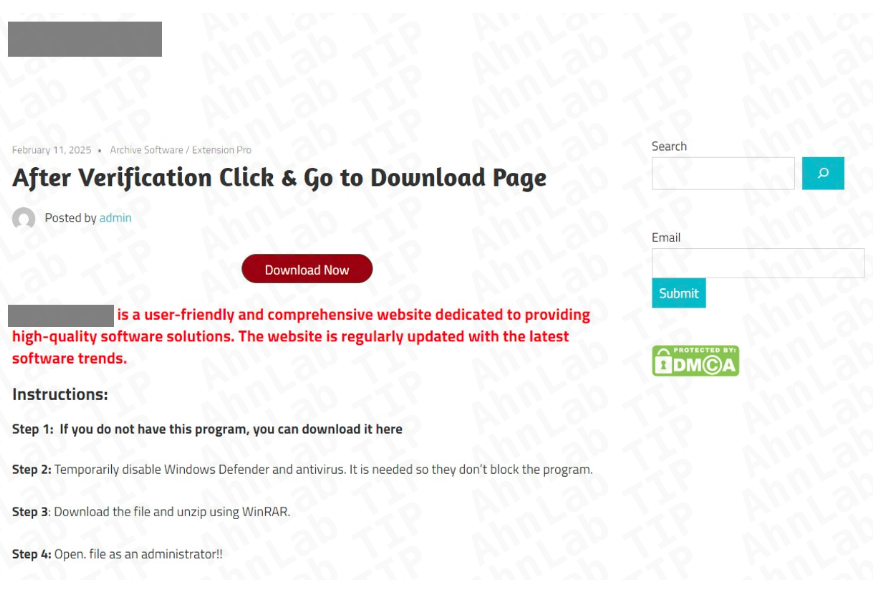
Attackers Create A Cloned Website Resembling The Official Notepad++ Download Page. These Sites Often Use Similar Domain Names And Professional Layouts To Appear Legitimate.
2. Trojanized Installer Download
The Victim Downloads What Appears To Be The Standard Notepad++ Installer. However, This File Contains Embedded Malicious Code.
3. Silent Proxyware Installation
While Installing The Visible Notepad++ Application (sometimes Even A Real Copy), The Installer Silently Deploys Proxyware Or Additional Malware Components In The Background.
4. Persistence Mechanisms
The Malicious Software Modifies System Settings, Registry Keys, Or Scheduled Tasks To Ensure It Runs Continuously—even After Reboot.
5. Remote Command & Control Communication
The Infected System Connects To Remote Servers Controlled By Attackers, Receiving Instructions And Routing Traffic Through The Victim’s Device.
This Layered Approach Ensures The Malware Remains Undetected While Leveraging User Trust In Legitimate Software.
Proxyware Turns A Victim’s Device Into A Traffic Relay. This Can Lead To Unusually High Data Usage, Slower Internet Speeds, And Potential ISP Warnings.
If Malicious Actors Use The Infected Proxy Node For Spam, Fraud, Scraping, Or Cyberattacks, The Victim’s IP Address May Become Blacklisted.
Unknown Third Parties May Route Traffic Through The User’s System, Increasing The Risk Of Surveillance, Tracking, And Data Exposure.
Businesses With Metered Internet Plans May Face Increased Operational Costs Due To Unexpected Bandwidth Consumption.
If Illegal Activities Are Traced Back To The Victim’s IP Address, The User May Experience Legal Scrutiny—even If They Are Unaware Of The Compromise.
One Common Distribution Method Is SEO Poisoning. Attackers Optimize Malicious Pages To Rank High In Search Engine Results For Terms Like:
“Download Notepad++ Free”
“Latest Notepad++ Installer”
“Notepad++ Official Download”
“Notepad++ Windows 11 Version”
Unsuspecting Users Who Click On Top Search Results May Land On Fraudulent Websites Instead Of Legitimate Sources. In Some Cases, Malicious Ads (malvertising) Are Displayed Above Organic Search Results, Increasing Click-through Rates For Compromised Downloads.
Cybercriminals Also Distribute Disguised Installers Via:
Torrent Sites
Cracked Software Forums
Phishing Emails
Discord Or Telegram Developer Groups
Software Aggregation Platforms
The Combination Of SEO Manipulation And Brand Impersonation Significantly Increases Infection Rates.
Malicious Proxyware Often Exhibits Several Technical Behaviors:
Background Service Execution
Obfuscated Executable Files
Encrypted Communication With Remote Servers
Registry Modifications For Persistence
Firewall Rule Changes
Randomized Process Names
Some Advanced Variants May Include Additional Payloads Such As:
Cryptocurrency Miners
Credential Stealers
Keyloggers
Remote Access Trojans (RATs)
Browser Hijackers
This Multi-function Approach Allows Attackers To Maximize Profitability From A Single Compromised System.
Detecting Proxyware-disguised Malware Can Be Difficult Because It Is Designed To Remain Hidden. However, Common Warning Signs Include:
Sudden Internet Slowdowns
High Unexplained Data Usage
Unknown Processes Running In Task Manager
Increased CPU Or Memory Usage
Firewall Alerts About Unusual Outbound Traffic
ISP Warnings Regarding Suspicious Network Activity
Advanced Users May Detect Abnormal Outbound Connections To Unfamiliar IP Addresses Using Network Monitoring Tools.
For Businesses, The Risks Extend Beyond Individual Devices. If A Corporate Workstation Becomes Infected:
The Company’s IP Reputation May Suffer
Sensitive Development Environments May Be Exposed
Network Segmentation Could Be Compromised
Incident Response Costs May Increase
Software Developers, In Particular, Are High-value Targets. If Attackers Infect A Developer’s Machine, They May Attempt To:
Steal Source Code
Access Private Repositories
Harvest API Keys Or Credentials
Inject Malicious Code Into Legitimate Projects
This Creates A Dangerous Supply Chain Risk, Where Compromised Developers Unintentionally Propagate Malware Further.
Always Verify The Domain Before Downloading Software. Avoid Clicking On Sponsored Search Results Unless You Confirm Authenticity.
Check That The Installer’s Digital Signature Matches The Legitimate Publisher.
Modern Antivirus And Endpoint Detection Tools Can Identify Suspicious Behavior, Even If The Installer Appears Legitimate.
Monitor Outbound Traffic And Investigate Unusual Data Flows.
Avoid Running Installers With Unnecessary Administrative Privileges.
Organizations Should Use Secure DNS Filtering Solutions To Block Known Malicious Domains.
Security Awareness Training Reduces The Likelihood Of Employees Downloading Software From Suspicious Sources.
If You Suspect Infection:
Disconnect From The Internet Immediately.
Run A Full System Scan Using Reputable Security Software.
Check Installed Programs For Unfamiliar Entries.
Remove Suspicious Scheduled Tasks Or Services.
Reset Compromised Passwords.
Monitor IP Reputation Status.
In Severe Cases, Consider A Full System Reinstall.
For Businesses, It Is Essential To Conduct A Full Forensic Investigation To Determine The Scope Of Compromise.
Notepad++ Is Not The Only Target. Cybercriminals Frequently Impersonate:
Popular Browsers
Developer IDEs
VPN Software
PDF Readers
System Utilities
This Broader Tactic Reflects A Strategic Shift Toward Exploiting Brand Trust Rather Than Relying Solely On Phishing Emails. Software Impersonation Attacks Are Effective Because They Target User Intent—individuals Actively Seeking Legitimate Tools.
Several Factors Contribute To The Rise In Proxyware-based Malware:
Growing Demand For Residential IP Addresses
Increased Monetization Opportunities
Lower Detection Rates Compared To Ransomware
Ability To Operate Quietly For Extended Periods
Unlike Ransomware, Which Is Loud And Immediate, Proxyware Infections Can Remain Unnoticed For Months, Generating Continuous Revenue For Attackers.
Legitimate Proxy Networks Require Transparent User Consent. Ethical Proxy Services Compensate Users And Clearly Disclose How Traffic Will Be Used. Malicious Proxyware, However, Removes User Control Entirely.
Organizations Must Ensure Compliance With Data Protection Laws And Cybersecurity Regulations. If A Compromised System Participates In Unlawful Activity, It May Trigger Regulatory Investigations, Especially In Industries With Strict Data Governance Standards.
As Cybersecurity Defenses Improve, Attackers Adapt. Future Proxyware-disguised Malware May Incorporate:
AI-generated Phishing Websites
More Convincing Cloned Download Portals
Fileless Malware Techniques
Advanced Evasion Against Sandbox Detection
Supply Chain Infiltration Targeting Open-source Ecosystems
The Sophistication Of These Campaigns Will Likely Increase, Making Proactive Defense Strategies More Important Than Ever.
Proxyware/Notepad++-disguised Malware Represents A Powerful Example Of Modern Cyber Deception. By Exploiting Trust In Well-known Software, Attackers Gain Access To User Systems Without Raising Immediate Suspicion. Once Installed, Malicious Proxyware Can Consume Bandwidth, Damage IP Reputation, And Expose Victims To Legal And Financial Risks.
The Best Defense Remains Vigilance. Users Must Download Software Only From Verified Sources, Monitor System Behavior Regularly, And Maintain Updated Security Tools. Businesses Should Implement Layered Security Controls, Educate Employees, And Monitor Network Traffic For Anomalies.
Cybersecurity Is No Longer Just About Avoiding Suspicious Emails—it Now Includes Verifying Every Software Download, Even Those That Appear Familiar And Trustworthy. In An Era Where Even Trusted Tools Can Be Weaponized Through Impersonation, Informed Caution Is The Most Powerful Safeguard.
Step 1: Boot Into Safe Mode
Restart Your PC And Press F8 (or Shift + F8 For Some Systems) Before Windows Loads.
Choose Safe Mode With Networking.
Safe Mode Prevents Most Malware From Loading.
Press Win + R, Type appwiz.cpl, And Press Enter.
Sort By Install Date And Uninstall Unknown Or Recently Added Programs.
Use A Trusted Anti-malware Tool:
Malwarebytes – https://www.malwarebytes.com
Screenshot Of Malwarebytes - Visit Links
Microsoft Defender – Built Into Windows 10/11
HitmanPro, ESET Online Scanner, Or Kaspersky Virus Removal Tool
ZoneAlarm Pro Antivirus + Firewall NextGen
VIPRE Antivirus - US And Others Countries, | India
Run A Full Scan And Delete/quarantine Detected Threats.
Win + R, Type temp → Delete All Files.Press Win + R, Type %temp% → Delete All Files.
Use Disk Cleanup: cleanmgr In The Run Dialog.
Go To: C:\Windows\System32\drivers\etc
Open hosts File With Notepad.
Replace With Default Content:
Press Ctrl + Shift + Esc → Open Task Manager
Go To Startup Tab
Disable Any Suspicious Entries.
Open Command Prompt As Administrator.
Run These Commands:
netsh Winsock Reset

netsh Int Ip Reset

ipconfig /flushdns
Unwanted Homepage Or Search Engine
Pop-ups Or Redirects
Unknown Extensions Installed
For Chrome:
Go To: chrome://extensions/
Remove Anything Unfamiliar
For Firefox:
Go To: about:addons → Extensions
Remove Suspicious Add-ons
For Edge:
Go To: edge://extensions/
Uninstall Unknown Add-ons
Chrome:
Go To chrome://settings/reset → "Restore Settings To Their Original Defaults"
Firefox:
Go To about:support → "Refresh Firefox"
Edge:
Go To edge://settings/resetProfileSettings → "Reset Settings"
All Browsers:
Use Ctrl + Shift + Del → Select All Time
Clear Cookies, Cached Files, And Site Data
Make Sure They Are Not Hijacked.
Chrome: chrome://settings/search
Firefox: about:preferences#search
Edge: edge://settings/search
Chrome: chrome://settings/cleanup
Use Malwarebytes Browser Guard For Real-time Browser Protection.
Always Download Software From Trusted Sources.
Keep Windows, Browsers, And Antivirus Updated.
Avoid Clicking Suspicious Links Or Ads.
Use ad Blockers And reputable Antivirus Software.
Backup Your Files Regularly.
To Remove Malware From Your Windows PC, Start By Booting Into Safe Mode, Uninstalling Suspicious Programs, And Scanning With Trusted Anti-malware Tools Like Malwarebytes. Clear Temporary Files, Reset Your Network Settings, And Check Startup Apps For Anything Unusual.
For web Browsers, Remove Unwanted Extensions, Reset Browser Settings, Clear Cache And Cookies, And Ensure Your Homepage And Search Engine Haven’t Been Hijacked. Use Cleanup Tools Like Chrome Cleanup Or Browser Guard For Added Protection.
?? Prevention Tips: Keep Software Updated, Avoid Suspicious Downloads, And Use Antivirus Protection Plus Browser Ad Blockers. Regular Backups Are Essential.
Why It Matters: Not All VPNs Offer Malware Protection.
What To Look For: Providers With built-in Malware/ad/tracker Blockers (e.g., NordVPN’s Threat Protection, ProtonVPN’s NetShield).
Purpose: Prevents Data Leaks If Your VPN Connection Drops.
Benefit: Ensures Your Real IP And Browsing Activity Aren’t Exposed To Malware-distributing Websites.
Why It Matters: DNS Leaks Can Expose Your Online Activity To Attackers.
Solution: Enable DNS Leak Protection In Your VPN Settings Or Use A Secure DNS Like Cloudflare (1.1.1.1).
Risk: Free VPNs Often Contain Malware, Sell User Data, Or Lack Security Features.
Better Option: Use Reputable Paid VPNs That Offer security Audits And Transparent Privacy Policies.
Some VPNs Block Known Phishing And Malicious Sites.
Example: Surfshark’s CleanWeb, CyberGhost’s Content Blocker.
Reason: Security Patches Fix Known Vulnerabilities.
Tip: Enable Auto-updates Or Check For Updates Weekly.
Scope: Malware Can Enter Through Phones, Tablets, Or IoT Devices.
Solution: Install VPN Apps On Every Internet-connected Device.
Fact: VPNs Do Not Remove Or Detect Malware On Your System.
Complement It With:
Antivirus Software
Firewall
Browser Extensions For Script Blocking
VPN Encrypts Traffic But Can’t Stop Malware From Executing If You Download Infected Files.
Split Tunneling Allows Certain Apps/sites To Bypass VPN.
Tip: Never Exclude Browsers, Email Clients, Or Download Managers From VPN Tunneling.
A VPN (Virtual Private Network) Enhances Your Online Privacy By Encrypting Your Internet Traffic And Masking Your IP Address. It Protects Your Data On Public Wi-Fi, Hides Browsing Activity From Hackers And ISPs, And Helps Bypass Geo-restrictions. VPNs Also Add A Layer Of Defense Against Malware By Blocking Malicious Websites And Trackers When Using Advanced Features. However, A VPN Does Not Remove Existing Malware Or Act As Antivirus Software. For Full Protection, Combine VPN Use With Antivirus Tools, Regular Software Updates, And Cautious Browsing Habits. Always Choose A Reputable VPN Provider With Strong Security And Privacy Policies.
Proxyware / Notepad++-Disguised Malware, Delete Proxyware / Notepad++-Disguised Malware, How To Uninstall Proxyware-Notepad++-Disguised Malware











