 Blog's Page
 Blog's Page
Panchan Is A Peer-to-peer (P2P) Cryptocurrency Mining Botnet That Primarily Targets Linux-based Systems. First Identified In 2022, Panchan Is Written In The Go (Golang) Programming Language And Is Designed To Compromise Cloud Servers, Virtual Private Servers (VPS), Internet-facing Linux Hosts, And Containerized Environments. Unlike Traditional Botnets That Primarily Conduct Distributed Denial-of-Service (DDoS) Attacks, Panchan Focuses On Unauthorized Cryptocurrency Mining While Maintaining Persistent Access To Compromised Systems.
The Botnet Is Notable For Combining Decentralized Peer-to-peer Communication With Traditional Command-and-control (C2) Mechanisms, Allowing Infected Hosts To Exchange Commands And Updates Without Relying Solely On Centralized Infrastructure. This Hybrid Communication Model Increases The Resilience Of The Botnet Against Takedown Efforts.
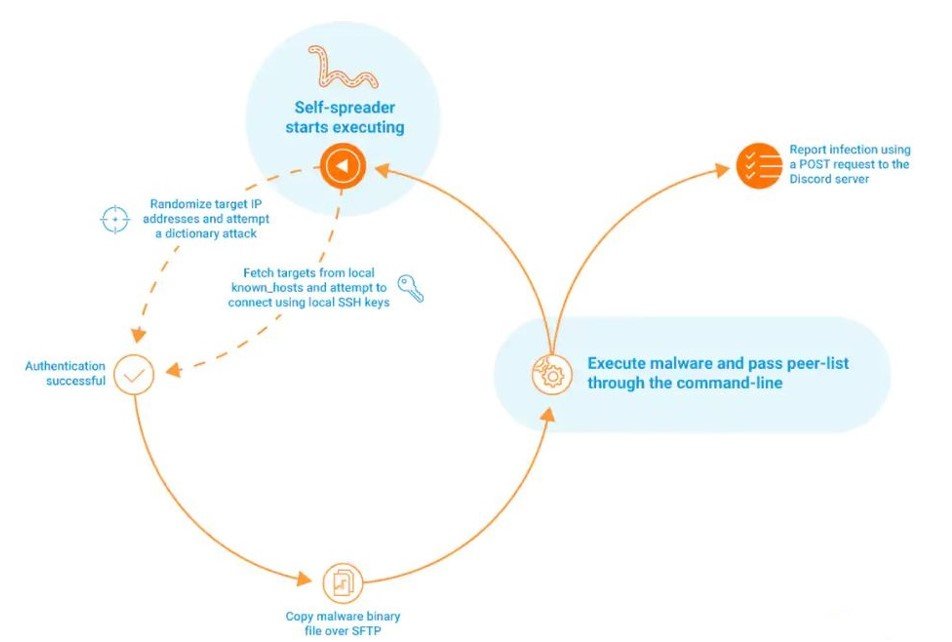
Panchan Exploits Publicly Known Vulnerabilities And Weak Credentials To Gain Initial Access To Linux Systems. Once Installed, It Deploys Cryptocurrency Mining Software, Establishes Persistence, Disables Competing Malware, And Attempts To Propagate Laterally By Scanning For Additional Vulnerable Systems.
Panchan Primarily Targets:
Linux Servers
Cloud-hosted Virtual Machines
Docker Containers
Kubernetes Environments
Internet-facing Web Servers
VPS Infrastructure
Development Servers
Misconfigured SSH Services
Industries Relying Heavily On Cloud Computing, Web Hosting, And Linux Infrastructure Are Particularly Vulnerable.
Panchan Follows A Multi-stage Infection Process.
Threat Actors Exploit Publicly Disclosed Vulnerabilities Affecting Linux Services And Internet-facing Applications. Systems Running Outdated Software Or Weak Administrative Credentials Are Especially Susceptible.
Common Attack Vectors Include:
Exploitation Of Remote Code Execution (RCE) Vulnerabilities
Weak Or Default SSH Credentials
Misconfigured Docker APIs
Vulnerable Web Applications
Exposed Management Interfaces
After Gaining Access, Panchan Downloads Additional Malware Components From Attacker-controlled Infrastructure.
The Downloaded Payload Typically Includes:
Cryptocurrency Mining Software
Peer-to-peer Communication Modules
Persistence Scripts
Propagation Tools
Network Scanning Utilities
To Survive System Reboots, Panchan Creates Persistence Mechanisms Using Linux Startup Services Such As:
Systemd Services
Cron Jobs
Startup Scripts
Background Daemon Processes
The Malware Also Renames Itself To Resemble Legitimate System Processes, Making Detection More Difficult.
Unlike Conventional Malware That Depends Entirely On Centralized C2 Servers, Panchan Establishes Encrypted Peer-to-peer Communications Between Infected Hosts.
This Architecture Allows Compromised Systems To:
Share Updates
Exchange Peer Information
Receive Commands
Continue Operating Even If Central Servers Become Unavailable
Once Active, Panchan Performs Several Malicious Operations.
The Botnet Installs Cryptocurrency Mining Software That Consumes System Resources To Mine Digital Currencies Such As Monero (XMR). Monero Is Commonly Selected Due To Its Privacy Features And Compatibility With CPU-based Mining.
Mining Operations Result In:
High CPU Utilization
Increased Electricity Consumption
Reduced Application Performance
Hardware Overheating
Premature Hardware Degradation
Panchan Continuously Exchanges Peer Information With Other Infected Systems.
Each Infected Host Maintains A List Of Active Peers And Periodically Updates This Information.
This Decentralized Communication Increases Resilience And Complicates Disruption Efforts.
The Malware Actively Searches For Additional Vulnerable Linux Systems.
Propagation Techniques Include:
SSH Brute-force Attacks
Exploitation Of Known Vulnerabilities
Network Scanning
Lateral Movement Within Compromised Environments
Successful Exploitation Enables Rapid Expansion Of The Botnet.
Instead Of Stealing User Information Directly, Panchan Focuses On Hijacking Computing Resources.
Compromised Systems Contribute CPU Cycles To Cryptocurrency Mining Operations Controlled By The Attacker.
Cloud Infrastructure Is Especially Attractive Because Compromised Cloud Instances Often Provide Substantial Processing Power.
One Distinctive Feature Of Panchan Is Its Ability To Remove Competing Malware.
The Botnet Terminates Rival Cryptocurrency Miners And Deletes Competing Malware Files To Maximize Available System Resources.
This Behavior Allows Attackers To Obtain Exclusive Control Over Infected Devices.
Panchan Employs Multiple Techniques To Evade Detection, Including:
Process Masquerading
Randomized File Names
Encrypted Communications
Fileless Execution Where Possible
Hidden Background Processes
These Techniques Complicate Forensic Investigations And Delay Detection.
A Successful Panchan Infection Can Have Significant Operational And Financial Consequences.
Potential Impacts Include:
Cryptocurrency Mining Consumes Substantial CPU And Memory Resources, Reducing System Performance And Affecting Business-critical Services.
Continuous Mining Increases Electricity Consumption And Cloud Computing Costs.
Organizations Operating Cloud Infrastructure May Experience Unexpectedly High Monthly Billing.
Excessive Processor Utilization May Cause:
Slow Application Performance
Service Outages
Server Crashes
Reduced Availability
Compromised Systems May Serve As Staging Points For Additional Attacks.
Attackers Can Leverage Infected Hosts For:
Internal Reconnaissance
Lateral Movement
Malware Deployment
Further Exploitation
Although Panchan Primarily Mines Cryptocurrency, Compromised Devices Remain Under Attacker Control And May Be Repurposed For Other Malicious Activities.
Administrators Should Investigate Systems Exhibiting The Following Indicators:
Unusually High CPU Utilization
Unexpected Cryptocurrency Mining Processes
Unknown Go (Golang) Executables
Persistent Outbound Connections To Unknown Peers
Unauthorized Cron Jobs
Suspicious Systemd Services
Excessive SSH Authentication Attempts
Unexpected Network Scanning Activity
High Outbound Bandwidth Usage
Unknown Background Processes Consuming Processor Resources.
Organizations Should Continuously Monitor For:
Abnormal Processor Utilization
Cryptocurrency Mining Signatures
Unauthorized Scheduled Tasks
Unexpected Outbound Peer-to-peer Traffic
Unauthorized Process Creation
Changes To Linux Startup Services
Suspicious SSH Login Attempts
Endpoint Detection And Response (EDR) Solutions Can Assist In Identifying Abnormal System Behavior Associated With Cryptocurrency Mining Malware.
Organizations Should Adopt A Layered Security Approach To Defend Against Panchan Infections.
Apply Security Updates Promptly.
Regularly Patch Linux Operating Systems.
Update Third-party Applications And Libraries.
Remediate Publicly Disclosed Vulnerabilities Without Delay.
Disable Password-based SSH Authentication Whenever Possible.
Implement SSH Key-based Authentication.
Restrict SSH Access Using Firewalls.
Enable Multi-factor Authentication (MFA) For Administrative Accounts.
Disable Unnecessary Internet Exposure.
Restrict Administrative Interfaces.
Secure Docker And Kubernetes Management Ports.
Follow Cloud Security Best Practices.
Deploy Firewalls To Limit Unnecessary Inbound Traffic.
Segment Critical Systems From Public-facing Infrastructure.
Monitor Peer-to-peer Network Communications.
Block Unauthorized Outbound Connections Where Feasible.
Deploy Endpoint Detection And Response (EDR) Solutions.
Enable Anti-malware Protection On Linux Systems.
Monitor System Resource Utilization.
Detect Unauthorized Cryptocurrency Mining Software.
Restrict Administrative Privileges.
Limit Service Account Permissions.
Remove Unnecessary Software Packages.
Disable Unused Services.
Monitor CPU And Memory Usage.
Review Authentication Logs Regularly.
Detect Unusual Outbound Connections.
Investigate Unexpected Scheduled Tasks And Startup Services.
Maintain Secure Offline Backups.
Test Disaster Recovery Procedures Regularly.
Develop Incident Response Plans For Malware Infections.
Train Administrators To Recognize Signs Of Compromise.
Educate Users On Secure Credential Management.
Promote Timely Reporting Of Suspicious System Behavior.
Panchan Represents A Sophisticated Linux-based Cryptocurrency Mining Botnet That Combines Peer-to-peer Communication, Automated Propagation, Persistence, And Resource Hijacking. Its Decentralized Architecture Makes Disruption More Challenging Than Traditional Botnets, While Its Focus On Cloud Infrastructure And Linux Servers Poses A Significant Risk To Enterprises Relying On Internet-facing Systems.
Organizations Should Adopt A Defense-in-depth Strategy That Includes Timely Patch Management, Secure Configuration Of Linux And Cloud Environments, Continuous Monitoring, Strong Authentication Controls, And Endpoint Protection. Regular Vulnerability Assessments, Network Segmentation, And Proactive Threat Detection Are Essential To Reducing The Risk Posed By Panchan And Other Evolving Linux Malware Campaigns.
Step 1: Boot Into Safe Mode
Restart Your PC And Press F8 (or Shift + F8 For Some Systems) Before Windows Loads.
Choose Safe Mode With Networking.
Safe Mode Prevents Most Malware From Loading.
Press Win + R, Type appwiz.cpl, And Press Enter.
Sort By Install Date And Uninstall Unknown Or Recently Added Programs.
Use A Trusted Anti-malware Tool:
Malwarebytes – https://www.malwarebytes.com
Screenshot Of Malwarebytes - Visit Links
Microsoft Defender – Built Into Windows 10/11
HitmanPro, ESET Online Scanner, Or Kaspersky Virus Removal Tool
ZoneAlarm Pro Antivirus + Firewall NextGen
VIPRE Antivirus - US And Others Countries, | India
Run A Full Scan And Delete/quarantine Detected Threats.
Win + R, Type temp → Delete All Files.Press Win + R, Type %temp% → Delete All Files.
Use Disk Cleanup: cleanmgr In The Run Dialog.
Go To: C:\Windows\System32\drivers\etc
Open hosts File With Notepad.
Replace With Default Content:
Press Ctrl + Shift + Esc → Open Task Manager
Go To Startup Tab
Disable Any Suspicious Entries.
Open Command Prompt As Administrator.
Run These Commands:
netsh Winsock Reset

netsh Int Ip Reset

ipconfig /flushdns
Unwanted Homepage Or Search Engine
Pop-ups Or Redirects
Unknown Extensions Installed
For Chrome:
Go To: chrome://extensions/
Remove Anything Unfamiliar
For Firefox:
Go To: about:addons → Extensions
Remove Suspicious Add-ons
For Edge:
Go To: edge://extensions/
Uninstall Unknown Add-ons
Chrome:
Go To chrome://settings/reset → "Restore Settings To Their Original Defaults"
Firefox:
Go To about:support → "Refresh Firefox"
Edge:
Go To edge://settings/resetProfileSettings → "Reset Settings"
All Browsers:
Use Ctrl + Shift + Del → Select All Time
Clear Cookies, Cached Files, And Site Data
Make Sure They Are Not Hijacked.
Chrome: chrome://settings/search
Firefox: about:preferences#search
Edge: edge://settings/search
Chrome: chrome://settings/cleanup
Use Malwarebytes Browser Guard For Real-time Browser Protection.
Always Download Software From Trusted Sources.
Keep Windows, Browsers, And Antivirus Updated.
Avoid Clicking Suspicious Links Or Ads.
Use ad Blockers And reputable Antivirus Software.
Backup Your Files Regularly.
To Remove Malware From Your Windows PC, Start By Booting Into Safe Mode, Uninstalling Suspicious Programs, And Scanning With Trusted Anti-malware Tools Like Malwarebytes. Clear Temporary Files, Reset Your Network Settings, And Check Startup Apps For Anything Unusual.
For web Browsers, Remove Unwanted Extensions, Reset Browser Settings, Clear Cache And Cookies, And Ensure Your Homepage And Search Engine Haven’t Been Hijacked. Use Cleanup Tools Like Chrome Cleanup Or Browser Guard For Added Protection.
?? Prevention Tips: Keep Software Updated, Avoid Suspicious Downloads, And Use Antivirus Protection Plus Browser Ad Blockers. Regular Backups Are Essential.
Why It Matters: Not All VPNs Offer Malware Protection.
What To Look For: Providers With built-in Malware/ad/tracker Blockers (e.g., NordVPN’s Threat Protection, ProtonVPN’s NetShield).
Purpose: Prevents Data Leaks If Your VPN Connection Drops.
Benefit: Ensures Your Real IP And Browsing Activity Aren’t Exposed To Malware-distributing Websites.
Why It Matters: DNS Leaks Can Expose Your Online Activity To Attackers.
Solution: Enable DNS Leak Protection In Your VPN Settings Or Use A Secure DNS Like Cloudflare (1.1.1.1).
Risk: Free VPNs Often Contain Malware, Sell User Data, Or Lack Security Features.
Better Option: Use Reputable Paid VPNs That Offer security Audits And Transparent Privacy Policies.
Some VPNs Block Known Phishing And Malicious Sites.
Example: Surfshark’s CleanWeb, CyberGhost’s Content Blocker.
Reason: Security Patches Fix Known Vulnerabilities.
Tip: Enable Auto-updates Or Check For Updates Weekly.
Scope: Malware Can Enter Through Phones, Tablets, Or IoT Devices.
Solution: Install VPN Apps On Every Internet-connected Device.
Fact: VPNs Do Not Remove Or Detect Malware On Your System.
Complement It With:
Antivirus Software
Firewall
Browser Extensions For Script Blocking
VPN Encrypts Traffic But Can’t Stop Malware From Executing If You Download Infected Files.
Split Tunneling Allows Certain Apps/sites To Bypass VPN.
Tip: Never Exclude Browsers, Email Clients, Or Download Managers From VPN Tunneling.
A VPN (Virtual Private Network) Enhances Your Online Privacy By Encrypting Your Internet Traffic And Masking Your IP Address. It Protects Your Data On Public Wi-Fi, Hides Browsing Activity From Hackers And ISPs, And Helps Bypass Geo-restrictions. VPNs Also Add A Layer Of Defense Against Malware By Blocking Malicious Websites And Trackers When Using Advanced Features. However, A VPN Does Not Remove Existing Malware Or Act As Antivirus Software. For Full Protection, Combine VPN Use With Antivirus Tools, Regular Software Updates, And Cautious Browsing Habits. Always Choose A Reputable VPN Provider With Strong Security And Privacy Policies.
Panchan Botnet, Fix The Panchan Botnet, Delete Panchan Botnet, Remove Panchan Botnet, Get Rid Of Panchan Botnet, Panchan Botnet Removal











