 Blog's Page
 Blog's Page
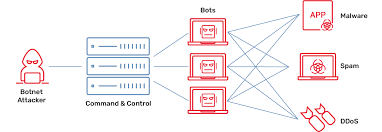
The Rapid Growth Of Internet Of Things (IoT) Devices Has Transformed Homes, Businesses, And Industries Around The World. From Smart Cameras And Routers To Connected Appliances And Industrial Systems, IoT Technology Has Improved Convenience And Efficiency. However, This Massive Expansion Has Also Created New Cybersecurity Risks. One Of The Most Dangerous Threats To Emerge In Recent Years Is The IoT Reaper Botnet, Also Known As IoTroop.
IoT Reaper Gained Global Attention Because Of Its Advanced Capabilities And Ability To Infect Thousands Of Vulnerable Devices Connected To The Internet. Unlike Traditional Malware, IoT Reaper Targets Weakly Secured IoT Systems And Uses Them To Build A Powerful Network Of Infected Devices Called A Botnet. Cybercriminals Can Then Use This Botnet To Launch Cyberattacks, Distribute Malware, Or Disrupt Online Services.
In This Article, We Will Explore What The IoT Reaper Botnet Is, How It Works, How It Differs From The Mirai Botnet, Its Impact On Cybersecurity, And The Best Ways To Protect IoT Devices From Infection.
IoT Reaper, Also Referred To As IoTroop, Is A Sophisticated IoT-based Botnet Malware First Discovered In 2017. Security Researchers Identified The Malware After Observing Unusual Internet Scanning Activity Targeting Vulnerable IoT Devices Worldwide.
The Botnet Mainly Infects Internet-connected Devices Such As:
Wireless Routers
IP Cameras
Network Video Recorders (NVRs)
Smart Home Devices
Digital Video Recorders (DVRs)
Embedded Linux Systems
The Primary Objective Of IoT Reaper Is To Recruit Vulnerable Devices Into A Centralized Botnet Network. Once Infected, Devices Can Be Remotely Controlled By Attackers To Perform Malicious Activities.
What Made IoT Reaper Especially Dangerous Was Its Ability To Exploit Known Software Vulnerabilities Rather Than Relying Solely On Default Usernames And Passwords. This Approach Allowed The Malware To Spread More Effectively And Infect Devices That Were Not Properly Updated.
The IoT Reaper Botnet Follows A Multi-stage Infection Process Designed To Compromise Vulnerable Devices And Connect Them To Command-and-control Servers.
The Malware Continuously Scans The Internet For IoT Devices With Known Security Vulnerabilities. It Searches For Outdated Firmware Versions And Exposed Services.
Unlike Simpler Botnets, IoT Reaper Uses Exploit-based Attacks To Gain Access To Devices. It Targets Vulnerabilities In Manufacturers’ Firmware And Software Components.
Some Affected Vendors Included:
D-Link
Netgear
Linksys
TP-Link
AVTECH
MikroTik
By Exploiting These Flaws, Attackers Can Remotely Execute Malicious Code On Vulnerable Systems.
Once Access Is Gained, The Malware Downloads Additional Malicious Scripts And Binaries Onto The Device. These Files Allow The Attacker To Maintain Persistent Control.
After Infection, The Device Connects To A Command-and-control (C2) Server. The Infected Device Becomes Part Of The Larger Botnet Network.
The Attackers Can Issue Commands To All Infected Devices Simultaneously. These Devices Can Then Participate In:
Distributed Denial-of-Service (DDoS) Attacks
Network Scanning
Malware Distribution
Credential Theft
Traffic Flooding
IoT Reaper Is Often Compared To The Infamous Mirai Botnet Because Both Target IoT Devices. However, There Are Major Differences Between The Two Malware Families.
| Feature | Mirai Botnet | IoT Reaper Botnet |
|---|---|---|
| Infection Method | Default Passwords | Software Exploits |
| Complexity | Basic | Advanced |
| Persistence | Limited | More Persistent |
| Attack Capability | DDoS-focused | Multi-functional |
| Propagation | Credential Brute-force | Vulnerability Exploitation |
Mirai Primarily Relied On Weak Or Factory-default Credentials To Infect Devices. IoT Reaper, On The Other Hand, Used Actual Software Vulnerabilities, Making It More Sophisticated And Harder To Stop.
This Evolution Highlighted A Growing Trend In Cybercrime Where Attackers Increasingly Target Unpatched IoT Systems Instead Of Relying Only On Poor Password Practices.
IoT Reaper Poses A Serious Threat Because Of The Enormous Number Of Vulnerable IoT Devices Connected To The Internet.
Millions Of IoT Devices Worldwide Lack Proper Security Updates. A Large-scale IoT Botnet Can Generate Enormous Internet Traffic During Cyberattacks.
Many IoT Devices Operate Silently In The Background Without Regular Monitoring. Users Often Do Not Notice Infections Until Performance Issues Occur.
Many Manufacturers Prioritize Convenience And Low Cost Over Cybersecurity. As A Result, Devices May Contain Outdated Firmware And Weak Protections.
IoT Reaper Can Launch Devastating DDoS Attacks Capable Of Disrupting Websites, Online Services, Cloud Platforms, And Business Operations.
Infected Devices Can Also Be Used For Broader Cybercriminal Activities, Including Malware Delivery And Network Infiltration.
Detecting IoT Malware Can Be Challenging, But Several Warning Signs May Indicate Compromise.
A Sudden Increase In Network Activity Could Indicate That Your Device Is Communicating With Malicious Servers.
Infected Devices May Become Sluggish Or Unstable Due To Malware Processes Running In The Background.
Unexpected Device Behavior Can Signal Malware Infection.
Attackers May Alter Device Settings, DNS Configurations, Or Network Permissions.
Botnet Activity Can Force Devices To Use Excessive Processing Power, Causing Overheating.
Preventing IoT Botnet Infections Requires Proactive Cybersecurity Practices.
Always Install Firmware And Software Updates From Device Manufacturers. Updates Often Contain Security Patches For Known Vulnerabilities.
Use Strong And Unique Passwords For Every IoT Device.
Turn Off Unnecessary Remote Access Features And Open Ports.
Protect Your Home Or Business Network With Firewalls, WPA3 Encryption, And Secure Router Configurations.
Regularly Check Network Traffic For Suspicious Behavior.
Place IoT Devices On A Separate Network Or VLAN To Reduce The Risk Of Lateral Movement During Attacks.
Choose Brands That Provide Regular Security Updates And Long-term Support.
As IoT Adoption Continues To Grow, Botnet Threats Are Expected To Become More Advanced. Cybercriminals Constantly Search For New Vulnerabilities In Connected Devices.
Emerging Technologies Such As Smart Cities, Connected Healthcare Devices, Industrial IoT Systems, And Autonomous Vehicles Could Become Future Targets If Proper Security Measures Are Not Implemented.
Artificial Intelligence And Automation May Also Increase The Sophistication Of Future Botnets, Allowing Malware To Spread Faster And Evade Detection.
Governments, Cybersecurity Organizations, And Technology Companies Are Increasingly Emphasizing Stronger IoT Security Regulations And Standards. However, User Awareness And Responsible Device Management Remain Critical Defenses.
The IoT Reaper (IoTroop) Botnet Represents A Major Evolution In IoT Cyber Threats. By Exploiting Software Vulnerabilities In Internet-connected Devices, This Malware Demonstrated How Insecure IoT Ecosystems Can Be Weaponized For Large-scale Cyberattacks.
Unlike Earlier Botnets That Relied Mainly On Weak Passwords, IoT Reaper Introduced More Sophisticated Exploit-based Infection Methods. This Shift Highlighted The Urgent Need For Stronger Cybersecurity Practices Across The IoT Industry.
Protecting IoT Devices Requires A Combination Of Firmware Updates, Strong Passwords, Secure Network Configurations, And Ongoing Monitoring. As The Number Of Connected Devices Continues To Rise Globally, Cybersecurity Awareness Will Play A Critical Role In Preventing Future Botnet Attacks.
Organizations And Individuals Alike Must Take IoT Security Seriously To Reduce The Risks Posed By Evolving Threats Such As IoT Reaper.
Step 1: Boot Into Safe Mode
Restart Your PC And Press F8 (or Shift + F8 For Some Systems) Before Windows Loads.
Choose Safe Mode With Networking.
Safe Mode Prevents Most Malware From Loading.
Press Win + R, Type appwiz.cpl, And Press Enter.
Sort By Install Date And Uninstall Unknown Or Recently Added Programs.
Use A Trusted Anti-malware Tool:
Malwarebytes – https://www.malwarebytes.com
Screenshot Of Malwarebytes - Visit Links
Microsoft Defender – Built Into Windows 10/11
HitmanPro, ESET Online Scanner, Or Kaspersky Virus Removal Tool
ZoneAlarm Pro Antivirus + Firewall NextGen
VIPRE Antivirus - US And Others Countries, | India
Run A Full Scan And Delete/quarantine Detected Threats.
Win + R, Type temp → Delete All Files.Press Win + R, Type %temp% → Delete All Files.
Use Disk Cleanup: cleanmgr In The Run Dialog.
Go To: C:\Windows\System32\drivers\etc
Open hosts File With Notepad.
Replace With Default Content:
Press Ctrl + Shift + Esc → Open Task Manager
Go To Startup Tab
Disable Any Suspicious Entries.
Open Command Prompt As Administrator.
Run These Commands:
netsh Winsock Reset

netsh Int Ip Reset

ipconfig /flushdns
Unwanted Homepage Or Search Engine
Pop-ups Or Redirects
Unknown Extensions Installed
For Chrome:
Go To: chrome://extensions/
Remove Anything Unfamiliar
For Firefox:
Go To: about:addons → Extensions
Remove Suspicious Add-ons
For Edge:
Go To: edge://extensions/
Uninstall Unknown Add-ons
Chrome:
Go To chrome://settings/reset → "Restore Settings To Their Original Defaults"
Firefox:
Go To about:support → "Refresh Firefox"
Edge:
Go To edge://settings/resetProfileSettings → "Reset Settings"
All Browsers:
Use Ctrl + Shift + Del → Select All Time
Clear Cookies, Cached Files, And Site Data
Make Sure They Are Not Hijacked.
Chrome: chrome://settings/search
Firefox: about:preferences#search
Edge: edge://settings/search
Chrome: chrome://settings/cleanup
Use Malwarebytes Browser Guard For Real-time Browser Protection.
Always Download Software From Trusted Sources.
Keep Windows, Browsers, And Antivirus Updated.
Avoid Clicking Suspicious Links Or Ads.
Use ad Blockers And reputable Antivirus Software.
Backup Your Files Regularly.
To Remove Malware From Your Windows PC, Start By Booting Into Safe Mode, Uninstalling Suspicious Programs, And Scanning With Trusted Anti-malware Tools Like Malwarebytes. Clear Temporary Files, Reset Your Network Settings, And Check Startup Apps For Anything Unusual.
For web Browsers, Remove Unwanted Extensions, Reset Browser Settings, Clear Cache And Cookies, And Ensure Your Homepage And Search Engine Haven’t Been Hijacked. Use Cleanup Tools Like Chrome Cleanup Or Browser Guard For Added Protection.
?? Prevention Tips: Keep Software Updated, Avoid Suspicious Downloads, And Use Antivirus Protection Plus Browser Ad Blockers. Regular Backups Are Essential.
Why It Matters: Not All VPNs Offer Malware Protection.
What To Look For: Providers With built-in Malware/ad/tracker Blockers (e.g., NordVPN’s Threat Protection, ProtonVPN’s NetShield).
Purpose: Prevents Data Leaks If Your VPN Connection Drops.
Benefit: Ensures Your Real IP And Browsing Activity Aren’t Exposed To Malware-distributing Websites.
Why It Matters: DNS Leaks Can Expose Your Online Activity To Attackers.
Solution: Enable DNS Leak Protection In Your VPN Settings Or Use A Secure DNS Like Cloudflare (1.1.1.1).
Risk: Free VPNs Often Contain Malware, Sell User Data, Or Lack Security Features.
Better Option: Use Reputable Paid VPNs That Offer security Audits And Transparent Privacy Policies.
Some VPNs Block Known Phishing And Malicious Sites.
Example: Surfshark’s CleanWeb, CyberGhost’s Content Blocker.
Reason: Security Patches Fix Known Vulnerabilities.
Tip: Enable Auto-updates Or Check For Updates Weekly.
Scope: Malware Can Enter Through Phones, Tablets, Or IoT Devices.
Solution: Install VPN Apps On Every Internet-connected Device.
Fact: VPNs Do Not Remove Or Detect Malware On Your System.
Complement It With:
Antivirus Software
Firewall
Browser Extensions For Script Blocking
VPN Encrypts Traffic But Can’t Stop Malware From Executing If You Download Infected Files.
Split Tunneling Allows Certain Apps/sites To Bypass VPN.
Tip: Never Exclude Browsers, Email Clients, Or Download Managers From VPN Tunneling.
A VPN (Virtual Private Network) Enhances Your Online Privacy By Encrypting Your Internet Traffic And Masking Your IP Address. It Protects Your Data On Public Wi-Fi, Hides Browsing Activity From Hackers And ISPs, And Helps Bypass Geo-restrictions. VPNs Also Add A Layer Of Defense Against Malware By Blocking Malicious Websites And Trackers When Using Advanced Features. However, A VPN Does Not Remove Existing Malware Or Act As Antivirus Software. For Full Protection, Combine VPN Use With Antivirus Tools, Regular Software Updates, And Cautious Browsing Habits. Always Choose A Reputable VPN Provider With Strong Security And Privacy Policies.
IoT Reaper Botnet, IoTroop Malware, IoT Botnet Attack, IoT Cybersecurity, IoT Malware Protection, Mirai Vs IoT Reaper, IoT Security Threats, DDoS Botn











