 Blog's Page
 Blog's Page
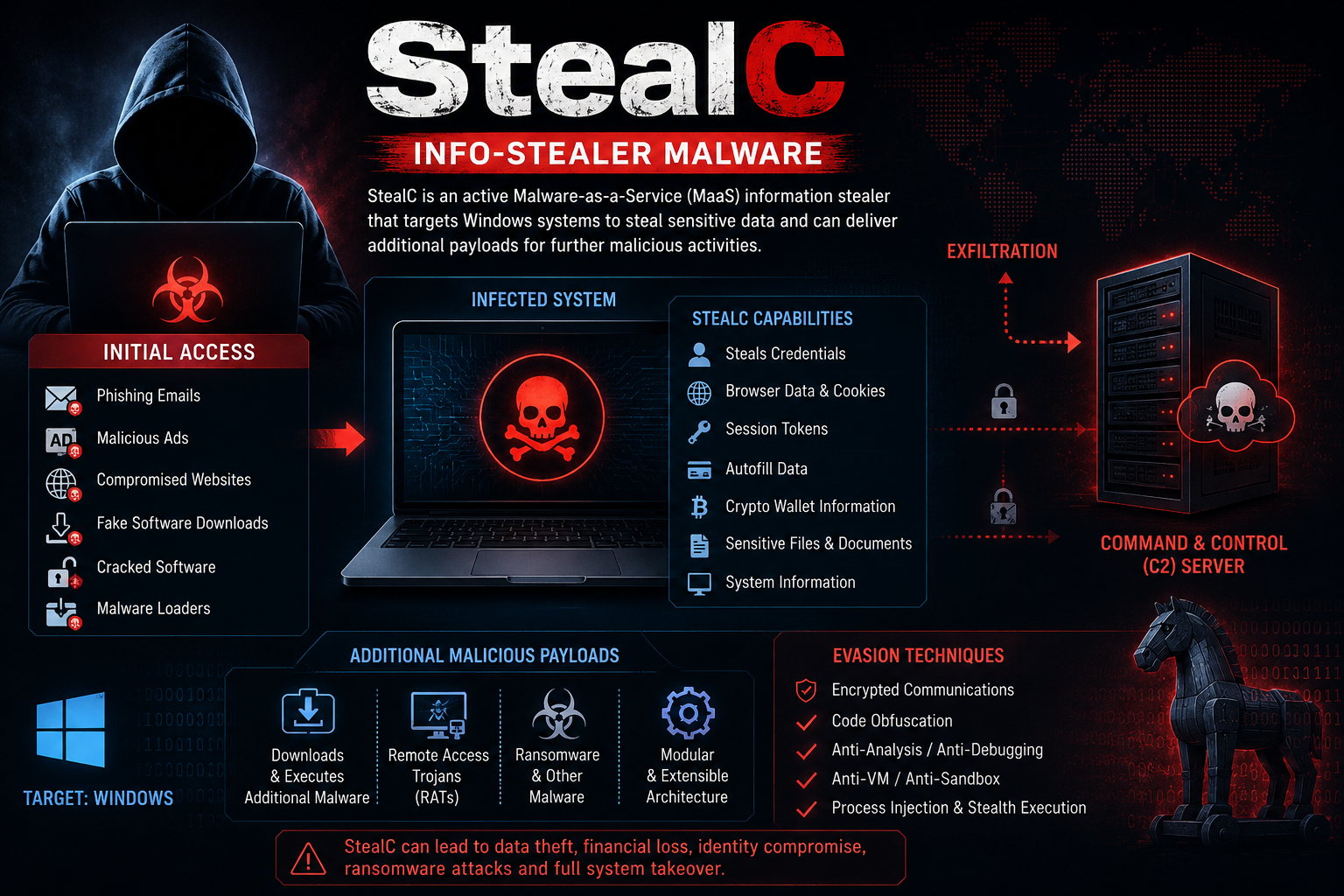
StealC Is A Sophisticated Malware-as-a-Service (MaaS) Information Stealer That Has Remained Actively Used By Cybercriminals Since Its Emergence In 2023. Primarily Targeting Microsoft Windows Systems, It Is Designed To Harvest A Wide Range Of Sensitive Information, Including User Credentials, Web Browser Cookies, Session And Authentication Tokens, Saved Autofill Data, Cryptocurrency Wallet Details, And Other Confidential Information Stored On Compromised Devices.
The Malware Has Undergone Continuous Development, Introducing Improved Stealth Techniques, Enhanced Evasion Mechanisms, And A Modular Architecture That Enables Operators To Expand Its Functionality.
Beyond Credential Theft, StealC Can Retrieve And Execute Additional Malicious Payloads From Command-and-control (C2) Servers, Allowing Attackers To Deploy Secondary Malware, Establish Persistent Remote Access, Or Deliver Ransomware. These Capabilities Make StealC A Highly Adaptable And Dangerous Cyber Threat That Can Serve As An Initial Access Vector For Larger, Multi-stage Cyberattacks.
Advisory
It Has Been Observed That StealC Is An Actively Distributed Malware-as-a-Service (MaaS) information-stealing Malware Targeting Microsoft Windows Systems. Since Its Emergence In 2023, The Malware Has Been Used By Multiple Threat Actors To Compromise Endpoints And Exfiltrate Sensitive Information From Infected Devices.
StealC Is Capable Of Collecting User Credentials, Web Browser Cookies, Saved Passwords, Authentication And Session Tokens, Autofill Information, Cryptocurrency Wallet Data, And Other Confidential Information Stored On The Victim's System. The Stolen Data Is Transmitted To Attacker-controlled Command-and-control (C2) Infrastructure, Enabling Unauthorized Access To User Accounts, Financial Assets, And Enterprise Resources.
Recent Variants Of StealC Demonstrate Enhanced Anti-analysis And Evasion Capabilities, Along With A Modular Architecture That Allows Operators To Extend Its Functionality. In Addition To Information Theft, The Malware Can Download And Execute Secondary Payloads, Facilitating The Deployment Of Remote Access Trojans (RATs), Additional Information Stealers, Cryptocurrency Miners, Or Ransomware.
As A Result, StealC May Serve As An Initial Access Vector For Multi-stage Cyber Intrusions, Increasing The Risk Of Data Breaches, Financial Fraud, And Widespread Compromise Of Organizational Networks.
Organizations And Individual Users Are Advised To Implement Robust Endpoint Security Controls, Maintain Up-to-date Operating Systems And Security Software, Monitor Network Traffic For Suspicious Command-and-control Communications, And Educate Users About Phishing And Other Social Engineering Techniques Commonly Used To Distribute StealC Malware.
StealC Is Commonly Propagated Through Phishing Campaigns, Malicious Websites, Deceptive Online Advertisements, Fake Software Installers And Updates, Pirated Software, And Malware Delivery Frameworks Operated By Cybercriminals. Attackers Typically Trick Users Into Running A Malicious Executable That Masquerades As A Legitimate Application, Document, Or Software Update.
After Execution, The Malware Establishes A Connection With Attacker-controlled Command-and-Control (C2) infrastructure To Retrieve Its Configuration And Operational Instructions. It Then Begins Collecting Valuable Information From The Compromised System, Including Login Credentials, Saved Browser Passwords, Cookies, Authentication Tokens, Autofill Data, Cryptocurrency Wallet Information, And Other Sensitive Files.
The Harvested Data Is Packaged And Securely Transmitted To The Remote C2 Server For Use By The Threat Actor. Modern Versions Of StealC Incorporate A Modular Design That Enables The Download And Execution Of Additional Malicious Payloads, Allowing Attackers To Expand The Scope Of The Compromise.
The Malware Also Employs Multiple Defense-evasion Techniques, Such As Encrypted Network Communications, Code Obfuscation, Anti-debugging, Anti-virtualization, And Anti-analysis Mechanisms, Making Detection And Forensic Analysis More Difficult. These Capabilities Enable StealC To Maintain Persistence, Evade Security Solutions, And Potentially Facilitate Follow-on Attacks, Including The Deployment Of Remote Access Malware, Credential Stealers, Or Ransomware.’s Website Directly Through Browser.
Step 1: Boot Into Safe Mode
Restart Your PC And Press F8 (or Shift + F8 For Some Systems) Before Windows Loads.
Choose Safe Mode With Networking.
Safe Mode Prevents Most Malware From Loading.
Press Win + R, Type appwiz.cpl, And Press Enter.
Sort By Install Date And Uninstall Unknown Or Recently Added Programs.
Use A Trusted Anti-malware Tool:
Malwarebytes – https://www.malwarebytes.com
Screenshot Of Malwarebytes - Visit Links
Microsoft Defender – Built Into Windows 10/11
HitmanPro, ESET Online Scanner, Or Kaspersky Virus Removal Tool
ZoneAlarm Pro Antivirus + Firewall NextGen
VIPRE Antivirus - US And Others Countries, | India
Run A Full Scan And Delete/quarantine Detected Threats.
Win + R, Type temp → Delete All Files.Press Win + R, Type %temp% → Delete All Files.
Use Disk Cleanup: cleanmgr In The Run Dialog.
Go To: C:\Windows\System32\drivers\etc
Open hosts File With Notepad.
Replace With Default Content:
Press Ctrl + Shift + Esc → Open Task Manager
Go To Startup Tab
Disable Any Suspicious Entries.
Open Command Prompt As Administrator.
Run These Commands:
netsh Winsock Reset

netsh Int Ip Reset

ipconfig /flushdns
Unwanted Homepage Or Search Engine
Pop-ups Or Redirects
Unknown Extensions Installed
For Chrome:
Go To: chrome://extensions/
Remove Anything Unfamiliar
For Firefox:
Go To: about:addons → Extensions
Remove Suspicious Add-ons
For Edge:
Go To: edge://extensions/
Uninstall Unknown Add-ons
Chrome:
Go To chrome://settings/reset → "Restore Settings To Their Original Defaults"
Firefox:
Go To about:support → "Refresh Firefox"
Edge:
Go To edge://settings/resetProfileSettings → "Reset Settings"
All Browsers:
Use Ctrl + Shift + Del → Select All Time
Clear Cookies, Cached Files, And Site Data
Make Sure They Are Not Hijacked.
Chrome: chrome://settings/search
Firefox: about:preferences#search
Edge: edge://settings/search
Chrome: chrome://settings/cleanup
Use Malwarebytes Browser Guard For Real-time Browser Protection.
Always Download Software From Trusted Sources.
Keep Windows, Browsers, And Antivirus Updated.
Avoid Clicking Suspicious Links Or Ads.
Use ad Blockers And reputable Antivirus Software.
Backup Your Files Regularly.
To Remove Malware From Your Windows PC, Start By Booting Into Safe Mode, Uninstalling Suspicious Programs, And Scanning With Trusted Anti-malware Tools Like Malwarebytes. Clear Temporary Files, Reset Your Network Settings, And Check Startup Apps For Anything Unusual.
For web Browsers, Remove Unwanted Extensions, Reset Browser Settings, Clear Cache And Cookies, And Ensure Your Homepage And Search Engine Haven’t Been Hijacked. Use Cleanup Tools Like Chrome Cleanup Or Browser Guard For Added Protection.
?? Prevention Tips: Keep Software Updated, Avoid Suspicious Downloads, And Use Antivirus Protection Plus Browser Ad Blockers. Regular Backups Are Essential.
Why It Matters: Not All VPNs Offer Malware Protection.
What To Look For: Providers With built-in Malware/ad/tracker Blockers (e.g., NordVPN’s Threat Protection, ProtonVPN’s NetShield).
Purpose: Prevents Data Leaks If Your VPN Connection Drops.
Benefit: Ensures Your Real IP And Browsing Activity Aren’t Exposed To Malware-distributing Websites.
Why It Matters: DNS Leaks Can Expose Your Online Activity To Attackers.
Solution: Enable DNS Leak Protection In Your VPN Settings Or Use A Secure DNS Like Cloudflare (1.1.1.1).
Risk: Free VPNs Often Contain Malware, Sell User Data, Or Lack Security Features.
Better Option: Use Reputable Paid VPNs That Offer security Audits And Transparent Privacy Policies.
Some VPNs Block Known Phishing And Malicious Sites.
Example: Surfshark’s CleanWeb, CyberGhost’s Content Blocker.
Reason: Security Patches Fix Known Vulnerabilities.
Tip: Enable Auto-updates Or Check For Updates Weekly.
Scope: Malware Can Enter Through Phones, Tablets, Or IoT Devices.
Solution: Install VPN Apps On Every Internet-connected Device.
Fact: VPNs Do Not Remove Or Detect Malware On Your System.
Complement It With:
Antivirus Software
Firewall
Browser Extensions For Script Blocking
VPN Encrypts Traffic But Can’t Stop Malware From Executing If You Download Infected Files.
Split Tunneling Allows Certain Apps/sites To Bypass VPN.
Tip: Never Exclude Browsers, Email Clients, Or Download Managers From VPN Tunneling.
A VPN (Virtual Private Network) Enhances Your Online Privacy By Encrypting Your Internet Traffic And Masking Your IP Address. It Protects Your Data On Public Wi-Fi, Hides Browsing Activity From Hackers And ISPs, And Helps Bypass Geo-restrictions. VPNs Also Add A Layer Of Defense Against Malware By Blocking Malicious Websites And Trackers When Using Advanced Features. However, A VPN Does Not Remove Existing Malware Or Act As Antivirus Software. For Full Protection, Combine VPN Use With Antivirus Tools, Regular Software Updates, And Cautious Browsing Habits. Always Choose A Reputable VPN Provider With Strong Security And Privacy Policies.
StealC Info-Stealer, Remove StealC Info-Stealer, Delete StealC Info-Stealer, Uninstall StealC Info-Stealer, Get Rid Of StealC Info-Stealer, StealC Inf











