 Blog's Page
 Blog's Page
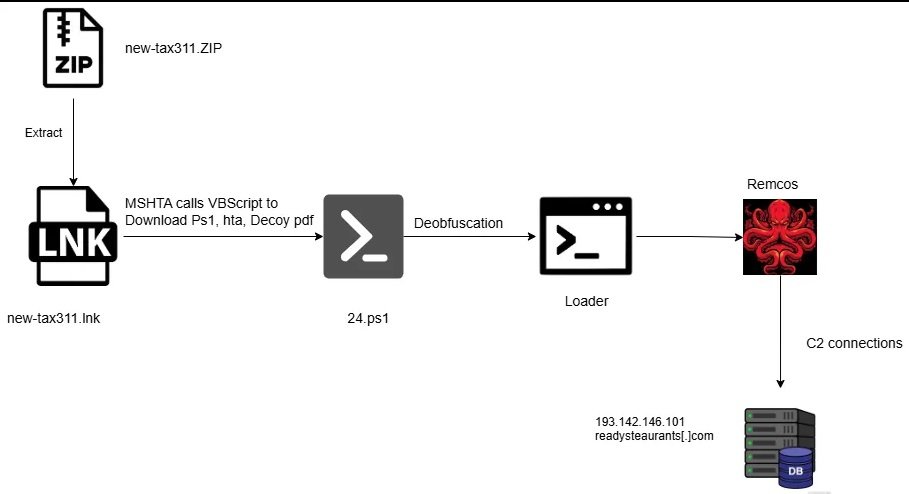
Remcos Is A Nasty One When Delivered Filelessly. Below I’ll Turn Your Description Into A Compact, Actionable Threat Brief You Can Use For Detection, Hunting, Containment, And Remediation (includes Ready-to-run Commands And Detection Rules You Can Drop Into EDR/SIEM). I Avoid Inventing Specific Hashes/IPs (don’t Trust Those Unless You Already Have Them) And Focus On Behavior And Telemetry You can Reliably Detect.
Remcos RAT Is A Commercial Remote-access Tool Abused By Attackers For Espionage, Credential Theft, And Full System Takeover.
Recent Campaigns Use A fileless, In-memory PowerShell Loader: A Short PowerShell Command (often Encoded) That Executes Code Directly In Memory, Disables/evades AMSI, And Loads The RAT Payload Without Writing A Disk File.
Fileless Delivery Greatly Reduces Antivirus Visibility And Allows Long-lived Stealthy Access.
Initial Delivery: Phishing Email, Malicious Attachment, Or Malicious Web Redirect To A Script Host.
Execution: Short PowerShell Command (often Uses -enc, -NoProfile, -WindowStyle Hidden, -ExecutionPolicy Bypass).
Loader Behavior:
Decodes/Decompresses Shellcode Or .NET Assembly In Memory.
Uses Reflection To Load .NET Assembly Or Shellcode Into A Running Process (e.g., powershell.exe, svchost.exe, explorer.exe) — Often Called process Injection Or process Hollowing.
May Attempt AMSI And ETW Bypasses, Disable Logging, Or Clear Event Logs.
Post-exploitation: Persistence (scheduled Tasks, Registry Run Keys, Service Creation, WMI), Credential Harvesting (LSASS Memory Dumps, Keylogging, Stealing Browser/Outlook Credentials), Remote Command Execution, Exfiltration Over HTTP/HTTPS Or Custom TCP.
C2: Regular Beacons To Attacker-controlled Servers (HTTP/S, Custom Ports).
(What To Monitor First)
PowerShell Command Lines:
Commands Using -EncodedCommand / -enc Or Long Base64 Strings.
-ExecutionPolicy Bypass + -NoProfile + -WindowStyle Hidden.
One-liners That Call IEX/Invoke-Expression, DownloadString, Invoke-WebRequest, New-Object System.Net.WebClient.
ScriptBlock And Module Logging (Windows):
ScriptBlock Logging Showing Reflection.Assembly::Load, System.Reflection, Assembly.Load, LoadFrom, Marshal-style P/Invoke.
Calls To GetProcAddress, VirtualAlloc, CreateRemoteThread.
AMSI/ETW Bypass Signs:
Calls That Alter amsi.dll Imports Or Patch Memory In amsi.dll.
Events With AmsiScanBuffer Failures Or Tampered Module Loads.
Process Injection / Hollowing Indicators:
CreateRemoteThread, WriteProcessMemory, NtUnmapViewOfSection, Suspicious Parent-child Process Relationships (e.g., powershell.exe Spawned From winword.exe).
Network Indicators:
Unusual Outbound HTTPS Traffic From Endpoints With No Business Need, Periodic Beacons, Unusual Domains Or Dynamic DNS.
HTTP Connections With Uncommon User-Agents, Repeated POSTs To Unknown Endpoints.
Persistence Artifacts:
New Scheduled Tasks, New Services, Run/RunOnce Registry Keys, WMI Event Subscriptions.
Credential Access:
Access To lsass.exe Via procdump, rundll32 Or Direct Memory Read; Suspicious Use Of rundll32 Or mimikatz-style Tool Indicators.
Sysmon Config Should Be On. Example Queries (Elastic / Splunk Style):
PowerShell One-liner Detection (Splunk-ish):
index=wineventlog (EventCode=4688 OR EventCode=800)
CommandLine="*powershell* -EncodedCommand *" OR CommandLine="*powershell* -enc *"
| Stats Count By Host, User, CommandLine
Sysmon Image Load + Suspicious Parent:
event.code:1 AND Process.name:"powershell.exe" AND Process.parent.name:"winword.exe"
Detect Reflection-based .NET Loading (via ScriptBlock):
EventID=4104   # PowerShell ScriptBlock Logging
| Where ScriptBlockText Like "%Assembly::Load%" Or ScriptBlockText Like "%Reflection%" Or ScriptBlockText Like "%Invoke-Expression%"
Network Beacon Detection (Elasticsearch-like Pseudo):
network.direction: Outbound AND (http.response.status_code:200 OR Dns.question.name:*)
| Stats Count By Destination.domain, Destination.ip, Source.host
| Where Count > 50
title: Suspicious Encoded PowerShell Execution
Detection:
  Selection:
    CommandLine|contains:
      - "-EncodedCommand"
      - "-enc"
  Condition: Selection
Level: High
Tags: [attack.execution, Attack.defense-evasion]
(Only Use For Binaries; Example Skeleton)
rule Remcos_Suspect
{
  Strings:
    $s1 = "Remcos" Ascii Nocase
    $s2 = "RemoteControlAndSurveillance" Ascii Nocase
  Condition:
    Any Of Them
}
Note: Fileless Loaders Won't Hit YARA On Disk — Use Behavioral Detection Above.
Isolate Affected Hosts From Network (remove Network Cable / Disable NIC) But Keep Them Powered For Forensics.
Collect Volatile Data:
tasklist /v Or Get-Process (PowerShell).
Memory Dump Of lsass.exe And Full RAM (forensics; Use Trusted Tools).
netstat -ano To List Network Connections And Remote IPs/ports.
Sysmon/Windows Event Logs, PowerShell Logs (Event IDs: 4103, 4104, 4688, 7045).
Contain:
Kill Suspicious Processes (but Capture Memory First).
Disable Persistence Artifacts: Scheduled Tasks, Suspicious Services, Run Keys.
Eradicate:
Re-image Host If Persistence Is Confirmed And Trust Is Broken.
Reset Credentials For Local And Domain Accounts Used On The Machine.
Scan Environment For Lateral Movement Signs.
Recovery:
Rebuild From Known-good Images Where Possible.
Ensure Patches, Up-to-date AV/EDR, EDR Sensors Reinstalled And Healthy.
Post-incident:
Rotate Credentials, Enable MFA, Review Logs For Other Compromised Hosts, Run Enterprise-wide Hunts For IOCs.
PowerShell Commands To Investigate (run From A Secure Admin Machine, Not The Suspect Host If Possible While Preserving Evidence):
List Scheduled Tasks:
Get-ScheduledTask | Where-Object {$_.TaskPath -notlike "\Microsoft\*"} | Format-Table TaskName, TaskPath, State
List Run Keys:
Get-ItemProperty HKLM:\Software\Microsoft\Windows\CurrentVersion\Run
Get-ItemProperty HKCU:\Software\Microsoft\Windows\CurrentVersion\Run
Check Running PowerShell Commands (from Event Logs):
Get-WinEvent -FilterHashtable @{LogName='Microsoft-Windows-PowerShell/Operational'; ID=4104} | Select-Object -First 50 | Format-List TimeCreated, Message
List Network Connections:
Get-NetTCPConnection | Where-Object {$_.State -eq "Established"} | Format-Table -AutoSize
Dump Process Memory (example Using ProcDump From Sysinternals):
procdump -ma <pid> <outputfile>
Capture Full Memory For
lsass.exeOnly If You Have A Legitimate Forensics Need And Are Mindful Of Privacy/regulations.
Enforce ScriptBlock Logging, Module Logging, And PowerShell Transcription; Forward These Logs To A Central SIEM.
Enable AMSI And Monitor For Tampering.
Enforce Application Controls: AppLocker Or Windows Defender Application Control (WDAC) To Prevent Unauthorized Script Interpreters And Unsigned Binaries.
Use Constrained Language Mode For PowerShell Where Possible.
Block Or Alert On -EncodedCommand Patterns At Proxy/NGFW And EDR.
Implement least Privilege, Remove Local Admin Rights Where Not Required.
Enforce MFA For All Remote Access (RDP, VPN).
Segment Networks So Endpoints Cannot Freely Reach Critical Systems.
Deploy EDR With Behavioral Blocking And Process-injection Detection.
Educate Users To Treat Email Attachments/links Cautiously; Use Safe Attachments / Preview Features.
Search PowerShell Logs For -enc / -EncodedCommand.
Hunt For Parent-child Anomalies: Office Apps Spawning PowerShell/cmd.exe.
Search For New Services And Scheduled Tasks Created In The Last 7–30 Days.
Hunt For Processes Making Many Outbound HTTPS Connections To Low-reputation Domains.
Check For Any Process With Write/execute Into Other Process Memory (WriteProcessMemory, CreateRemoteThread).
Enable/verify PowerShell Logging + Forward To SIEM.
Create Detection Rule For -EncodedCommand + IEX And Alert On Host/user.
Hunt For CreateRemoteThread And WriteProcessMemory Sysmon Events.
Block Suspicious Outbound C2 Domains At The Proxy.
Reset Credentials For Hosts That Show Injection Or LSASS Reads.
I Can:
produce A Sigma Rule Or A Splunk Saved Search (give Me Which SIEM),
write A Sysmon Event Rule Snippet,
draft An incident Response Checklist Formatted As A Printable Playbook,
or Produce A Short Blog/alert For Your Org Summarizing This Campaign.
Tell Me Which Of Those You'd Like And The Tool/format (Splunk, Elastic/KQL, Sentinel, QRadar, Etc.), And I’ll Generate It Immediately.
Meta Description: A New Remcos RAT Campaign Uses Phishing .zip Files With Malicious .lnk Shortcuts That Invoke mshta.exe, Run Obfuscated VBScript, And Load A PowerShell In-memory Shellcode Loader. Learn How It Works, Indicators To Hunt, And How To Protect Your Network.
Cybercriminals And Advanced Threat Actors Are Once Again Abusing Legitimate Windows Utilities To Deliver Remcos — A Powerful Remote Access Trojan (RAT) Known For Espionage, Credential Theft, And Full System Takeover. The Latest Campaign Is Notable For Its Stealthy, Fileless Chain: Attackers Deliver A Zipped Attachment With A Deceptive Windows Shortcut, Which Ultimately Leads To A Memory-only Remcos Implant. This Post Breaks Down The Technique, Highlights High-value Indicators, And Provides Practical Steps To Detect And Stop It.
Phishing Delivery — Victims Receive An Email With A .zip Attachment. Inside The Archive Is A .lnk (Windows Shortcut) Disguised As A Document Or Installer.
Shortcut Execution — When The User Clicks The .lnk, It Launches The Legitimate Windows Tool mshta.exe. Because mshta.exe Is Trusted, Many Endpoint Protections Give It A Lower Suspicion Score.
Obfuscated VBScript — mshta.exe Fetches And Runs A Remote, Heavily Obfuscated VBScript. The Script’s Job Is To Covertly Download The Next-stage Payload.
In-memory PowerShell Loader — The VBScript Retrieves A PowerShell-based Shellcode Loader. That Loader Runs Entirely In Memory (fileless), Evading Disk-based Antivirus And Many Basic Scanners.
Process Injection & Persistence — The Loader Injects Remcos Into Legitimate System Processes, Giving Attackers A Stealthy Foothold. The Campaign Also Modifies The Registry At:
HKCU\Software\Microsoft\Windows\CurrentVersion\Run
to Maintain Persistence Across Reboots.
Fileless Execution Avoids Simple Signature-based Detection Because Nothing Is Saved As A Typical Executable On Disk.
Living-off-the-land (LotL) Abuse (e.g., mshta.exe, PowerShell) Exploits Trusted Windows Components That Are Often Allowed Through Corporate Controls.
Credential Theft & Remote Control Capabilities Let Attackers Pivot, Harvest Passwords, And Exfiltrate Data While Remaining Covert.
Focus On Behavior And Telemetry, Not Just Filenames — Fileless Attacks Change How You Should Search.
Phishing Attachments: .zip Files With .lnk Shortcuts Inside; Unexpected Compressed Attachments From External Senders.
mshta.exe Activity: mshta.exe Making Outbound HTTP/HTTPS Requests Or Spawning Child Processes (especially When Launched From Explorer Or Email Clients).
Remote VBScript Execution: Unusual Script Downloads Initiated By mshta.exe Or mshta Network Connections To Uncommon Domains.
PowerShell In-memory Execution: PowerShell Instances Started With -EncodedCommand, -NoProfile, -ExecutionPolicy Bypass, Or Short One-liners Using IEX/Invoke-Expression.
Registry Persistence: New Or Modified Run Keys Under HKCU\Software\Microsoft\Windows\CurrentVersion\Run.
Process Injection Patterns: Processes Exhibiting Anomalous Memory Writes, CreateRemoteThread, Or Reflective .NET Assembly Loads (monitorable Via EDR/Sysmon).
Search For mshta.exe Initiating Outbound Connections To Rare Domains In The Last 7 Days.
PowerShell Logs Containing -EncodedCommand Or IEX.
New HKCU Run Key Additions Outside Expected Applications.
mshta.exe Parent/child Anomalies (e.g., Spawned By Outlook/Explorer With Network Activity).
Isolate Affected Hosts From The Network While Preserving Volatile Evidence (do Not Power Off).
Collect Memory And Logs (PowerShell ScriptBlock Logs, Sysmon, Firewall/proxy Logs, Web Proxy Request Details).
Remove Persistence: Inspect And Delete Suspicious Run Keys, Scheduled Tasks, Or Services Created By The Attacker.
Terminate Malicious Processes After Capturing Memory Images For Forensics.
Reset Credentials For Accounts Used On Compromised Hosts And Enable MFA Globally.
Reimage If Needed: If Escalation Or Widespread Persistence Is Confirmed, Reimage From Known-good Media.
Hunt For Lateral Movement: Search For Similar Indicators Across The Domain (email Delivery, Mshta Activity, Unusual PowerShell Execution).
Enforce PowerShell Logging (ScriptBlock And Module Logging) And Forward Logs To Your SIEM.
Block Or Closely Monitor mshta.exe Outbound Network Usage Via Application Control Or Proxy Rules.
Apply AppLocker/WDAC Policies To Restrict Execution Of Untrusted Scripts And Discourage mshta/PowerShell Misuse.
Disable Or Restrict The Use Of .lnk As A Trust Mechanism In High-risk Environments; Train Users Not To Open Attachments From Unknown Senders.
Remove Unnecessary Local Admin Rights And Enforce Least Privilege.
Mandate MFA For Remote Access And Privileged Accounts.
Keep EDR Sensors Updated And Configure Behavioral Blocking (process Injection, Anomalous Parent-child Relationships).
This Remcos Campaign Combines Classic Social Engineering With Modern Fileless Techniques To Maximize Stealth. The Chain — .lnk → mshta.exe → Obfuscated VBScript → In-memory PowerShell Loader → Remcos Injection — Highlights The Need To Move Beyond Simple IOC-based Defenses And To Invest In Behavioral Telemetry And Strict Application Control. Prioritize Logging, Monitoring, And Least-privilege Controls — And Treat mshta And Encoded PowerShell Executions As High-risk Signals.
Suggested SEO Elements
Slug: Remcos-fileless-mshta-vbscript-powershell
Primary Keywords: Remcos RAT, Fileless Remcos, Mshta.exe Remcos, Remcos Phishing .lnk
Secondary Keywords: PowerShell Shellcode Loader, .lnk Malware, HKCU Run Persistence, Process Injection Detection
Tags: Cybersecurity, Malware, Remcos, Fileless-malware, Phishing, Threat-hunting
If You Want, I Can Now:
convert The Hunting Queries To Splunk, Elastic/KQL, Or Microsoft Sentinel Rules;
produce A Short Infographic Or Social Post Summarizing The Attack Chain;
or Expand This Into A 1,500-word Longform Article Suitable For Publication. Which Do You Prefer?












