 Blog's Page
 Blog's Page
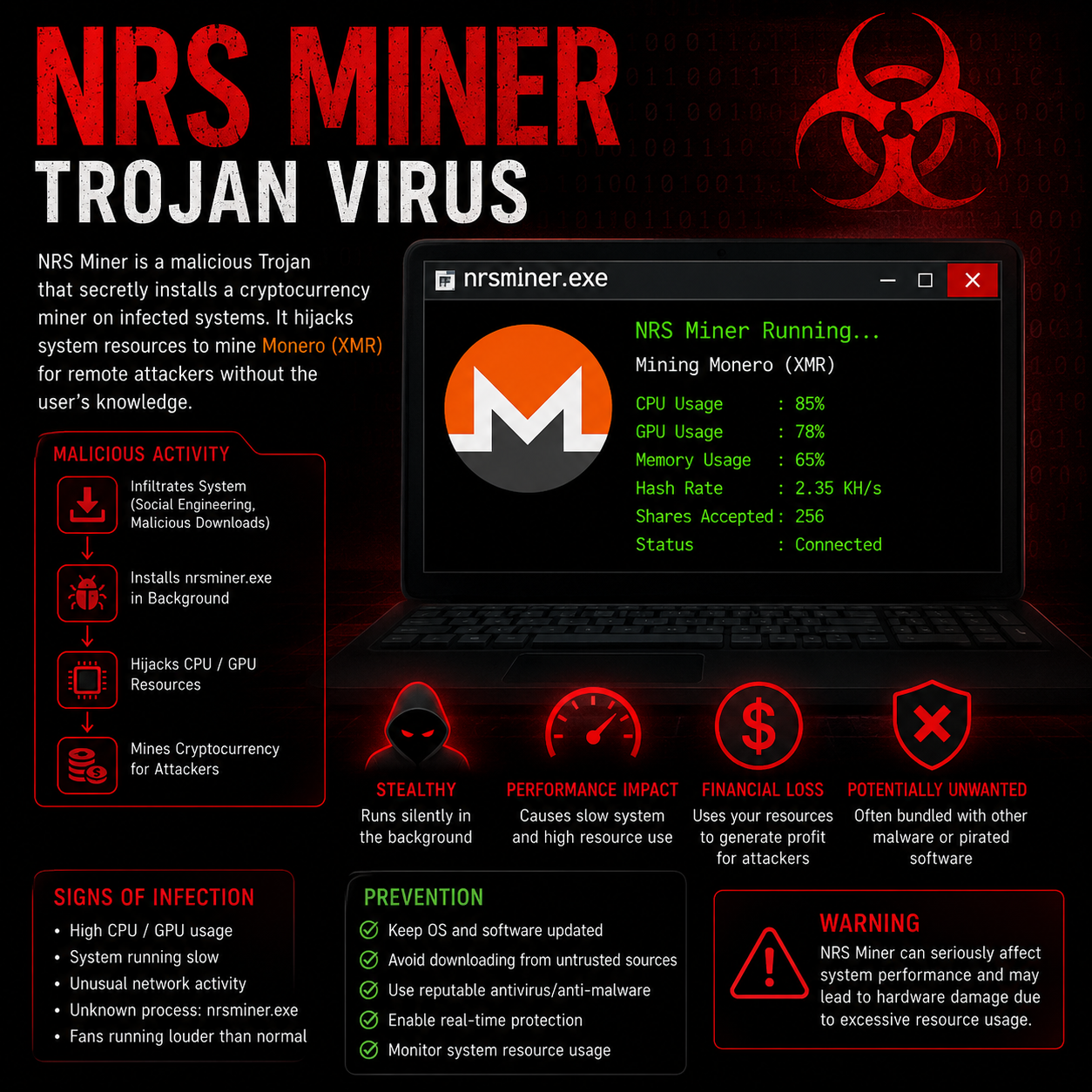
NRS Miner Is A Type Of Trojan Cryptocurrency Mining Malware (cryptojacker) That Secretly Installs Itself On A Victim's Computer And Uses System Resources To Mine Cryptocurrency, Usually Monero (XMR), For Cybercriminals. Unlike Ransomware, Which Encrypts Files And Demands Payment, NRS Miner Operates Silently In The Background, Consuming CPU And GPU Power Without The User's Knowledge.
The Malware Is Commonly Distributed Through Malicious Software Downloads, Cracked Applications, Pirated Programs, Fake Software Updates, Infected Email Attachments, Exploit Kits, And Compromised Websites. Once Installed, NRS Miner Creates Processes Such As nrsminer.exe And May Establish Persistence Mechanisms To Automatically Start Whenever The Computer Boots.
The Primary Objective Of NRS Miner Is Financial Gain. By Hijacking Thousands Of Infected Devices, Attackers Can Generate Cryptocurrency While Victims Experience Degraded System Performance, Increased Electricity Consumption, Overheating Hardware, And Reduced Productivity.
Because The Malware Often Operates Without Displaying Visible Symptoms, Many Users Remain Unaware Of The Infection For Weeks Or Even Months. Organizations With Multiple Infected Systems May Experience Significant Performance Degradation Across Their Networks.
The Infection Process Generally Follows These Steps:
User Downloads An Infected File Or Application.
Trojan Installs Itself In The Background.
Malware Creates Persistence Mechanisms In Windows Startup Entries.
The Miner Connects To A Remote Mining Pool.
CPU And GPU Resources Are Utilized For Cryptocurrency Mining.
Attackers Receive Mining Rewards While Victims Bear The Hardware And Energy Costs.
Some Variants May Also Download Additional Malware, Including Spyware, Adware, Or Remote Access Trojans (RATs).
NRS Miner Primarily Targets System Resources Rather Than User Documents. However, Several Files And Directories May Become Infected Or Modified During Installation.
Commonly Created Or Modified Files
nrsminer.exe
miner.exe
update.exe
svchost.exe (fake Copy)
service.exe
config.json
startup Registry Entries
scheduled Task Files
Potentially Affected File Types
Executable Files (.exe)
Dynamic Link Libraries (.dll)
Batch Files (.bat)
PowerShell Scripts (.ps1)
Registry Entries
Startup Configuration Files
Temporary System Files
Unlike Ransomware, NRS Miner Generally Does Not Encrypt Or Delete Personal Files Such As:
Documents (.doc, .docx)
Spreadsheets (.xls, .xlsx)
PDFs
Images (.jpg, .png)
Videos (.mp4, .avi)
However, Some Advanced Variants May Download Additional Malware That Could Compromise User Data.
NRS Miner Primarily Targets Windows Systems Because Of Their Widespread Use.
Windows
Windows 7
Windows 8
Windows 8.1
Windows 10
Windows 11
Windows Server 2008
Windows Server 2012
Windows Server 2016
Windows Server 2019
Windows Server 2022
Other Platforms
Some Cryptocurrency Miners Have Also Been Observed Targeting:
Linux Servers
Ubuntu
CentOS
Debian
Red Hat Enterprise Linux
In Cloud Environments, Compromised Linux Servers Are Often Attractive Targets Due To Their High Processing Power.
NRS Miner Does Not Specifically Infect Browsers, But Browser-related Downloads Frequently Serve As The Infection Source.
Common Browsers Associated With Malware Delivery Include:
Google Chrome
Mozilla Firefox
Microsoft Edge
Internet Explorer
Opera
Brave
Users May Unknowingly Download Infected Software Through Malicious Advertisements, Fake Update Prompts, Or Compromised Websites Accessed Through These Browsers.
A Computer Infected With NRS Miner May Display The Following Signs:
Performance Issues
Slow Computer Performance
High CPU Usage (70–100%)
High GPU Utilization
Frequent Application Crashes
Delayed System Response
Hardware Symptoms
Overheating Components
Constantly Running Cooling Fans
Reduced Battery Life
Increased Power Consumption
Network Symptoms
Unusual Internet Traffic
Connections To Unknown Mining Servers
Unexpected Background Processes
Security Indicators
Unknown Process Named Nrsminer.exe
Disabled Antivirus Software
New Startup Programs
Unauthorized Scheduled Tasks
Organizations And Individuals Can Reduce The Risk Of NRS Miner Infections By Implementing The Following Security Measures:
1. Use Reputable Security Software
Install And Maintain Updated Antivirus And Anti-malware Solutions Capable Of Detecting Cryptocurrency Miners.
2. Keep Systems Updated
Regularly Install Security Patches For:
Operating Systems
Browsers
Applications
Network Devices
3. Avoid Pirated Software
Many NRS Miner Infections Originate From:
Cracked Software
Key Generators
Pirated Games
Unauthorized Software Downloads
4. Enable Real-Time Protection
Ensure Real-time Scanning Is Enabled To Detect Suspicious Files Before Execution.
5. Restrict Administrative Privileges
Limit Administrator Access To Reduce Malware Installation Opportunities.
6. Monitor Resource Usage
Regularly Review:
CPU Usage
GPU Usage
Memory Consumption
Running Processes
7. Use Web Filtering
Block Access To Malicious Websites And Suspicious Downloads.
8. Conduct Security Awareness Training
Educate Users About Malware Risks And Safe Downloading Practices.
Unlike Globally Tracked Ransomware Families, There Is No Verified Public Statistic Specifically Identifying The Exact Number Of Systems Infected By "NRS Miner."
However, Cryptocurrency Mining Trojans Generally Infect:
Thousands To Hundreds Of Thousands Of Computers Worldwide.
Personal Computers.
Business Workstations.
Educational Networks.
Cloud Servers.
Reports Involving Mining Trojans With Similar Behavior Have Documented Infections Across Numerous Countries, Including:
United States
Canada
United Kingdom
Germany
France
India
China
Russia
Brazil
Australia
South Korea
Japan
Because Many Infections Go Unreported, The True Number Of Affected Systems Is Difficult To Determine.
If Your Computer Is Infected With NRS Miner, Follow These Steps:
Disconnect:
Wi-Fi
Ethernet
VPN Connections
This Prevents Communication With Mining Servers.
Open Task Manager And Look For:
nrsminer.exe
miner.exe
Unknown High-CPU Processes
End Suspicious Tasks.
Restart Windows In Safe Mode To Prevent Malware From Automatically Loading.
Use Trusted Security Tools Such As:
Microsoft Defender
Malwarebytes
Bitdefender
ESET
Norton
Perform A Full System Scan And Remove Detected Threats.
Check:
Task Manager → Startup
Registry Run Keys
Scheduled Tasks
Delete Suspicious Entries Associated With The Miner.
Remove Identified Files Such As:
nrsminer.exe
miner.exe
Unknown Executables In Temp Folders
Only Delete Files Confirmed As Malicious.
Install The Latest Updates For:
Windows
Browsers
Security Software
After Cleaning The System:
Change Windows Passwords
Update Email Passwords
Reset Banking And Cloud Account Credentials
Verify That:
CPU Usage Returns To Normal.
Fans Are No Longer Constantly Running.
Unknown Processes Are Absent.
For Severe Infections Or Persistent Reinfections, Perform A Clean Operating System Installation And Restore Files From A Trusted Backup.
NRS Miner Is A Cryptocurrency Mining Trojan Designed To Exploit Computer Resources For Unauthorized Cryptocurrency Mining. Although It Does Not Usually Encrypt Files Like Ransomware, It Can Significantly Reduce System Performance, Increase Power Consumption, And Shorten Hardware Lifespan. The Malware Primarily Affects Windows Systems, Spreads Through Malicious Downloads And Pirated Software, And May Remain Hidden For Extended Periods. Strong Security Practices, Regular Software Updates, Reputable Antivirus Protection, And Careful Monitoring Of System Resources Are Essential For Preventing And Removing NRS Miner Infections.
Step 1: Boot Into Safe Mode
Restart Your PC And Press F8 (or Shift + F8 For Some Systems) Before Windows Loads.
Choose Safe Mode With Networking.
Safe Mode Prevents Most Malware From Loading.
Press Win + R, Type appwiz.cpl, And Press Enter.
Sort By Install Date And Uninstall Unknown Or Recently Added Programs.
Use A Trusted Anti-malware Tool:
Malwarebytes – https://www.malwarebytes.com
Screenshot Of Malwarebytes - Visit Links
Microsoft Defender – Built Into Windows 10/11
HitmanPro, ESET Online Scanner, Or Kaspersky Virus Removal Tool
ZoneAlarm Pro Antivirus + Firewall NextGen
VIPRE Antivirus - US And Others Countries, | India
Run A Full Scan And Delete/quarantine Detected Threats.
Win + R, Type temp → Delete All Files.Press Win + R, Type %temp% → Delete All Files.
Use Disk Cleanup: cleanmgr In The Run Dialog.
Go To: C:\Windows\System32\drivers\etc
Open hosts File With Notepad.
Replace With Default Content:
Press Ctrl + Shift + Esc → Open Task Manager
Go To Startup Tab
Disable Any Suspicious Entries.
Open Command Prompt As Administrator.
Run These Commands:
netsh Winsock Reset

netsh Int Ip Reset

ipconfig /flushdns
Unwanted Homepage Or Search Engine
Pop-ups Or Redirects
Unknown Extensions Installed
For Chrome:
Go To: chrome://extensions/
Remove Anything Unfamiliar
For Firefox:
Go To: about:addons → Extensions
Remove Suspicious Add-ons
For Edge:
Go To: edge://extensions/
Uninstall Unknown Add-ons
Chrome:
Go To chrome://settings/reset → "Restore Settings To Their Original Defaults"
Firefox:
Go To about:support → "Refresh Firefox"
Edge:
Go To edge://settings/resetProfileSettings → "Reset Settings"
All Browsers:
Use Ctrl + Shift + Del → Select All Time
Clear Cookies, Cached Files, And Site Data
Make Sure They Are Not Hijacked.
Chrome: chrome://settings/search
Firefox: about:preferences#search
Edge: edge://settings/search
Chrome: chrome://settings/cleanup
Use Malwarebytes Browser Guard For Real-time Browser Protection.
Always Download Software From Trusted Sources.
Keep Windows, Browsers, And Antivirus Updated.
Avoid Clicking Suspicious Links Or Ads.
Use ad Blockers And reputable Antivirus Software.
Backup Your Files Regularly.
To Remove Malware From Your Windows PC, Start By Booting Into Safe Mode, Uninstalling Suspicious Programs, And Scanning With Trusted Anti-malware Tools Like Malwarebytes. Clear Temporary Files, Reset Your Network Settings, And Check Startup Apps For Anything Unusual.
For web Browsers, Remove Unwanted Extensions, Reset Browser Settings, Clear Cache And Cookies, And Ensure Your Homepage And Search Engine Haven’t Been Hijacked. Use Cleanup Tools Like Chrome Cleanup Or Browser Guard For Added Protection.
?? Prevention Tips: Keep Software Updated, Avoid Suspicious Downloads, And Use Antivirus Protection Plus Browser Ad Blockers. Regular Backups Are Essential.
Why It Matters: Not All VPNs Offer Malware Protection.
What To Look For: Providers With built-in Malware/ad/tracker Blockers (e.g., NordVPN’s Threat Protection, ProtonVPN’s NetShield).
Purpose: Prevents Data Leaks If Your VPN Connection Drops.
Benefit: Ensures Your Real IP And Browsing Activity Aren’t Exposed To Malware-distributing Websites.
Why It Matters: DNS Leaks Can Expose Your Online Activity To Attackers.
Solution: Enable DNS Leak Protection In Your VPN Settings Or Use A Secure DNS Like Cloudflare (1.1.1.1).
Risk: Free VPNs Often Contain Malware, Sell User Data, Or Lack Security Features.
Better Option: Use Reputable Paid VPNs That Offer security Audits And Transparent Privacy Policies.
Some VPNs Block Known Phishing And Malicious Sites.
Example: Surfshark’s CleanWeb, CyberGhost’s Content Blocker.
Reason: Security Patches Fix Known Vulnerabilities.
Tip: Enable Auto-updates Or Check For Updates Weekly.
Scope: Malware Can Enter Through Phones, Tablets, Or IoT Devices.
Solution: Install VPN Apps On Every Internet-connected Device.
Fact: VPNs Do Not Remove Or Detect Malware On Your System.
Complement It With:
Antivirus Software
Firewall
Browser Extensions For Script Blocking
VPN Encrypts Traffic But Can’t Stop Malware From Executing If You Download Infected Files.
Split Tunneling Allows Certain Apps/sites To Bypass VPN.
Tip: Never Exclude Browsers, Email Clients, Or Download Managers From VPN Tunneling.
A VPN (Virtual Private Network) Enhances Your Online Privacy By Encrypting Your Internet Traffic And Masking Your IP Address. It Protects Your Data On Public Wi-Fi, Hides Browsing Activity From Hackers And ISPs, And Helps Bypass Geo-restrictions. VPNs Also Add A Layer Of Defense Against Malware By Blocking Malicious Websites And Trackers When Using Advanced Features. However, A VPN Does Not Remove Existing Malware Or Act As Antivirus Software. For Full Protection, Combine VPN Use With Antivirus Tools, Regular Software Updates, And Cautious Browsing Habits. Always Choose A Reputable VPN Provider With Strong Security And Privacy Policies.
NRS Miner Trojan Virus, How To Fix NRS Miner Trojan Virus, Uninstall NRS Miner Trojan Virus, Fix NRS Miner Trojan Virus, NRS Miner Trojan Virus Remova











