 Blog's Page
 Blog's Page
Learn How To Remove Aldet Ransomware, Stop .aldet File Encryption, Protect Backups, Identify The Infection, And Recover Encrypted Files Safely.
Keywords: Aldet Ransomware Removal, .aldet Files, Aldet Decryptor, Recover Aldet Encrypted Files, Aldet Virus Removal, Ransomware Recovery, Remove Aldet Virus
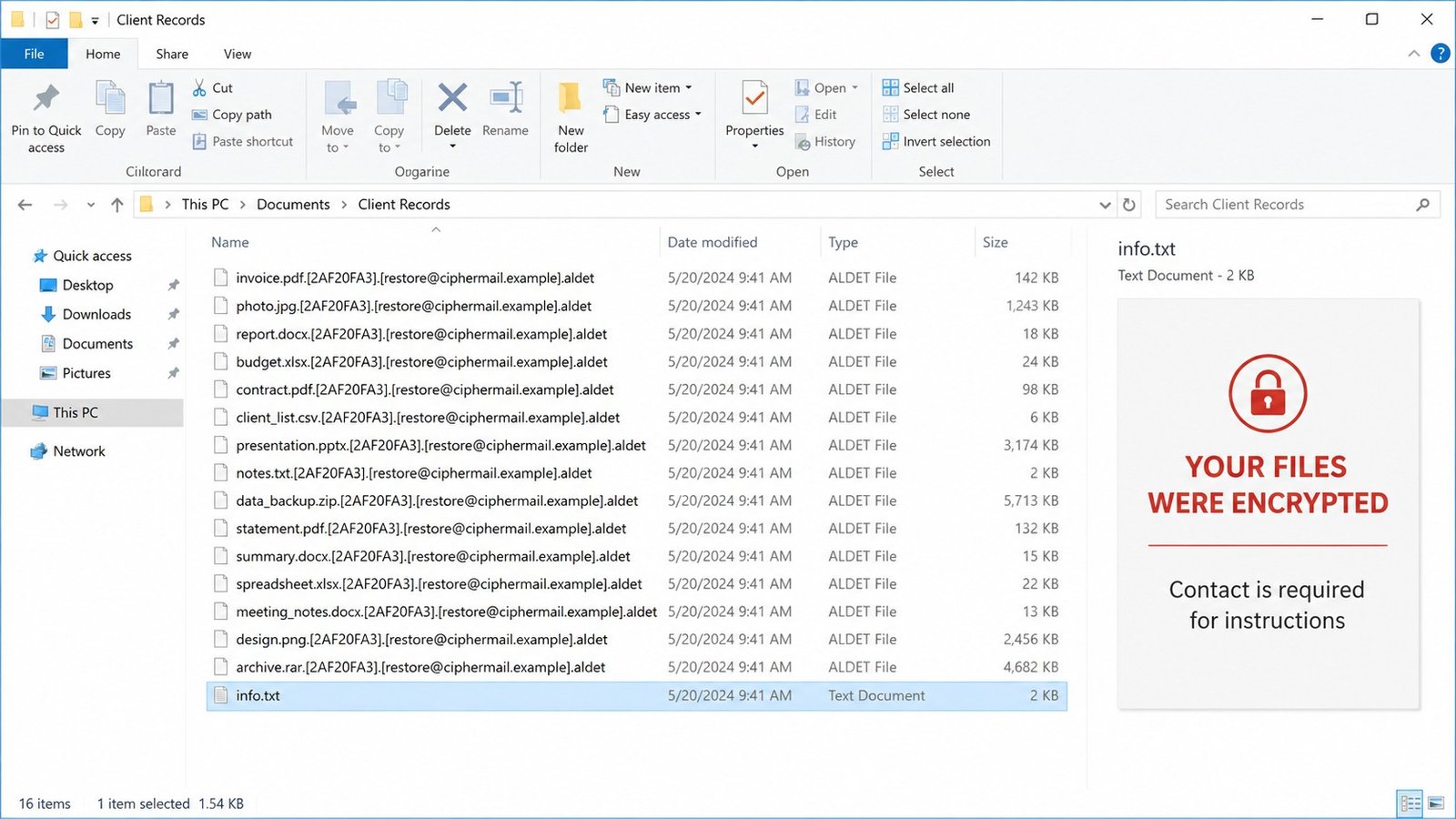
Aldet Ransomware Is A Dangerous File-encrypting Malware Threat That Prevents Victims From Opening Personal And Business Files And Demands Payment For Recovery. Recent Analysis Shows That Aldet Encrypts Files And Changes Their Names By Adding A Unique Victim ID, An Attacker-controlled Email Address, And The .aldet Extension. It Also Creates A Ransom Note Called +README-WARNING+.txt And May Replace The Windows Desktop Wallpaper With A Ransom Message.
If Your Files Suddenly Have Names Ending In .aldet, Do Not Panic And Do Not Immediately Pay The Ransom. The First Priority Is To Stop The Ransomware From Spreading, Preserve Evidence, Remove The Malicious Program, And Then Determine Whether Your Files Can Be Recovered From Backups Or A Legitimate Decryptor.
Aldet Is A Ransomware Infection Designed To Encrypt Files And Make Them Inaccessible. During Analysis, Files Such As Documents, Images And Other Personal Data Were Renamed Using A Pattern Containing A Victim Identifier, An Email Address And The .aldet Extension. For Example, A Normal File May Appear Similar To:
document.docx.[VictimID].[attacker-email].aldet
The Ransomware Also Creates A Ransom Message And Changes The Desktop Background. The Observed Ransom Instructions Demand Cryptocurrency And Claim That Files Can Be Decrypted After Payment.
Importantly, Removing The .aldet Extension Manually does Not Decrypt The File. The Underlying File Contents Remain Encrypted.
Aldet Infection May Produce Several Recognizable Symptoms:
Documents, Photos And Other Files Cannot Be Opened.
Filenames Contain The .aldet Extension.
A Victim ID And Email Address May Appear In Filenames.
+README-WARNING+.txt May Appear On The System.
The Desktop Wallpaper May Be Replaced With A Ransom Warning.
Files May Suddenly Become Inaccessible.
Network Or Shared-drive Files May Also Be Affected.
Suspicious Processes Or Recently Installed Programs May Appear.
Security Software May Generate Ransomware-related Alerts.
These Indicators Should Be Preserved Because They Can Help Identify The Exact Ransomware Variant.
Immediately Disconnect The Affected Computer From The Internet And Local Network.
Turn Off Wi-Fi And Disconnect The Ethernet Cable. Also Disconnect External Hard Drives, USB Storage And Other Removable Media. If The Computer Is Connected To A Business Network, Isolate It From Shared Servers And Network Drives.
This Step Is Important Because Ransomware Can Potentially Affect Accessible Network Resources. Cloud Synchronization Should Also Be Paused Or Disconnected So Encrypted Files Are Not Automatically Synchronized To Otherwise Healthy Copies.
Do Not Delete Files Carrying The .aldet Extension.
Also Avoid Renaming Large Numbers Of Encrypted Files. Preserve Several Encrypted Files As Samples Because Security Researchers Or Legitimate Recovery Services May Need Them To Identify The Variant.
Save A Copy Of The Ransom Note And Record The Victim ID And Other Visible Indicators.
The Ransomware Itself Should Be Removed Before Attempting File Recovery. Otherwise, Recovered Files Could Potentially Be Encrypted Again.
Use A Reputable, Fully Updated Anti-malware Or Endpoint-security Product And Perform A Full System Scan. For Business Environments, Professional Incident-response Assistance May Be Appropriate.
If There Is Significant Uncertainty About Whether The Operating System Has Been Compromised, Rebuilding The Affected Computer From A Trusted Installation Can Provide A Stronger Recovery Baseline Than Simply Deleting Suspicious Files.
Do Not Restore Backups Until The Machine And Network Have Been Determined To Be Clean.
Correct Identification Is Important Because Ransomware Decryptors Are Normally Designed For Specific Variants.
The .aldet Extension, Ransom Note, Victim ID And Attacker Contact Information Are Useful Indicators. A Reputable Ransomware-identification Service Can Also Help Determine Whether The Sample Is Associated With A Known Ransomware Family.
Do Not Download Random Programs Advertised As “Aldet Decryptors.” Fake Decryptors Can Contain Additional Malware Or Steal Credentials.
One Of The Safest Recovery Options Is To Determine Whether A Legitimate Security Organization Has Released A Free Decryptor For The Exact Aldet Variant.
Recent Public Guidance Did not Confirm A Reliable Public Aldet Decryptor At The Time Of Those Analyses, So Victims Should Avoid Assuming That Any Website Claiming To Have A Guaranteed Aldet Decryptor Is Legitimate.
Check Recognized Projects Such As The No More Ransom Project And Established Cybersecurity Vendors For Updates. Only Use A Decryptor Specifically Matched To The Identified Variant.
A Clean Backup Is Generally The Safest Recovery Method When No Compatible Decryptor Exists.
Possible Recovery Sources Include:
Offline Backups
Air-gapped Backups
Immutable Backups
Previous Cloud Versions
Enterprise Backup Systems
External Drives That Were Disconnected Before Infection
Clean System Snapshots
Before Connecting A Backup, Make Sure The Ransomware Has Been Removed And The Affected Environment Has Been Investigated.
For Organizations, Restore The Most Critical Systems First And Monitor Them Carefully After Restoration.
Depending On The System Configuration, Windows Recovery Features Or Previous Versions May Provide Additional Recovery Possibilities.
However, Ransomware Can Attempt To Remove Or Damage Recovery Mechanisms. Therefore, The Absence Of A Restore Point Does Not Necessarily Indicate That The Files Are Permanently Lost, While The Presence Of A Restore Point Does Not Guarantee That Encrypted Documents Can Be Recovered.
Never Experiment With Recovery Techniques On The Only Copy Of Important Encrypted Files. Make A Backup Of The Encrypted Data First.
Paying The Ransom Is Generally Not Recommended.
There Is No Guarantee That Criminals Will Provide A Working Decryptor After Payment. Paying Also Funds Criminal Activity And Can Encourage Further Attacks. In Addition, Ransomware Operators May Make Additional Demands After Receiving Payment.
Instead, Concentrate On Containment, Malware Removal, Forensic Investigation, Backups And Legitimate Recovery Options.
Organizations And Individual Users Can Significantly Reduce Ransomware Risk By Following Basic Security Practices:
Maintain Regular Offline Or Immutable Backups.
Enable Multi-factor Authentication Wherever Possible.
Keep Windows And Applications Updated.
Avoid Pirated Software And Suspicious Installers.
Do Not Open Unexpected Email Attachments.
Restrict Administrator Privileges.
Secure RDP And Other Remote-access Services.
Use Reputable Endpoint Protection.
Monitor Unusual File-encryption Activity.
Segment Important Networks And Servers.
Train Employees To Recognize Phishing Attacks.
Regularly Test Backup Restoration Procedures.
Aldet Ransomware Can Cause Serious Data Loss By Encrypting Files And Adding The .aldet Extension Together With Victim-specific Information. The Appearance Of +README-WARNING+.txt And A Changed Desktop Wallpaper Can Provide Additional Indicators Of Compromise.
The Safest Approach Is To disconnect The Infected System, Protect Backups, Preserve Evidence, Remove The Ransomware, Identify The Exact Variant And Investigate Legitimate Recovery Options. Do Not Assume That Changing The File Extension Will Repair The Files, And Do Not Trust Unverified Decryptor Programs.
If No Working Decryptor Is Available, A Clean Offline Or Immutable Backup May Provide The Best Route To Recovery. After Restoration, Investigate How Aldet Entered The System And Strengthen Security Controls To Prevent Another Ransomware Incident.
Step 1: Boot Into Safe Mode
Restart Your PC And Press F8 (or Shift + F8 For Some Systems) Before Windows Loads.
Choose Safe Mode With Networking.
Safe Mode Prevents Most Malware From Loading.
Press Win + R, Type appwiz.cpl, And Press Enter.
Sort By Install Date And Uninstall Unknown Or Recently Added Programs.
Use A Trusted Anti-malware Tool:
Malwarebytes – https://www.malwarebytes.com
Screenshot Of Malwarebytes - Visit Links
Microsoft Defender – Built Into Windows 10/11
HitmanPro, ESET Online Scanner, Or Kaspersky Virus Removal Tool
ZoneAlarm Pro Antivirus + Firewall NextGen
VIPRE Antivirus - US And Others Countries, | India
Run A Full Scan And Delete/quarantine Detected Threats.
Win + R, Type temp → Delete All Files.Press Win + R, Type %temp% → Delete All Files.
Use Disk Cleanup: cleanmgr In The Run Dialog.
Go To: C:\Windows\System32\drivers\etc
Open hosts File With Notepad.
Replace With Default Content:
Press Ctrl + Shift + Esc → Open Task Manager
Go To Startup Tab
Disable Any Suspicious Entries.
Open Command Prompt As Administrator.
Run These Commands:
netsh Winsock Reset

netsh Int Ip Reset

ipconfig /flushdns
Unwanted Homepage Or Search Engine
Pop-ups Or Redirects
Unknown Extensions Installed
For Chrome:
Go To: chrome://extensions/
Remove Anything Unfamiliar
For Firefox:
Go To: about:addons → Extensions
Remove Suspicious Add-ons
For Edge:
Go To: edge://extensions/
Uninstall Unknown Add-ons
Chrome:
Go To chrome://settings/reset → "Restore Settings To Their Original Defaults"
Firefox:
Go To about:support → "Refresh Firefox"
Edge:
Go To edge://settings/resetProfileSettings → "Reset Settings"
All Browsers:
Use Ctrl + Shift + Del → Select All Time
Clear Cookies, Cached Files, And Site Data
Make Sure They Are Not Hijacked.
Chrome: chrome://settings/search
Firefox: about:preferences#search
Edge: edge://settings/search
Chrome: chrome://settings/cleanup
Use Malwarebytes Browser Guard For Real-time Browser Protection.
Always Download Software From Trusted Sources.
Keep Windows, Browsers, And Antivirus Updated.
Avoid Clicking Suspicious Links Or Ads.
Use ad Blockers And reputable Antivirus Software.
Backup Your Files Regularly.
To Remove Malware From Your Windows PC, Start By Booting Into Safe Mode, Uninstalling Suspicious Programs, And Scanning With Trusted Anti-malware Tools Like Malwarebytes. Clear Temporary Files, Reset Your Network Settings, And Check Startup Apps For Anything Unusual.
For web Browsers, Remove Unwanted Extensions, Reset Browser Settings, Clear Cache And Cookies, And Ensure Your Homepage And Search Engine Haven’t Been Hijacked. Use Cleanup Tools Like Chrome Cleanup Or Browser Guard For Added Protection.
?? Prevention Tips: Keep Software Updated, Avoid Suspicious Downloads, And Use Antivirus Protection Plus Browser Ad Blockers. Regular Backups Are Essential.
Why It Matters: Not All VPNs Offer Malware Protection.
What To Look For: Providers With built-in Malware/ad/tracker Blockers (e.g., NordVPN’s Threat Protection, ProtonVPN’s NetShield).
Purpose: Prevents Data Leaks If Your VPN Connection Drops.
Benefit: Ensures Your Real IP And Browsing Activity Aren’t Exposed To Malware-distributing Websites.
Why It Matters: DNS Leaks Can Expose Your Online Activity To Attackers.
Solution: Enable DNS Leak Protection In Your VPN Settings Or Use A Secure DNS Like Cloudflare (1.1.1.1).
Risk: Free VPNs Often Contain Malware, Sell User Data, Or Lack Security Features.
Better Option: Use Reputable Paid VPNs That Offer security Audits And Transparent Privacy Policies.
Some VPNs Block Known Phishing And Malicious Sites.
Example: Surfshark’s CleanWeb, CyberGhost’s Content Blocker.
Reason: Security Patches Fix Known Vulnerabilities.
Tip: Enable Auto-updates Or Check For Updates Weekly.
Scope: Malware Can Enter Through Phones, Tablets, Or IoT Devices.
Solution: Install VPN Apps On Every Internet-connected Device.
Fact: VPNs Do Not Remove Or Detect Malware On Your System.
Complement It With:
Antivirus Software
Firewall
Browser Extensions For Script Blocking
VPN Encrypts Traffic But Can’t Stop Malware From Executing If You Download Infected Files.
Split Tunneling Allows Certain Apps/sites To Bypass VPN.
Tip: Never Exclude Browsers, Email Clients, Or Download Managers From VPN Tunneling.
A VPN (Virtual Private Network) Enhances Your Online Privacy By Encrypting Your Internet Traffic And Masking Your IP Address. It Protects Your Data On Public Wi-Fi, Hides Browsing Activity From Hackers And ISPs, And Helps Bypass Geo-restrictions. VPNs Also Add A Layer Of Defense Against Malware By Blocking Malicious Websites And Trackers When Using Advanced Features. However, A VPN Does Not Remove Existing Malware Or Act As Antivirus Software. For Full Protection, Combine VPN Use With Antivirus Tools, Regular Software Updates, And Cautious Browsing Habits. Always Choose A Reputable VPN Provider With Strong Security And Privacy Policies.
Aldet Ransomware, Ransomware Removal, .aldet Files, Malware, Cybersecurity, Ransomware Recovery, File Encryption, Data Recovery











