 Blog's Page
 Blog's Page
Learn About HMDL Ransomware, Its IOCs, MITRE ATT&CK Techniques, Infection Methods, Encrypted Files, Detection Rules, Removal, Recovery And Prevention.
Keywords: HMDL Ransomware Removal, HMDL Decryptor, HMDL Encrypted Files, HMDL Ransomware IOCs, HMDL Virus, HMDL Ransomware Recovery, !!README_HMDL!!.txt, Ransomware Detection.
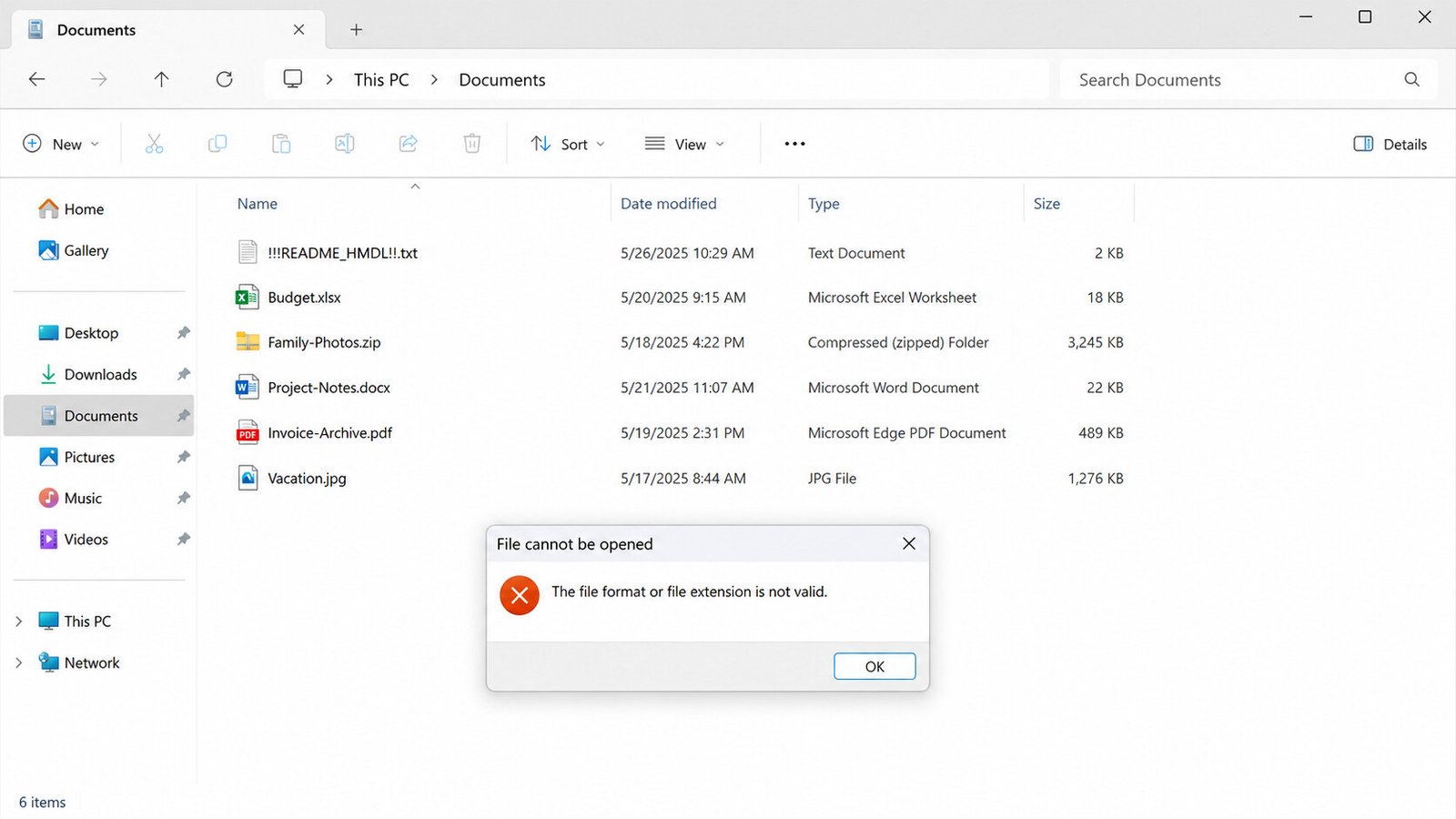
HMDL Ransomware Is A Recently Documented File-encrypting Malware Threat That Can Make Documents, Photographs, Databases And Other Important Files Inaccessible. Unlike Many Ransomware Families, The Analyzed HMDL Samples Reportedly do Not Add A New Extension To Encrypted Files. A File Such As report.docx May Continue To Appear As report.docx Even Though Its Contents Have Been Encrypted.
One Of The Strongest Visible Indicators Is The Ransom Note !!README_HMDL!!.txt. Recent Analysis Reports That The Note Identifies The Victim And Demands Cryptocurrency In Exchange For An Alleged Decryptor And Private Key. The Analyzed Sample Reportedly Requested 0.05 BTC And Used A Victim-specific ProtonMail Address Following A victim_[VictimID]@protonmail.com Pattern.
Because HMDL Can Preserve Original Filenames, Organizations Should Not Rely Exclusively On File-extension Monitoring To Detect This Ransomware.
HMDL Is A Crypto-ransomware Threat Designed To Encrypt Files And Prevent Victims From Accessing Their Data. Security Researchers Reported That HMDL Was Identified From Newly Submitted Malware Samples And That The Ransomware Encrypts Files While Leaving Their Original Names And Extensions Intact.
The Ransom Note Claims That HMDL Uses ChaCha20-Poly1305 For Symmetric Encryption And Protects The Encryption Key Using RSA-2048-OAEP. These Technical Details Come From The Attackers' Ransom Message And Should Therefore Be Treated As Reported Characteristics Rather Than Independently Verified Cryptographic Claims.
The Extensionless Approach Creates An Important Detection Problem. Traditional Ransomware Rules Frequently Look For Large Numbers Of Files Being Renamed To Extensions Such As .locked, .encrypted Or .crypt. HMDL Can Potentially Evade That Simple Detection Strategy Because Filenames Remain Unchanged.
HMDL Reportedly Does not Append A Dedicated Extension.
For Example, Before Infection:
financial-report.xlsx
Customer-database.sql
Family-photo.jpg
Project-document.docx
Backup.zip
After Encryption, Filenames May Still Appear As:
financial-report.xlsx
Customer-database.sql
Family-photo.jpg
Project-document.docx
Backup.zip
The Important Difference Is That The Underlying File Contents Are No Longer Valid Or Readable.
Therefore, A File Retaining .jpg, .docx, .xlsx Or .sql Does not Necessarily Mean The File Is Healthy.
Trying To Rename The Files Will Not Decrypt Them. Reported Analysis Specifically Warns That Modifying Encrypted Files May Interfere With Authentication Information Associated With The Encryption Process.
The Principal Reported Ransom-note Indicator Is:
!!README_HMDL!!.txtThe Note Reportedly Contains:
HMDL Ransomware Identification
A Unique Victim ID
Cryptocurrency Payment Instructions
A Bitcoin Ransom Demand
Victim-specific Email Contact Information
Instructions For Obtaining A Claimed Decryptor/private Key
Warnings Against Modifying Encrypted Files
The Reported Contact Format Is:
victim_[VictimID]@protonmail.comThe Exact Victim ID And Email Address Will Vary Between Infections.
The Following Indicators Are Useful For Initial Investigation.
| IOC Type | Reported Indicator |
|---|---|
| Malware Family | HMDL Ransomware |
| Ransom Note | !!README_HMDL!!.txt |
| Encrypted Extension | None Reported |
| Victim Identifier | Unique ID Contained In Ransom Note |
| Contact Pattern | victim_[VictimID]@protonmail.com |
| Reported Ransom | 0.05 BTC |
| Encryption Claim | ChaCha20-Poly1305 |
| Key-protection Claim | RSA-2048-OAEP |
| File Behavior | Original Filenames/extensions Reportedly Retained |
These Indicators Should Be Treated As detection Clues Rather Than A Complete IOC List. No Universal File Hash, Bitcoin Wallet Or Attacker Email Should Be Assumed To Represent Every HMDL Infection Because Victim-specific Values Can Differ.
Public Reporting On HMDL's Exact Initial-access Chain Remains Limited. General Ransomware Delivery Methods Include Phishing Attachments, Malicious Links, Trojanized Software, Compromised Websites, Fake Updates And Exploitation Of Exposed Services.
Recent HMDL-focused Reporting Describes Phishing And Malicious Downloads As Possible Delivery Mechanisms, But These Should Be Treated As reported Possibilities Rather Than Universally Confirmed HMDL Infection Paths.
Potential Entry Points That Defenders Should Investigate Include:
Attackers May Distribute Malicious Documents, Archives Or Executable Files Through Convincing Business-themed Emails.
Fake Software Installers, Cracked Applications And Untrusted Download Sites Are Common Ransomware Delivery Mechanisms.
If Attackers Obtain VPN, Administrator Or Remote-access Credentials, They May Gain Access Without Relying On Traditional Email Malware.
Exposed Or Poorly Secured Remote-access Services Can Provide Opportunities For Ransomware Deployment.
A Ransomware Payload Can Also Represent The Final Stage Of An Intrusion Where Another Malware Family Initially Established Access.
Because Public HMDL-specific ATT&CK Procedure Mappings Are Limited, The Following Table Distinguishes directly Relevant Ransomware Behavior From Techniques That Should Be Investigated When Evidence Supports Them.
This Is The Strongest ATT&CK Mapping For HMDL.
HMDL Encrypts Files To Make Data Unavailable And Demands Payment For Alleged Recovery. MITRE ATT&CK Defines T1486 As Encrypting Data On Target Systems To Interrupt Access To Files And Resources.
If Forensic Evidence Shows That HMDL Entered Through A Malicious Email Attachment, Defenders Can Map The Initial-access Activity To T1566.001 – Spearphishing Attachment. MITRE Describes This Technique As Using Malicious Attachments To Gain Access To Victim Systems.
If A Victim Manually Opens A Malicious Executable, Document Or Archive That Launches HMDL, The Activity May Map To T1204.002.
This Should Only Be Reported When Logs Or Forensic Evidence Demonstrate User Execution.
If Investigation Confirms That HMDL Or An Associated Payload Deleted Shadow Copies, Disabled Recovery Mechanisms Or Destroyed Backup Resources, The Behavior Can Be Mapped To T1490 – Inhibit System Recovery. MITRE Documents This Technique As The Removal Or Disabling Of Recovery Mechanisms Such As Volume Shadow Copies.
Do Not Automatically Attribute T1490 To HMDL Without Evidence Showing Those Actions.
Because HMDL Does Not Necessarily Change File Extensions, Defenders Should Combine file-content, File-creation, Ransom-note And Behavioral Detections.
Monitor For Creation Of:
**\!!README_HMDL!!.txtA SIEM Or EDR Alert Should Be Generated When This File Appears Unexpectedly Across Multiple Directories.
Look For A Single Process Modifying Unusually Large Numbers Of Files Within A Short Period.
For Example:
One Process
      ↓
Hundreds/thousands Of Files Modified
      ↓
Multiple Directories
      ↓
Different File Types
      ↓
High Entropy Or Invalid File Headers
This Is Particularly Important Because HMDL May Leave Filenames Unchanged.
Detect Files Whose Extensions Indicate Common Formats But Whose Magic Bytes No Longer Correspond To The Expected Format.
For Example:
report.docx → Invalid ZIP/Office Structure
Photo.jpg   → Invalid JPEG Header
Database.db → Unexpected Encrypted Content
This Type Of Detection Can Identify Extensionless Ransomware More Effectively Than Filename Monitoring.
Monitor Suspicious Use Of Windows Recovery Utilities Such As:
vssadmin.exe
Wbadmin.exe
Bcdedit.exe
Wmic.exe
Diskshadow.exe
MITRE Identifies These Utilities As Potential Mechanisms For Inhibiting Recovery.
A Particularly Valuable Detection Is An Unusual Process Chain Involving A Newly Executed Unsigned Binary Followed By Recovery-management Commands And Large-scale File Modifications.
Do Not Begin By Deleting Encrypted Files.
Follow This Incident-response Sequence:
Immediately Disconnect Ethernet And Wi-Fi.
Disconnect Mapped Network Drives And Removable Storage Where Safe To Do So.
If The Infection Occurred In An Organization, Check Servers, NAS Devices, Workstations And Shared Folders For Similar Activity.
Save:
!!README_HMDL!!.txt
Several Encrypted Files
Victim ID
Relevant Windows Event Logs
EDR Alerts
Suspicious Executables
Network Logs
Timeline Information
Disconnect Offline Backup Media.
Protect Cloud And Backup-management Accounts From Compromised Credentials.
Use A Reputable, Updated Endpoint-security Product To Identify The Ransomware And Possible Additional Malware.
Do Not Assume That Removing The Visible Ransomware Automatically Removes An Initial-access Trojan, Credential Stealer Or Remote-access Malware.
For Heavily Compromised Business Systems, A Clean Operating-system Rebuild Followed By Restoration From Verified Backups Is Often Preferable To Trusting A Potentially Compromised Installation.
Removing HMDL Does not Decrypt Files That Have Already Been Encrypted.
Recovery Options Should Be Investigated In This Order:
Check For A Legitimate Free Decryptor.
Check Offline Backups.
Check Immutable Backups.
Check Cloud Version History.
Check Enterprise Backup Systems.
Investigate Windows Recovery Mechanisms If They Remain Intact.
Preserve Encrypted Samples For Future Decryptor Research.
Consider Professional Ransomware Recovery Or Forensic Services.
Current Reporting Reviewed For This Article Does not Identify A Confirmed Public Free HMDL Decryptor. Availability Can Change, So Victims Should Periodically Check Reputable Ransomware-recovery Resources Rather Than Downloading Questionable Decryptor Software.
No.
If:
report.docxhas Been Encrypted, Changing It To:
report.docx.backupor Restoring Another Extension Will Not Reverse The Encryption.
The Problem Is The Encrypted Contents, Not The Filename.
Because HMDL Reportedly Preserves Original Filenames, Users May Incorrectly Assume That The Files Are Merely Corrupted. They Should Instead Preserve The Original Encrypted Files For Forensic And Recovery Purposes.
Paying The Ransom Is Generally Discouraged.
There Is No Guarantee That Attackers Will Provide A Functional Decryptor After Payment. Payment Can Also Encourage Further Criminal Activity.
The Ransom Note Is An Attacker-controlled Document, So Its Claims About Encryption, Recovery And Payment Should Not Be Treated As Guaranteed Promises.
Organizations Should Involve Incident-response Teams, Management, Legal Counsel, Cyber-insurance Contacts And Appropriate Authorities According To Their Incident-response Plan.
A Strong Ransomware-defense Strategy Should Include:
Maintain Multiple Backup Copies, Including At Least One Backup Isolated From Normal Network Access.
Enable MFA For Email, VPN, Cloud Administration, Remote Access And Privileged Accounts.
Deploy EDR Capable Of Detecting Suspicious File-modification Behavior Rather Than Relying Solely On Malicious Extensions.
Block Suspicious Attachments, Executable Content And Dangerous Archive Formats.
Users Should Not Have Unnecessary Administrator Privileges.
Separate Workstations, Servers, Backup Infrastructure And Critical Systems.
Regularly Update Operating Systems, Browsers, Office Applications, VPN Appliances And Other Internet-facing Software.
Protect Backup Credentials Separately And Prevent Ordinary Administrator Accounts From Deleting Recovery Repositories.
Employees Should Be Trained To Recognize Phishing Emails, Fake Invoices, Suspicious Attachments And Malicious Downloads.
Regularly Test Whether Security Monitoring Can Detect:
Mass File Modification
Unusual Encryption Activity
Ransom-note Creation
Recovery-tool Abuse
Suspicious Process Chains
Abnormal Access To Network Shares
When HMDL Is Suspected:
Immediately
Disconnect The Infected Machine.
Disconnect Accessible Network Storage.
Protect Clean Backups.
Do Not Rename Encrypted Files.
Preserve The Ransom Note.
Record The Victim ID.
During Investigation
Identify The Initial Access Vector.
Search For Additional Compromised Systems.
Review Authentication Logs.
Examine EDR Alerts.
Search For Suspicious Processes.
Investigate Recovery-tool Execution.
Check Whether Credentials Were Stolen.
During Recovery
Remove Or Rebuild Compromised Systems.
Reset Compromised Credentials.
Patch Exploited Weaknesses.
Restore Only Verified Clean Backups.
Monitor Restored Systems.
HMDL Ransomware Represents A Particularly Difficult Detection Scenario Because The Analyzed Samples Reportedly leave Encrypted Filenames And Extensions Unchanged. The Appearance Of !!README_HMDL!!.txt, Combined With Widespread File-opening Failures And Abnormal File-content Changes, Can Provide Important Clues.
From A Defensive Perspective, Organizations Should Not Depend Exclusively On Ransomware-extension Detection. Behavioral Monitoring For mass File Modification, Abnormal File Entropy, Invalid File Structures, Ransom-note Creation And Suspicious Recovery-tool Activity Provides A Stronger Detection Strategy.
The Principal Confirmed Behavioral ATT&CK Mapping Is T1486 – Data Encrypted For Impact. Other Techniques Such As Phishing Attachment And Inhibition Of System Recovery Should Be Mapped When Forensic Evidence Confirms Those Behaviors.
If HMDL Has Infected A System, Isolate It First, Preserve Evidence, Protect Backups, Remove The Malware Or Rebuild The Affected System, And Then Pursue Legitimate Recovery Options. Do Not Rename Encrypted Files And Do Not Trust Unverified Decryptor Programs.
Because HMDL Is A Relatively New Threat, do Not Publish A Single SHA-256 Hash, Bitcoin Wallet, IP Address Or Email Address As A Universal HMDL IOC Unless It Has Been Verified Against The Specific Sample Being Analyzed. The Victim-specific Contact Address And ID Can Change Between Infections. This Is Particularly Important For A Threat-intelligence Blog Where Inaccurate IOCs Could Cause False Positives.
Step 1: Boot Into Safe Mode
Restart Your PC And Press F8 (or Shift + F8 For Some Systems) Before Windows Loads.
Choose Safe Mode With Networking.
Safe Mode Prevents Most Malware From Loading.
Press Win + R, Type appwiz.cpl, And Press Enter.
Sort By Install Date And Uninstall Unknown Or Recently Added Programs.
Use A Trusted Anti-malware Tool:
Malwarebytes – https://www.malwarebytes.com
Screenshot Of Malwarebytes - Visit Links
Microsoft Defender – Built Into Windows 10/11
HitmanPro, ESET Online Scanner, Or Kaspersky Virus Removal Tool
ZoneAlarm Pro Antivirus + Firewall NextGen
VIPRE Antivirus - US And Others Countries, | India
Run A Full Scan And Delete/quarantine Detected Threats.
Win + R, Type temp → Delete All Files.Press Win + R, Type %temp% → Delete All Files.
Use Disk Cleanup: cleanmgr In The Run Dialog.
Go To: C:\Windows\System32\drivers\etc
Open hosts File With Notepad.
Replace With Default Content:
Press Ctrl + Shift + Esc → Open Task Manager
Go To Startup Tab
Disable Any Suspicious Entries.
Open Command Prompt As Administrator.
Run These Commands:
netsh Winsock Reset

netsh Int Ip Reset

ipconfig /flushdns
Unwanted Homepage Or Search Engine
Pop-ups Or Redirects
Unknown Extensions Installed
For Chrome:
Go To: chrome://extensions/
Remove Anything Unfamiliar
For Firefox:
Go To: about:addons → Extensions
Remove Suspicious Add-ons
For Edge:
Go To: edge://extensions/
Uninstall Unknown Add-ons
Chrome:
Go To chrome://settings/reset → "Restore Settings To Their Original Defaults"
Firefox:
Go To about:support → "Refresh Firefox"
Edge:
Go To edge://settings/resetProfileSettings → "Reset Settings"
All Browsers:
Use Ctrl + Shift + Del → Select All Time
Clear Cookies, Cached Files, And Site Data
Make Sure They Are Not Hijacked.
Chrome: chrome://settings/search
Firefox: about:preferences#search
Edge: edge://settings/search
Chrome: chrome://settings/cleanup
Use Malwarebytes Browser Guard For Real-time Browser Protection.
Always Download Software From Trusted Sources.
Keep Windows, Browsers, And Antivirus Updated.
Avoid Clicking Suspicious Links Or Ads.
Use ad Blockers And reputable Antivirus Software.
Backup Your Files Regularly.
To Remove Malware From Your Windows PC, Start By Booting Into Safe Mode, Uninstalling Suspicious Programs, And Scanning With Trusted Anti-malware Tools Like Malwarebytes. Clear Temporary Files, Reset Your Network Settings, And Check Startup Apps For Anything Unusual.
For web Browsers, Remove Unwanted Extensions, Reset Browser Settings, Clear Cache And Cookies, And Ensure Your Homepage And Search Engine Haven’t Been Hijacked. Use Cleanup Tools Like Chrome Cleanup Or Browser Guard For Added Protection.
?? Prevention Tips: Keep Software Updated, Avoid Suspicious Downloads, And Use Antivirus Protection Plus Browser Ad Blockers. Regular Backups Are Essential.
Why It Matters: Not All VPNs Offer Malware Protection.
What To Look For: Providers With built-in Malware/ad/tracker Blockers (e.g., NordVPN’s Threat Protection, ProtonVPN’s NetShield).
Purpose: Prevents Data Leaks If Your VPN Connection Drops.
Benefit: Ensures Your Real IP And Browsing Activity Aren’t Exposed To Malware-distributing Websites.
Why It Matters: DNS Leaks Can Expose Your Online Activity To Attackers.
Solution: Enable DNS Leak Protection In Your VPN Settings Or Use A Secure DNS Like Cloudflare (1.1.1.1).
Risk: Free VPNs Often Contain Malware, Sell User Data, Or Lack Security Features.
Better Option: Use Reputable Paid VPNs That Offer security Audits And Transparent Privacy Policies.
Some VPNs Block Known Phishing And Malicious Sites.
Example: Surfshark’s CleanWeb, CyberGhost’s Content Blocker.
Reason: Security Patches Fix Known Vulnerabilities.
Tip: Enable Auto-updates Or Check For Updates Weekly.
Scope: Malware Can Enter Through Phones, Tablets, Or IoT Devices.
Solution: Install VPN Apps On Every Internet-connected Device.
Fact: VPNs Do Not Remove Or Detect Malware On Your System.
Complement It With:
Antivirus Software
Firewall
Browser Extensions For Script Blocking
VPN Encrypts Traffic But Can’t Stop Malware From Executing If You Download Infected Files.
Split Tunneling Allows Certain Apps/sites To Bypass VPN.
Tip: Never Exclude Browsers, Email Clients, Or Download Managers From VPN Tunneling.
A VPN (Virtual Private Network) Enhances Your Online Privacy By Encrypting Your Internet Traffic And Masking Your IP Address. It Protects Your Data On Public Wi-Fi, Hides Browsing Activity From Hackers And ISPs, And Helps Bypass Geo-restrictions. VPNs Also Add A Layer Of Defense Against Malware By Blocking Malicious Websites And Trackers When Using Advanced Features. However, A VPN Does Not Remove Existing Malware Or Act As Antivirus Software. For Full Protection, Combine VPN Use With Antivirus Tools, Regular Software Updates, And Cautious Browsing Habits. Always Choose A Reputable VPN Provider With Strong Security And Privacy Policies.
HMDL Ransomware, Ransomware, Malware, Cybersecurity, IOCs, MITRE ATT&CK, Incident Response, Ransomware Recovery, File Encryption, Threat Detection











