 Blog's Page
 Blog's Page
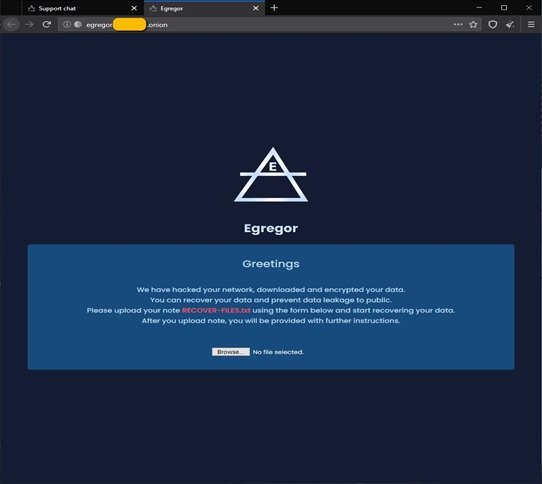
Ransomware Has Become One Of The Most Damaging Forms Of Cybercrime, Affecting Businesses, Government Agencies, Healthcare Organizations, And Individuals Worldwide. Among The Many Ransomware Families That Have Emerged In Recent Years, Egregor Ransomware Gained Significant Attention For Its Sophisticated Attack Techniques, Rapid Encryption Process, And Double-extortion Strategy.
Although Law Enforcement Operations Disrupted Many Of Its Activities, The Methods Pioneered By Egregor Continue To Influence Modern Ransomware Campaigns. Understanding How Egregor Operates Can Help Organizations Strengthen Their Cybersecurity Defenses And Reduce The Risk Of Ransomware Attacks.
This Article Explores Egregor Ransomware, Its History, Attack Methodology, Key Characteristics, Impact, And Best Practices For Prevention And Recovery.
Egregor Is A Sophisticated Ransomware Family First Identified In September 2020. It Quickly Became One Of The Most Active Ransomware Operations, Targeting Organizations Across Multiple Industries, Including Retail, Logistics, Finance, Manufacturing, Education, And Healthcare.
Cybersecurity Researchers Believe Egregor Evolved From The Maze Ransomware Ecosystem, Inheriting Many Of Its Attack Techniques And Operational Strategies. Like Many Modern Ransomware Groups, Egregor Adopted A Ransomware-as-a-Service (RaaS) Business Model, Allowing Affiliates To Conduct Attacks While Sharing Profits With The Ransomware Operators.
Instead Of Simply Encrypting Files, Egregor Also Stole Sensitive Information Before Encryption, Increasing Pressure On Victims To Pay The Ransom.
An Egregor Ransomware Attack Typically Follows Several Stages.
Attackers First Gain Unauthorized Access To A Victim's Network Through Various Methods, Including:
Phishing Emails Containing Malicious Attachments
Compromised Remote Desktop Protocol (RDP) Services
Stolen Credentials
Exploiting Software Vulnerabilities
Supply Chain Compromises
The Attackers Carefully Select Organizations With Valuable Data And Significant Financial Resources.
After Obtaining Access, Attackers Spend Time Exploring The Compromised Environment.
During This Phase, They:
Identify Domain Controllers
Enumerate User Accounts
Locate Sensitive Databases
Discover Backup Servers
Map The Internal Network
Escalate Privileges
This Reconnaissance Allows Attackers To Maximize Damage Before Launching Encryption.
Before Encrypting Files, Egregor Operators Steal Confidential Information.
The Stolen Data May Include:
Customer Records
Financial Documents
Employee Information
Intellectual Property
Business Contracts
Internal Communications
This Step Enables Attackers To Threaten Public Disclosure If The Ransom Is Not Paid.
Once Valuable Data Has Been Stolen, Egregor Encrypts Files Across Infected Systems Using Strong Cryptographic Algorithms.
Encrypted Files Become Inaccessible, Preventing Users From Opening Documents, Databases, Images, And Application Files.
The Ransomware Typically Avoids Encrypting Certain System Files To Ensure The Operating System Remains Functional Enough For Victims To View The Ransom Demand.
After Encryption Is Complete, Victims Receive A Ransom Note Containing Instructions For Contacting The Attackers Through Anonymous Communication Channels.
The Ransom Note Generally Includes:
Payment Instructions
Deadline For Payment
Threats Of Publishing Stolen Data
Decryption Information
Victim Identification Number
Failure To Comply May Result In Permanent Data Loss Or Public Release Of Confidential Information.
One Of Egregor's Defining Characteristics Is Its double-extortion Strategy.
Rather Than Relying Solely On Encrypted Files, Attackers First Steal Sensitive Information.
Victims Face Two Separate Threats:
Loss Of Access To Critical Files
Exposure Of Confidential Business Information
If Payment Is Refused, Attackers May Publish Stolen Data On Leak Websites, Creating Legal, Financial, And Reputational Consequences.
This Approach Significantly Increased The Pressure On Organizations To Negotiate.
Egregor Operators Targeted Organizations Of Various Sizes Across Numerous Sectors.
Common Targets Included:
Healthcare
Manufacturing
Retail
Financial Services
Transportation
Government Agencies
Technology Companies
Educational Institutions
Organizations With Valuable Customer Information Or Mission-critical Operations Were Particularly Attractive Targets.
Several Characteristics Distinguish Egregor From Earlier Ransomware Families.
Egregor Employs Robust Encryption Techniques, Making File Recovery Without The Decryption Key Extremely Difficult.
The Ransomware Spreads Quickly Across Networks After Privilege Escalation, Encrypting Multiple Systems In A Short Period.
Sensitive Information Is Exfiltrated Before Encryption To Support Extortion Efforts.
Through The Ransomware-as-a-Service Model, Affiliates Conduct Attacks While Sharing Ransom Payments With The Operators.
Unlike Mass Ransomware Campaigns, Egregor Often Focuses On Carefully Selected Organizations With Higher Potential Ransom Payouts.
Organizations Affected By Egregor May Experience Severe Operational Disruption.
Common Consequences Include:
Business Downtime
Financial Losses
Data Breaches
Regulatory Penalties
Customer Trust Issues
Reputation Damage
Legal Liabilities
Recovery Costs
Recovery Often Requires Rebuilding Systems, Restoring Backups, Conducting Forensic Investigations, And Implementing Stronger Security Controls.
Potential Signs Of An Egregor Ransomware Attack Include:
Unexpected File Encryption
Modified File Extensions
Appearance Of Ransom Notes
Disabled Security Software
Unusual Administrator Account Activity
High CPU Or Disk Utilization
Unauthorized PowerShell Execution
Suspicious Outbound Network Traffic
Early Detection Can Significantly Reduce The Overall Impact Of An Attack.
Organizations Should Adopt Multiple Layers Of Security To Minimize Ransomware Risks.
Create Secure, Offline, And Immutable Backups Of Critical Business Data.
Test Backup Restoration Procedures Regularly.
Install Operating System Patches And Firmware Updates Promptly.
Many Ransomware Attacks Exploit Known Vulnerabilities That Have Already Been Patched.
Protect Remote Access Services And Privileged Accounts Using MFA.
This Reduces The Effectiveness Of Stolen Credentials.
Disable Unused Remote Desktop Protocol (RDP) Services.
Limit Administrative Privileges And Monitor Remote Connections.
Deploy Advanced Email Filtering To Detect Phishing Attempts And Malicious Attachments.
Educate Employees To Recognize Suspicious Emails.
Use Modern Endpoint Detection And Response (EDR) Solutions Capable Of Identifying Ransomware Behavior Before Encryption Occurs.
Separate Critical Systems From Standard User Networks.
Segmentation Limits Ransomware Movement Within An Organization.
Monitor Network Activity, Authentication Logs, And Endpoint Events For Suspicious Behavior.
Security Information And Event Management (SIEM) Solutions Can Help Identify Attacks Early.
If Egregor Ransomware Is Detected:
Disconnect Infected Devices From The Network Immediately.
Isolate Affected Servers.
Preserve Forensic Evidence.
Notify The Incident Response Team.
Identify The Initial Infection Vector.
Restore Systems From Verified Backups.
Reset Compromised Credentials.
Report The Incident To Appropriate Authorities.
Perform A Complete Security Assessment Before Reconnecting Systems.
Organizations Should Avoid Making Ransom Payments Whenever Possible, As Payment Does Not Guarantee Successful Decryption Or Deletion Of Stolen Data.
Egregor Ransomware Demonstrated How Modern Cybercriminals Have Evolved Beyond Simple File Encryption To Sophisticated, Multi-stage Extortion Campaigns. By Combining Unauthorized Network Access, Data Theft, Rapid Encryption, And Public Data Leak Threats, Egregor Caused Substantial Financial And Operational Damage To Organizations Around The World.
Although Law Enforcement Actions Disrupted The Original Egregor Operation, The Techniques It Popularized Continue To Appear In Newer Ransomware Families. Organizations Should Adopt A Proactive Cybersecurity Strategy That Includes Regular Patching, Strong Authentication, Employee Awareness Training, Secure Backups, Endpoint Protection, And Continuous Network Monitoring.
Building A Layered Security Posture Is The Most Effective Way To Defend Against Ransomware Attacks And Ensure Business Continuity In Today's Rapidly Evolving Threat Landscape.
Step 1: Boot Into Safe Mode
Restart Your PC And Press F8 (or Shift + F8 For Some Systems) Before Windows Loads.
Choose Safe Mode With Networking.
Safe Mode Prevents Most Malware From Loading.
Press Win + R, Type appwiz.cpl, And Press Enter.
Sort By Install Date And Uninstall Unknown Or Recently Added Programs.
Use A Trusted Anti-malware Tool:
Malwarebytes – https://www.malwarebytes.com
Screenshot Of Malwarebytes - Visit Links
Microsoft Defender – Built Into Windows 10/11
HitmanPro, ESET Online Scanner, Or Kaspersky Virus Removal Tool
ZoneAlarm Pro Antivirus + Firewall NextGen
VIPRE Antivirus - US And Others Countries, | India
Run A Full Scan And Delete/quarantine Detected Threats.
Win + R, Type temp → Delete All Files.Press Win + R, Type %temp% → Delete All Files.
Use Disk Cleanup: cleanmgr In The Run Dialog.
Go To: C:\Windows\System32\drivers\etc
Open hosts File With Notepad.
Replace With Default Content:
Press Ctrl + Shift + Esc → Open Task Manager
Go To Startup Tab
Disable Any Suspicious Entries.
Open Command Prompt As Administrator.
Run These Commands:
netsh Winsock Reset

netsh Int Ip Reset

ipconfig /flushdns
Unwanted Homepage Or Search Engine
Pop-ups Or Redirects
Unknown Extensions Installed
For Chrome:
Go To: chrome://extensions/
Remove Anything Unfamiliar
For Firefox:
Go To: about:addons → Extensions
Remove Suspicious Add-ons
For Edge:
Go To: edge://extensions/
Uninstall Unknown Add-ons
Chrome:
Go To chrome://settings/reset → "Restore Settings To Their Original Defaults"
Firefox:
Go To about:support → "Refresh Firefox"
Edge:
Go To edge://settings/resetProfileSettings → "Reset Settings"
All Browsers:
Use Ctrl + Shift + Del → Select All Time
Clear Cookies, Cached Files, And Site Data
Make Sure They Are Not Hijacked.
Chrome: chrome://settings/search
Firefox: about:preferences#search
Edge: edge://settings/search
Chrome: chrome://settings/cleanup
Use Malwarebytes Browser Guard For Real-time Browser Protection.
Always Download Software From Trusted Sources.
Keep Windows, Browsers, And Antivirus Updated.
Avoid Clicking Suspicious Links Or Ads.
Use ad Blockers And reputable Antivirus Software.
Backup Your Files Regularly.
To Remove Malware From Your Windows PC, Start By Booting Into Safe Mode, Uninstalling Suspicious Programs, And Scanning With Trusted Anti-malware Tools Like Malwarebytes. Clear Temporary Files, Reset Your Network Settings, And Check Startup Apps For Anything Unusual.
For web Browsers, Remove Unwanted Extensions, Reset Browser Settings, Clear Cache And Cookies, And Ensure Your Homepage And Search Engine Haven’t Been Hijacked. Use Cleanup Tools Like Chrome Cleanup Or Browser Guard For Added Protection.
?? Prevention Tips: Keep Software Updated, Avoid Suspicious Downloads, And Use Antivirus Protection Plus Browser Ad Blockers. Regular Backups Are Essential.
Why It Matters: Not All VPNs Offer Malware Protection.
What To Look For: Providers With built-in Malware/ad/tracker Blockers (e.g., NordVPN’s Threat Protection, ProtonVPN’s NetShield).
Purpose: Prevents Data Leaks If Your VPN Connection Drops.
Benefit: Ensures Your Real IP And Browsing Activity Aren’t Exposed To Malware-distributing Websites.
Why It Matters: DNS Leaks Can Expose Your Online Activity To Attackers.
Solution: Enable DNS Leak Protection In Your VPN Settings Or Use A Secure DNS Like Cloudflare (1.1.1.1).
Risk: Free VPNs Often Contain Malware, Sell User Data, Or Lack Security Features.
Better Option: Use Reputable Paid VPNs That Offer security Audits And Transparent Privacy Policies.
Some VPNs Block Known Phishing And Malicious Sites.
Example: Surfshark’s CleanWeb, CyberGhost’s Content Blocker.
Reason: Security Patches Fix Known Vulnerabilities.
Tip: Enable Auto-updates Or Check For Updates Weekly.
Scope: Malware Can Enter Through Phones, Tablets, Or IoT Devices.
Solution: Install VPN Apps On Every Internet-connected Device.
Fact: VPNs Do Not Remove Or Detect Malware On Your System.
Complement It With:
Antivirus Software
Firewall
Browser Extensions For Script Blocking
VPN Encrypts Traffic But Can’t Stop Malware From Executing If You Download Infected Files.
Split Tunneling Allows Certain Apps/sites To Bypass VPN.
Tip: Never Exclude Browsers, Email Clients, Or Download Managers From VPN Tunneling.
A VPN (Virtual Private Network) Enhances Your Online Privacy By Encrypting Your Internet Traffic And Masking Your IP Address. It Protects Your Data On Public Wi-Fi, Hides Browsing Activity From Hackers And ISPs, And Helps Bypass Geo-restrictions. VPNs Also Add A Layer Of Defense Against Malware By Blocking Malicious Websites And Trackers When Using Advanced Features. However, A VPN Does Not Remove Existing Malware Or Act As Antivirus Software. For Full Protection, Combine VPN Use With Antivirus Tools, Regular Software Updates, And Cautious Browsing Habits. Always Choose A Reputable VPN Provider With Strong Security And Privacy Policies.
Egregor Ransomware, Remove Egregor Ransomware, Delete Egregor Ransomware, Uninstall Egregor Ransomware, Get Rid Of Egregor Ransomware











