 Blog's Page
 Blog's Page
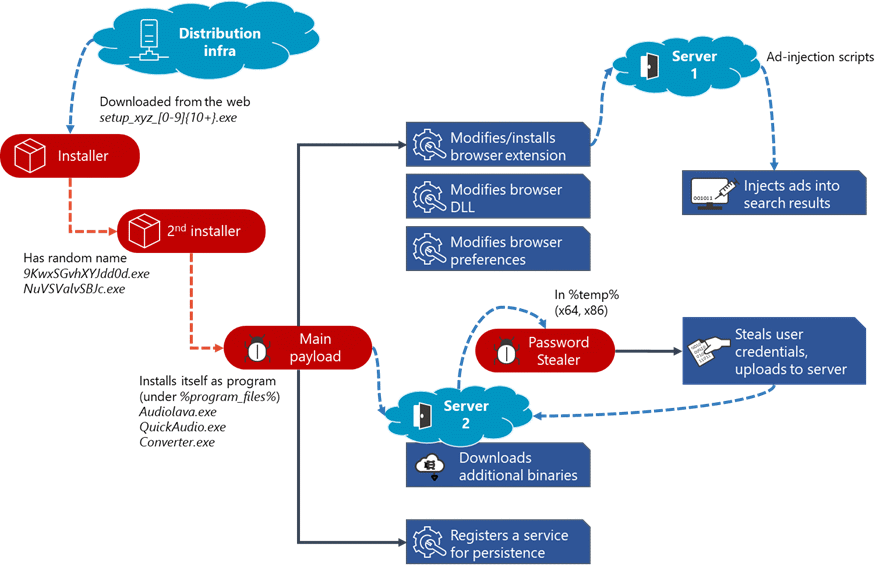
Adrozek Is A Sophisticated Browser-modifying Malware Family That Targets Multiple Web Browsers By Altering Browser Components, Changing Browser Settings, Injecting Malicious Code, And Redirecting Users To Attacker-controlled Advertisements And Search Results. Unlike Traditional Browser Hijackers That Simply Change A Homepage Or Search Engine, Adrozek Modifies Browser DLLs And Configuration Files To Inject Unauthorized Advertisements, Manipulate Affiliate Revenue, And Potentially Steal Browser Credentials.
First Publicly Documented In 2020 By Microsoft, Adrozek Was Distributed Through Drive-by Downloads And Malicious Websites Hosting Fake Software Installers. The Malware Affected Thousands Of Systems Globally By Silently Installing Itself And Modifying Chromium- And Mozilla-based Browsers.
Although Adrozek Primarily Focuses On Browser Manipulation And Ad Fraud, Its Persistence Mechanisms And Browser Modifications Make It A Significant Security Threat. It Can Also Disable Browser Security Features, Bypass Extension Verification, And Maintain Persistence Even After Browser Updates.
Once Executed, Adrozek Copies Itself Into A Randomly Named Folder Within The Program Files Or AppData Directories. It Establishes Persistence By Creating Registry Run Entries Or Scheduled Tasks.
After Installation, It Searches For Installed Browsers And Modifies Browser-specific Files Such As DLLs, Preferences, And Extension Configurations.
Its Primary Objectives Include:
Injecting Advertisements Into Legitimate Websites
Redirecting Search Results
Modifying Browser Extensions
Disabling Browser Security Protections
Replacing Legitimate Browser DLL Files
Collecting Browser Credentials
Generating Affiliate Advertising Revenue
The Malware Continues Operating In The Background While Intercepting Browsing Activity.
| Category | Details |
|---|---|
| Malware Type | Browser Hijacker |
| Primary Goal | Ad Injection & Browser Manipulation |
| First Observed | 2020 |
| Distribution | Fake Software Installers, Malicious Websites |
| Platform | Windows |
| Persistence | Registry Run Keys, Scheduled Tasks |
| Payload | Browser Modification |
| Risk Level | High |
User Downloads Fake Software.
Installer Executes Malicious Payload.
Malware Copies Itself Into Hidden Directory.
Registry Persistence Is Established.
Installed Browsers Are Detected.
Browser DLL Files Are Modified.
Browser Settings Are Altered.
Security Features Are Disabled.
Malicious Advertisements Begin Appearing.
Search Traffic Is Redirected.
Adrozek Primarily Targets Microsoft Windows Systems.
Supported Targets Include:
Windows 7
Windows 8
Windows 8.1
Windows 10
Windows 11 (variants May Still Function)
Windows Server Editions (limited Observations)
The Malware Does Not Target:
Linux
macOS
Android
iOS
Adrozek Was Designed To Compromise Several Popular Browsers.
These Include:
Google Chrome
Microsoft Edge (Chromium)
Mozilla Firefox
Yandex Browser
The Malware Modifies Browser Files Differently Depending On The Browser Architecture.
Common Browser Components Modified Include:
chrome.dll
Preferences
Secure Preferences
Local State
Extension Configuration Files
msedge.dll
Preferences
Secure Preferences
Browser Policies
xul.dll
omni.ja
prefs.js
extensions.json
browser.dll
Preferences
Extension Settings
Common Dropped Files Include:
[random].exe

[random].dll

[random].dat

[random].tmp
Installation Directories:
C:\Program Files\[Random Folder]\

C:\Users\<User>\AppData\Local\[Random Folder]\

C:\Users\<User>\AppData\Roaming\[Random Folder]\
Configuration Files:
config.dat

Settings.dat

Version.dat

Install.log
Rather Than Installing Traditional Malicious Extensions, Adrozek Often Modifies Existing Extension Configurations Or Bypasses Extension Verification.
Affected Components Include:
Chrome Extension Preferences
Firefox Extension Registry
Edge Extension Configuration
Browser Policies
Secure Preferences
Local State
It May Also Enable Unauthorized Advertising Extensions Or Inject JavaScript Into Existing Browser Processes.
Common Registry Locations:
HKCU\Software\Microsoft\Windows\CurrentVersion\Run

HKLM\Software\Microsoft\Windows\CurrentVersion\Run

HKCU\Software\Policies\Google\Chrome

HKLM\Software\Policies\Microsoft\Edge
Adrozek Maintains Persistence Through:
Registry Run Keys
Startup Folders
Scheduled Tasks
Browser Startup Configuration
Browser DLL Replacement
Browser Preference Modification
Microsoft Reported Widespread Adrozek Activity Across Multiple Regions.
Frequently Affected Countries Included:
India
United States
United Kingdom
Germany
France
Italy
Spain
Canada
Brazil
Australia
Russia
Turkey
Poland
Mexico
South Korea
Indonesia
Campaigns Were Observed Globally Due To Malicious Download Sites And Fake Software Installers.
During Its Major Campaign:
Hundreds Of Thousands Of Malicious URLs Were Active.
Thousands Of Malware Samples Were Distributed.
Tens Of Thousands Of Computers Were Infected Worldwide.
Multiple Browser Families Were Successfully Compromised.
Users May Notice:
Browser Homepage Changes
Unknown Advertisements
Pop-up Ads
Redirected Searches
Slow Browser Performance
Disabled Browser Security
Unauthorized Browser Extensions
High CPU Usage
Increased Memory Consumption
Unexpected Affiliate Websites
[random].exe

[random].dll

Config.dat

Settings.dat

Install.log

Version.dat
HKCU\Software\Microsoft\Windows\CurrentVersion\Run

HKLM\Software\Microsoft\Windows\CurrentVersion\Run

HKCU\Software\Policies\Google\Chrome

HKLM\Software\Policies\Microsoft\Edge
C:\Program Files\[Random Folder]\

C:\Users\<User>\AppData\Local\[Random Folder]\

C:\Users\<User>\AppData\Roaming\[Random Folder]\
Modified Browser DLLs
Browser Preference Tampering
Unauthorized Advertisements
Search Engine Redirection
Browser Update Interference
Extension Verification Bypass
Unexpected Browser Policies
| Technique ID | Technique |
|---|---|
| T1055 | Process Injection |
| T1547.001 | Registry Run Keys / Startup Folder |
| T1112 | Modify Registry |
| T1027 | Obfuscated Files Or Information |
| T1036 | Masquerading |
| T1059 | Command And Scripting Interpreter |
| T1070 | Indicator Removal On Host |
| T1082 | System Information Discovery |
| T1083 | File And Directory Discovery |
| T1497 | Virtualization/Sandbox Evasion |
| T1562.001 | Impair Defenses |
| T1555 | Credentials From Password Stores |
| T1204 | User Execution |
| T1105 | Ingress Tool Transfer |
rule Adrozek_Browser_Hijacker
{
    Meta:
        Description = "Detects Adrozek Browser Hijacker"

    Strings:
        $a = "Secure Preferences"
        $b = "Local State"
        $c = "chrome.dll"
        $d = "msedge.dll"
        $e = "prefs.js"

    Condition:
        2 Of ($a,$b,$c,$d,$e)
}
title: Adrozek Browser Modification

Id: 2d54a1b5-7d3e-4d8c-a1f7-acde48001122

Status: Experimental

Logsource:
  Category: File_event
  Product: Windows

Detection:
  Selection:
    TargetFilename|contains:
      - "chrome.dll"
      - "msedge.dll"
      - "prefs.js"
      - "Secure Preferences"

  Condition: Selection

Level: High
Possible Detections Include:
BrowserModifier
Trojan:Win32/Adrozek
TrojanDownloader
BrowserHijacker
PUA:Win32
Recommended Removal Steps:
Disconnect The Computer From The Internet.
Boot Windows Into Safe Mode.
Run A Full Antivirus Scan Using An Up-to-date Security Solution.
Remove Malicious Files And Registry Entries.
Reinstall Affected Browsers To Restore Modified DLLs And Configuration Files.
Reset Browser Settings And Search Providers.
Remove Unknown Browser Extensions.
Change Saved Passwords After Cleanup, As Browser Credentials May Have Been Exposed.
Update Windows And Browsers To The Latest Versions.
To Reduce The Risk Of Adrozek Infection:
Download Software Only From Trusted Vendors.
Keep Browsers And Windows Updated.
Use Reputable Endpoint Protection.
Avoid Cracked Software And Unofficial Installers.
Enable Browser Security Features.
Regularly Review Installed Extensions.
Monitor Browser Policy Changes.
Restrict Administrative Privileges Where Possible.
Educate Users About Phishing And Fake Download Sites.
Adrozek Is Generally Classified As Browser-modifying Malware Or A Browser Hijacker. It Also Exhibits Trojan-like Behavior Because It Alters Browser Components Without User Consent.
It Primarily Targets Google Chrome, Microsoft Edge (Chromium), Mozilla Firefox, And Yandex Browser.
Yes. Some Variants Have Been Observed Extracting Credentials Stored In Browsers By Interfering With Browser Security Mechanisms.
The Malware Has Primarily Been Distributed Through Fake Software Installers, Malicious Websites, And Drive-by Download Campaigns.
Reinstalling The Browser Can Restore Modified Browser Files, But The Underlying Malware And Persistence Mechanisms Must Be Removed First To Prevent Reinfection.
Adrozek Mainly Targets Windows Systems, Including Windows 7, Windows 8/8.1, Windows 10, Windows 11, And Some Windows Server Editions.
No. Adrozek Does Not Encrypt Files Or Demand Payment. Its Primary Purpose Is Browser Manipulation, Ad Fraud, And, In Some Cases, Credential Theft.
Yes. Modern Antivirus And Endpoint Detection Solutions Can Identify Known Adrozek Variants Through Signatures, Behavioral Analysis, And Heuristic Detection.
Common Indicators Include Modified Browser DLLs, Altered Browser Preferences, Suspicious Files In AppData Or Program Files, Registry Run Entries, Unexpected Advertisements, And Search Engine Redirections.
Because It Modifies Trusted Browser Components, Can Disable Browser Protections, Inject Unauthorized Advertisements, Redirect Web Traffic, And Potentially Compromise Stored Credentials, Making It More Advanced Than Typical Browser Hijackers.
Adrozek Represents A More Advanced Class Of Browser Hijacker That Goes Beyond Changing Browser Settings. By Modifying Browser Binaries, Manipulating Extension Configurations, Disabling Security Mechanisms, And Redirecting User Traffic, It Enables Persistent Advertising Fraud And May Expose Sensitive Information Such As Stored Credentials. Organizations And Individuals Can Reduce Their Exposure By Maintaining Updated Systems, Limiting Software Installation To Trusted Sources, Monitoring Browser Integrity, And Deploying Layered Endpoint Security With Behavioral Detection Capabilities.
Step 1: Boot Into Safe Mode
Restart Your PC And Press F8 (or Shift + F8 For Some Systems) Before Windows Loads.
Choose Safe Mode With Networking.
Safe Mode Prevents Most Malware From Loading.
Press Win + R, Type appwiz.cpl, And Press Enter.
Sort By Install Date And Uninstall Unknown Or Recently Added Programs.
Use A Trusted Anti-malware Tool:
Malwarebytes – https://www.malwarebytes.com
Screenshot Of Malwarebytes - Visit Links
Microsoft Defender – Built Into Windows 10/11
HitmanPro, ESET Online Scanner, Or Kaspersky Virus Removal Tool
ZoneAlarm Pro Antivirus + Firewall NextGen
VIPRE Antivirus - US And Others Countries, | India
Run A Full Scan And Delete/quarantine Detected Threats.
Win + R, Type temp → Delete All Files.Press Win + R, Type %temp% → Delete All Files.
Use Disk Cleanup: cleanmgr In The Run Dialog.
Go To: C:\Windows\System32\drivers\etc
Open hosts File With Notepad.
Replace With Default Content:
Press Ctrl + Shift + Esc → Open Task Manager
Go To Startup Tab
Disable Any Suspicious Entries.
Open Command Prompt As Administrator.
Run These Commands:
netsh Winsock Reset

netsh Int Ip Reset

ipconfig /flushdns
Unwanted Homepage Or Search Engine
Pop-ups Or Redirects
Unknown Extensions Installed
For Chrome:
Go To: chrome://extensions/
Remove Anything Unfamiliar
For Firefox:
Go To: about:addons → Extensions
Remove Suspicious Add-ons
For Edge:
Go To: edge://extensions/
Uninstall Unknown Add-ons
Chrome:
Go To chrome://settings/reset → "Restore Settings To Their Original Defaults"
Firefox:
Go To about:support → "Refresh Firefox"
Edge:
Go To edge://settings/resetProfileSettings → "Reset Settings"
All Browsers:
Use Ctrl + Shift + Del → Select All Time
Clear Cookies, Cached Files, And Site Data
Make Sure They Are Not Hijacked.
Chrome: chrome://settings/search
Firefox: about:preferences#search
Edge: edge://settings/search
Chrome: chrome://settings/cleanup
Use Malwarebytes Browser Guard For Real-time Browser Protection.
Always Download Software From Trusted Sources.
Keep Windows, Browsers, And Antivirus Updated.
Avoid Clicking Suspicious Links Or Ads.
Use ad Blockers And reputable Antivirus Software.
Backup Your Files Regularly.
To Remove Malware From Your Windows PC, Start By Booting Into Safe Mode, Uninstalling Suspicious Programs, And Scanning With Trusted Anti-malware Tools Like Malwarebytes. Clear Temporary Files, Reset Your Network Settings, And Check Startup Apps For Anything Unusual.
For web Browsers, Remove Unwanted Extensions, Reset Browser Settings, Clear Cache And Cookies, And Ensure Your Homepage And Search Engine Haven’t Been Hijacked. Use Cleanup Tools Like Chrome Cleanup Or Browser Guard For Added Protection.
?? Prevention Tips: Keep Software Updated, Avoid Suspicious Downloads, And Use Antivirus Protection Plus Browser Ad Blockers. Regular Backups Are Essential.
Why It Matters: Not All VPNs Offer Malware Protection.
What To Look For: Providers With built-in Malware/ad/tracker Blockers (e.g., NordVPN’s Threat Protection, ProtonVPN’s NetShield).
Purpose: Prevents Data Leaks If Your VPN Connection Drops.
Benefit: Ensures Your Real IP And Browsing Activity Aren’t Exposed To Malware-distributing Websites.
Why It Matters: DNS Leaks Can Expose Your Online Activity To Attackers.
Solution: Enable DNS Leak Protection In Your VPN Settings Or Use A Secure DNS Like Cloudflare (1.1.1.1).
Risk: Free VPNs Often Contain Malware, Sell User Data, Or Lack Security Features.
Better Option: Use Reputable Paid VPNs That Offer security Audits And Transparent Privacy Policies.
Some VPNs Block Known Phishing And Malicious Sites.
Example: Surfshark’s CleanWeb, CyberGhost’s Content Blocker.
Reason: Security Patches Fix Known Vulnerabilities.
Tip: Enable Auto-updates Or Check For Updates Weekly.
Scope: Malware Can Enter Through Phones, Tablets, Or IoT Devices.
Solution: Install VPN Apps On Every Internet-connected Device.
Fact: VPNs Do Not Remove Or Detect Malware On Your System.
Complement It With:
Antivirus Software
Firewall
Browser Extensions For Script Blocking
VPN Encrypts Traffic But Can’t Stop Malware From Executing If You Download Infected Files.
Split Tunneling Allows Certain Apps/sites To Bypass VPN.
Tip: Never Exclude Browsers, Email Clients, Or Download Managers From VPN Tunneling.
A VPN (Virtual Private Network) Enhances Your Online Privacy By Encrypting Your Internet Traffic And Masking Your IP Address. It Protects Your Data On Public Wi-Fi, Hides Browsing Activity From Hackers And ISPs, And Helps Bypass Geo-restrictions. VPNs Also Add A Layer Of Defense Against Malware By Blocking Malicious Websites And Trackers When Using Advanced Features. However, A VPN Does Not Remove Existing Malware Or Act As Antivirus Software. For Full Protection, Combine VPN Use With Antivirus Tools, Regular Software Updates, And Cautious Browsing Habits. Always Choose A Reputable VPN Provider With Strong Security And Privacy Policies.
Adrozek Browser Hijacker, Remove Adrozek Browser Hijacker, Uninstall Adrozek Browser Hijacker, Delete Adrozek Browser Hijacker, Get Rid Of Adrozek Bro











